- Updated
Preview a beard or moustache style
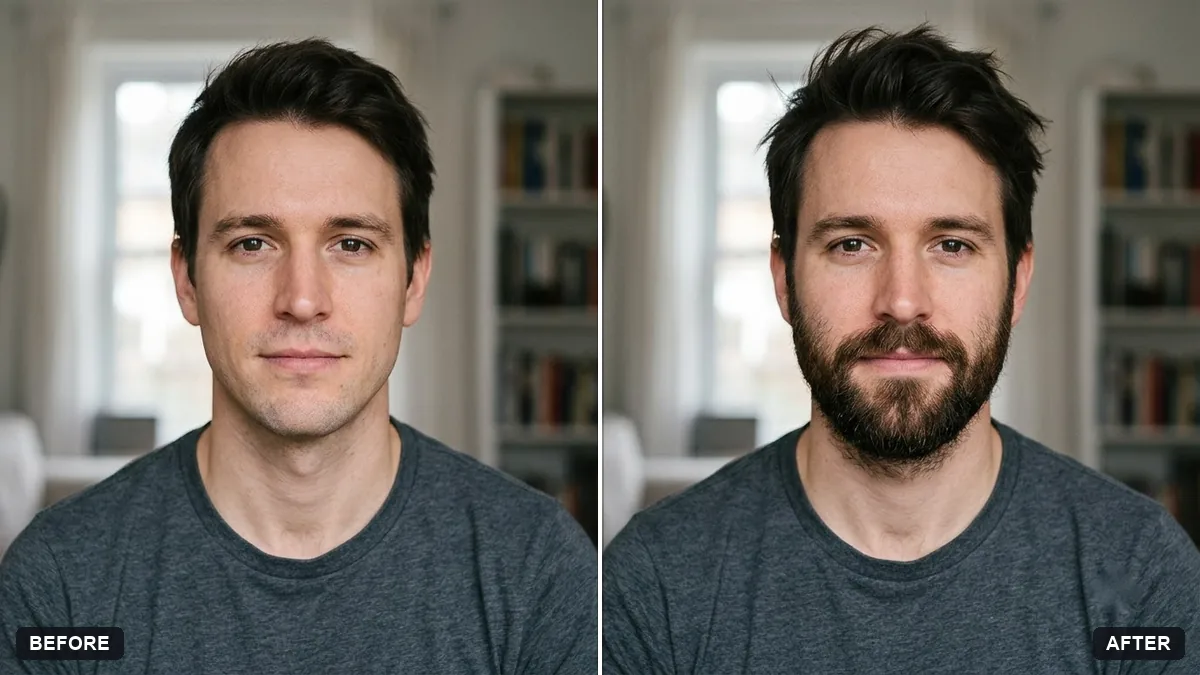
This prompt adds a beard style you choose, matching your hair colour and skin tone and blending along the jawline, without changing your face shape or expression. Use a clear front-facing photo with even lighting.
Add a [FULL BEARD / STUBBLE / GOATEE / MOUSTACHE] to my face in this photo. Keep the beard neat and natural, matching my hair colour and skin tone, and blend properly along the jawline.

Do not change my face shape, features or expression.
Pick a clear front-facing photo with even lighting for the most accurate preview.
Your photo goes to the AI app you choose, never to PromptUp.
Get a better result
Your photo with the chosen beard or moustache style added, matched to your hair colour and skin tone and blended along the jawline, with your face shape and expression unchanged.
A beard preview is only useful if the rest of the face stays the same, so the prompt protects your face shape, features and expression. Matching your hair colour and skin tone, and blending along the jawline, are what make the beard look grown instead of drawn on. The style blank lets you compare a few looks.
The beard looks stuck on.
Fix: Use an evenly lit, front-facing photo, and ask for natural density that fades into the cheeks.
- The colour does not match. Say “same colour as my hair, with a few lighter hairs”. Many men have a beard a shade different from their hair.
- It is not what your face can grow. Treat it as a style preview only. Real growth depends on your own hair pattern.
Ask for the same beard with a sharper neckline and cheek line, as a barber might shape it.
Keep my face the same. Show three versions side by side: a short boxed beard, stubble and a full beard, all matching my hair colour.
More photo editing prompts
See all 334 →
More like this
- Preview a new shop frontGemini · ChatGPT
- Virtually try on an outfitGemini · ChatGPT
- Smooth flyaway hairGemini · ChatGPT
- Natural teeth brighteningGemini · ChatGPT
- Change the colour of clothingGemini · ChatGPT