- Prompt at a glance
- Category
- Photo edit
- Works with
- Gemini · ChatGPT
- Latest versions
- Nano Banana 2 · ChatGPT Images 2.5 (checked September 2026)
- Length
- 89 words
- Fields to fill
- JERSEY COLOUR, FACE PAINT
- Last updated
Cricket fan face-paint portrait
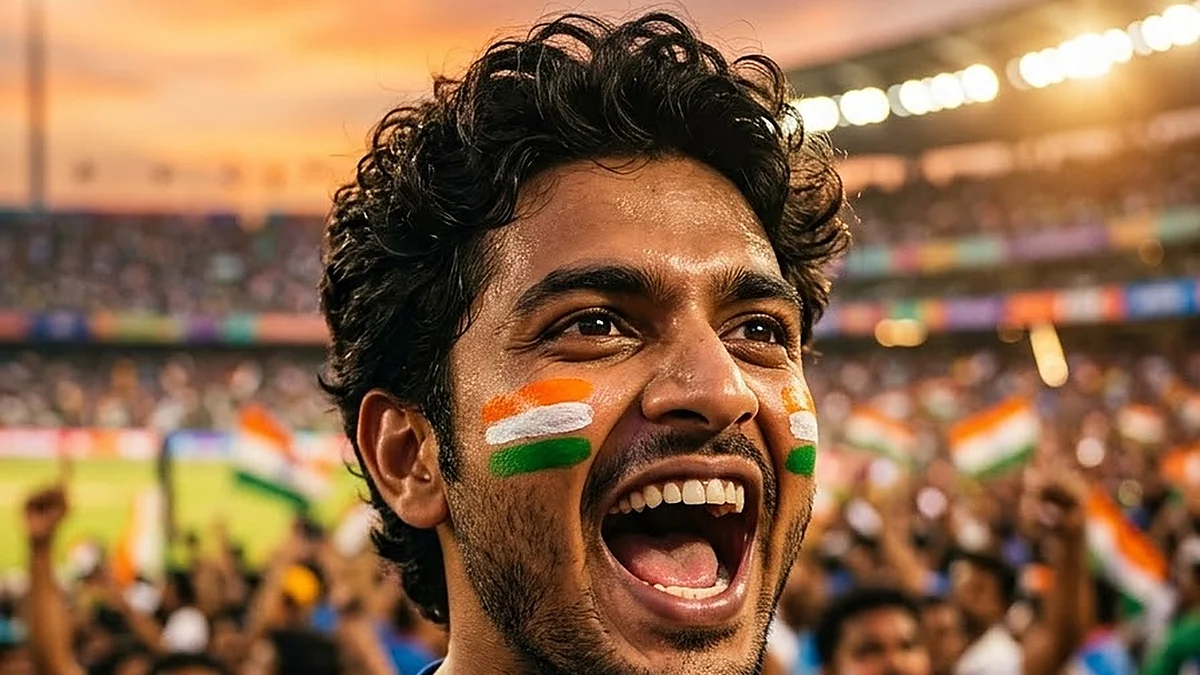
Cheer in style: this prompt puts you in a stadium at sunset, mouth open mid-cheer, with painted cheeks and floodlights behind you. It keeps your face the same and asks for a plain jersey, so no team crest or player name sneaks in. Works with Gemini or ChatGPT.
Turn this photo of me into a cheering cricket-fan portrait. Keep my face, features and skin tone exactly the same — it must clearly be me, cheering with an open mouth.

Styling: a plain [JERSEY COLOUR, e.g. royal-blue] jersey with no logos or numbers and [FACE PAINT, e.g. saffron, white and green stripes] painted on my cheeks.

Scene: huge stadium floodlights and a golden sunset sky behind me, a soft blur of the crowd, hands out of frame. 85mm lens at f/2, vivid and energetic, warm highlights. Portrait 4:5.
Ask for a plain jersey with no logos or numbers. AI tools tend to invent team crests and player names, and a clean one is safer to post.
From copy to finished photo in four steps
- 1
Open Gemini and start a new chat.
- 2
Upload your photo (a clear, front-facing one works best).
- 3
Paste the prompt and replace any [BRACKETED] fields with your own details.
- 4
Send it. If something is off, regenerate or change one detail at a time.
About this prompt
Which AI tools work with this prompt?
It is written for Gemini and ChatGPT. Both can edit a photo you upload.
What do I need to fill in?
Replace these fields before you send it: JERSEY COLOUR, FACE PAINT. Each field shows an example in the prompt.
Will the AI change my face?
The prompt tells the AI to keep faces and identities the same, but results vary between runs. If a face drifts, regenerate or reply "keep the face identical to the original".
Is my photo uploaded to PromptUp?
No. PromptUp only gives you the text of the prompt. You upload your photo directly to the AI tool you choose, under that tool's own privacy terms.