- Updated
Sports jersey portrait
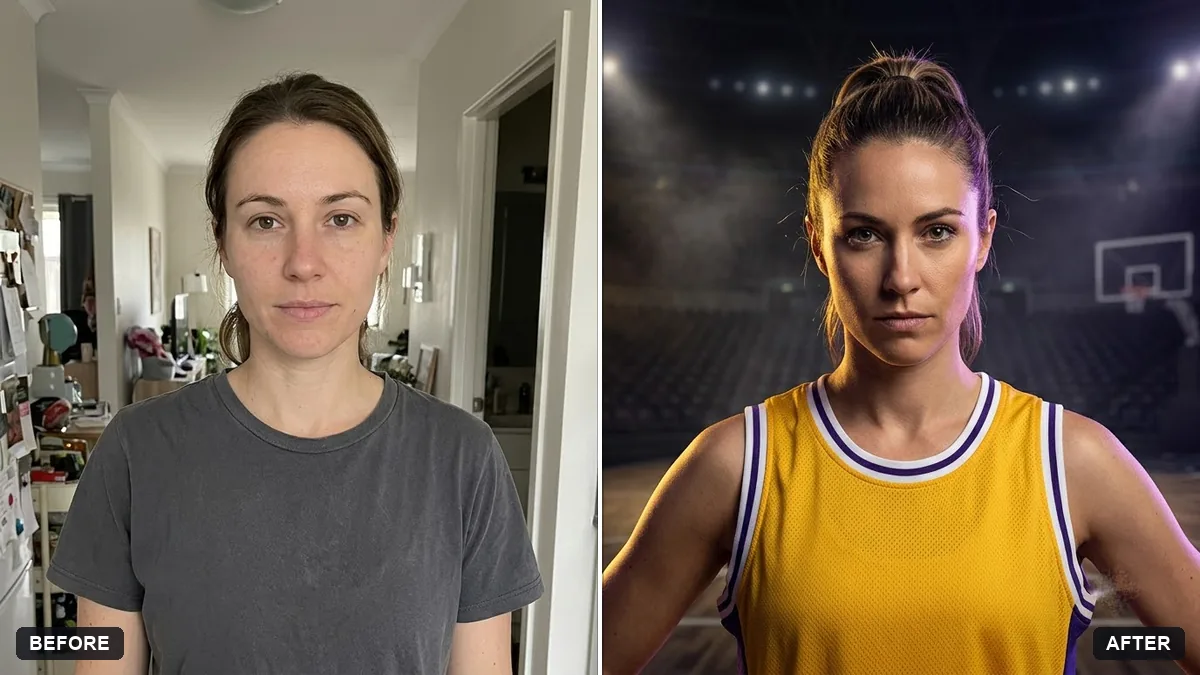
This prompt puts you in a jersey for a sport you choose, in your colours with a number and name, against an empty stadium with soft lights. It uses an invented team design with no real logos.
Put me in a [SPORT] jersey in [COLOURS] with the number [NUMBER] and the name "[NAME]" on it. Keep my face, body and pose exactly the same.

Background: an empty stadium with soft lights. Confident expression, sharp detail, dramatic rim light, sports magazine portrait style. Use an invented team design with no real logos.
Use a plain team design or invented team name to avoid using real club logos.
Your photo goes to the AI app you choose, never to PromptUp.
Get a better result
A sports-magazine style portrait of you in an invented team jersey with your chosen number and name, standing in a softly lit empty stadium with a rim light, your face, body and pose unchanged.
The AI adds a real club badge or sponsor.
Fix: Keep “an invented team design with no real logos” and add “no badges, sponsors or brand marks”. Real crests can be a problem when you share the picture.
- The name or number on the jersey is garbled. Keep the name to one short word and a one or two digit number, and check the back and the front. Fix any broken letters in an editor.
- The body or pose changes. Repeat “keep my face, body and pose exactly the same”. A clear photo showing your upper body gives the AI less to guess.
Run the same idea with a group photo and add “every player in the same invented kit, with different numbers”. Use the team poster prompt for a ready-made layout.
Keep my exact face from the original photo: same eyes, nose, smile, skin tone and age. Change only the style.
Guides that use this prompt
More photo editing prompts
See all 334 →
More like this
- Sports team posterGemini · ChatGPT
- Cricket fan face-paint portraitGemini · ChatGPT
- Realistic portrait of an invented personMidjourney · Gemini · ChatGPT
- Cricket batsman portraitGemini · ChatGPT
- Book club discussion questionsChatGPT · Gemini · Claude