- Updated
Sports team poster
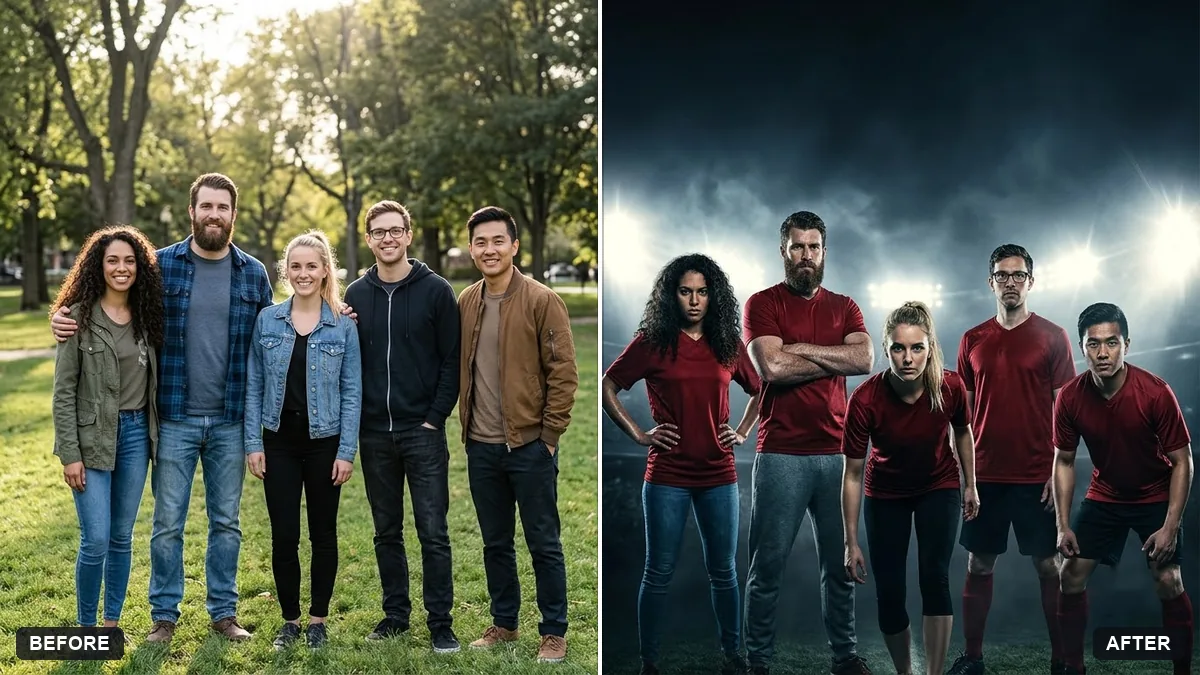
This prompt dresses everyone in matching jerseys with an invented team name for a dramatic team poster. Every face stays exactly the same.
Turn this group photo into a sports team poster. Keep every face exactly the same.

Everyone wears matching [COLOUR] jerseys with the invented team name "[TEAM NAME]", dramatic stadium lights behind, moody cinematic colour grade, bold space at the top for the title.
Use an invented team name and design to avoid real logos.
Your photo goes to the AI app you choose, never to PromptUp.
Get a better result
Your group photo turned into a sports team poster, with everyone in matching jerseys carrying your invented team name, dramatic stadium lights, a moody cinematic grade and room at the top for the title.
A team poster only works if everyone is still recognisable, so the prompt says to keep every face exactly the same. Matching jerseys with an invented team name tie the group together without real logos. Dramatic stadium lights and a moody grade give it a match-day feel, and space at the top holds the title.
Faces change or become alike.
Fix: Use a sharp, evenly lit group photo and repeat “keep every face exactly the same”. Check each player against the original.
- The team name on the jerseys is misspelt. Use a short name in capitals. If a few jerseys are wrong, ask “spell the team name exactly the same on every jersey”, or fix them in an editor.
- The title space is filled with random text. Keep the “bold space at the top” line and add “leave it empty, no text”. Add your title afterwards in Canva.
Change the mood to “celebrating with raised arms, confetti and golden light” and keep the jerseys and faces unchanged. It suits a match-day or trophy post.
Keep every face exactly the same. Make all jerseys identical, spell the team name exactly as written, and leave the top of the poster empty.
Guides that use this prompt
More photo editing prompts
See all 334 →
More like this
- Sports jersey portraitGemini · ChatGPT
- Cricket batsman portraitGemini · ChatGPT
- Poster in a frame mockupGemini · ChatGPT
- School sports day highlightsVeo · Kling · Seedance
- Flat illustration of a diverse teamMidjourney · Gemini · ChatGPT