- Updated
Cricket batsman portrait
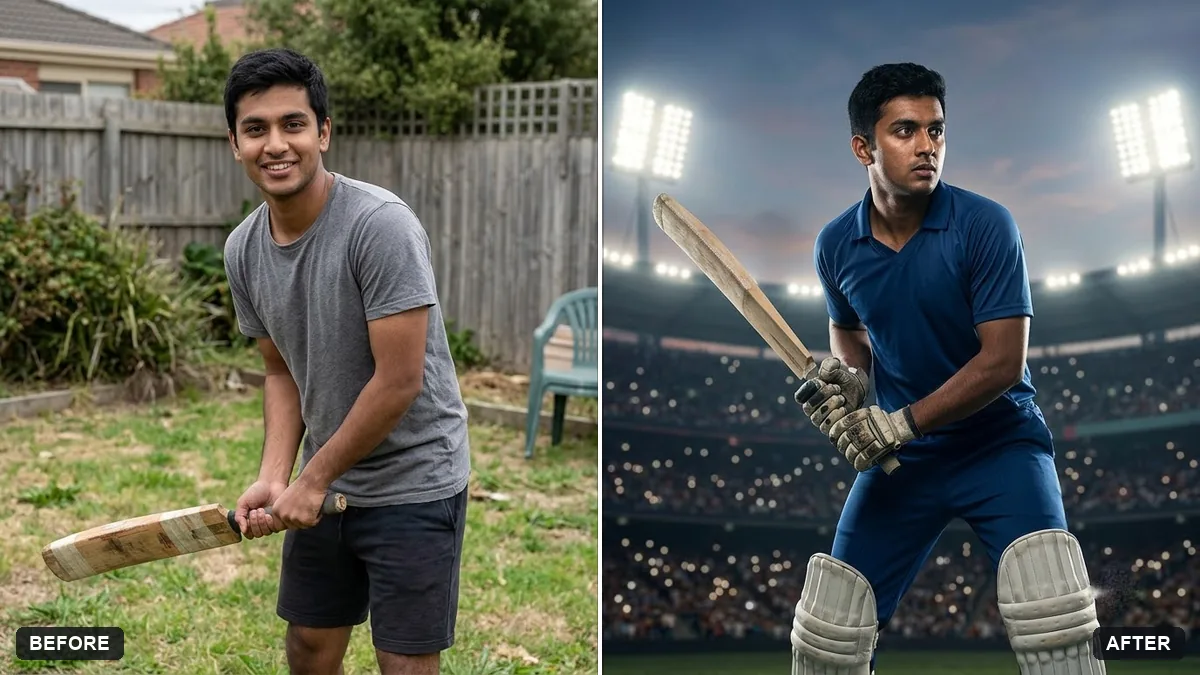
This prompt shows you as a batsman in a stadium in a kit colour you choose with an invented team design, keeping your face and body exactly the same.
Turn this photo into a portrait of me as a cricket batsman in a stadium. Keep my face and body exactly the same.

Wear a [COLOUR] kit with an invented team design, a bat raised, a cheering crowd blurred behind, floodlights, dramatic golden light, sports photography.
Use an invented team kit and no real logos.
Your photo goes to the AI app you choose, never to PromptUp.
Get a better result
You as a batsman in a stadium, with an invented team kit, the bat raised, a cheering crowd blurred behind, floodlights and warm golden light in a sports-photography style.
The prompt keeps both face and body unchanged, because a sports portrait only works if the stance still looks like you. An invented team design avoids real logos and badges, which also keeps the picture safe to share. A raised bat, floodlights and a blurred crowd tell the story of a big match in one frame. Golden light warms the scene, and the kit colour blank lets you match your own club or favourite team colours without copying their branding.
Real team logos appear.
Fix: Keep “invented team design, no real logos or sponsors”. Real badges can cause trouble if you share it.
- Your body or stance looks odd. Describe the shot, such as “bat raised after a boundary, helmet under the arm”, and use a full-body photo.
- The crowd is sharp and distracting. Ask for a heavily blurred crowd with colour only.
Ask for the same stadium with you in a bowling action, mid-delivery, with the same invented kit and lighting.
Keep the stadium. Change the kit colour to a favourite and add a number on the back.
Guides that use this prompt
More photo editing prompts
See all 334 →
More like this
- Street cricket with kidsVeo · Kling · Seedance
- Realistic portrait of an invented personMidjourney · Gemini · ChatGPT
- Sports jersey portraitGemini · ChatGPT
- Sports team posterGemini · ChatGPT
- Astronaut portraitGemini · ChatGPT