- Updated
Enhance a mountain landscape
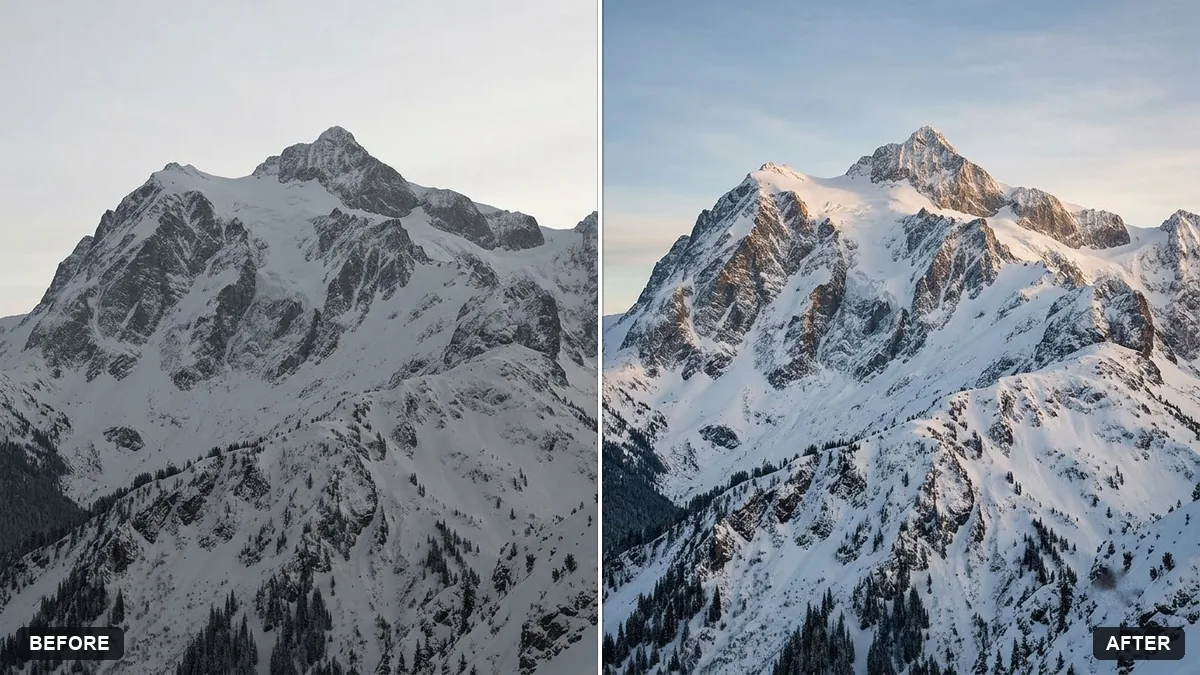
This prompt adds depth with subtle contrast, recovers detail in snow and shadows, brings out the sky and warms the light slightly, with natural colours and no halos. Small careful edits look the most natural.
Enhance this mountain landscape photo taken in [SEASON]. Add depth with subtle contrast, recover detail in the snow and shadows, bring out the sky and warm the light slightly.

Natural colours, no oversaturation, no halos, and no new objects.
Small, careful edits look more natural than heavy contrast and saturation.
Your photo goes to the AI app you choose, never to PromptUp.
Get a better result
Your mountain photo with more depth, detail back in the snow and shadows, a clearer sky and slightly warmer light, without halos, strong saturation or anything new added.
The prompt asks for small, careful changes, as the tip says: subtle contrast, recovered detail in the snow and shadows, a stronger sky and slightly warmer light. It rules out oversaturation, halos and new objects, which are the usual signs of a heavy edit. Naming the season helps the model keep colours true to the time you took the photo.
Halos appear around the peaks.
Fix: Ask for “no halos along the ridge” and lower the contrast boost.
- The snow turns grey or blue. Ask for clean white snow with detail kept in the brightest parts.
- The season changes. Fill in the season. A summer photo can come back with extra snow if you leave it blank.
Ask for a high-contrast black and white version with deep skies and bright snow, like a classic landscape print.
Make the edits more subtle: half the contrast boost, natural snow without a blue tint, and no added objects.
More photo editing prompts
See all 334 →
More like this
- Mountain monastery in the mistMidjourney · Gemini · ChatGPT
- Dreamy watercolour landscapeMidjourney · Gemini · ChatGPT
- Landscape photo with depth parallaxKling · Veo · Seedance
- Low-poly landscapeMidjourney · Gemini · ChatGPT
- Trek summit portraitGemini · ChatGPT