- Updated
Gentle memorial tribute portrait
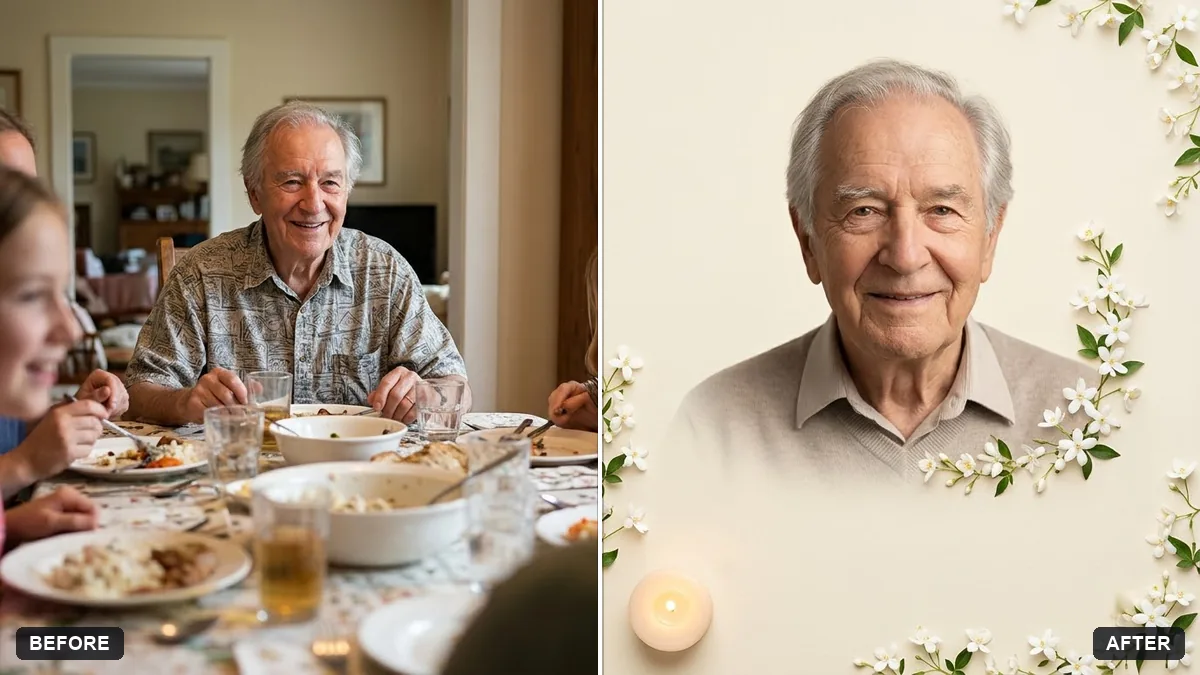
This prompt creates a gentle tribute portrait of a loved one with soft, warm light and a plain backdrop, keeping the face and features exactly as in the original.
Turn this photo of my loved one into a gentle tribute portrait. Keep the face and features exactly as in the original.

Soft, warm light, a plain [CREAM / SOFT BLUE] background, a subtle border of white flowers and a small candle, calm, dignified and respectful, with space at the bottom for a name and dates.
Use the clearest, most cherished photo; this style works with a calm, respectful mood.
Your photo goes to the AI app you choose, never to PromptUp.
Get a better result
A calm, warm tribute portrait of your loved one, with their face kept true, a soft cream or blue backdrop, white flowers around the edge, a small candle and clear space below for a name and dates.
A tribute must look exactly like the person, so the face and features stay as in the original. Everything else is quiet: warm light, a plain soft background, white flowers and one candle. Space at the bottom for a name and dates makes it ready for a service or a frame.
The face looks slightly different or younger.
Fix: Repeat “keep the face exactly as in the original, no smoothing, no age change”, and use the clearest photo you have.
- The decoration feels too busy or too bright. Reduce it to one flower type and one candle, and ask for “muted, gentle, nothing flashy”.
- Text added by the AI is wrong. Leave the space blank and add the name and dates yourself in an editor, where you can check each letter.
Ask for the same portrait in a portrait-shaped frame with a wide margin, ready to print as a small memorial card or place in a frame.
Keep the layout. Soften the light a little more and move the flowers further out so nothing crosses the face.
Guides on this topic
More photo editing prompts
See all 334 →
More like this
- Soft maternity portraitGemini · ChatGPT
- Fix an overexposed baby photoGemini · ChatGPT
- Baby milestone photo cardGemini · ChatGPT
- Turn a family photo into a Christmas cardGemini · ChatGPT
- Hug your younger selfGemini · ChatGPT