
- Updated
Retirement tribute portrait
This prompt creates a warm tribute portrait with soft golden light for a retirement celebration, keeping the person's face and features exactly the same.
Create a warm tribute portrait from this photo for a retirement celebration. Keep the person's face and features exactly the same.

Soft golden light, elegant [COLOUR] background with a subtle pattern, a small banner "[NAME] · [YEARS] years of service" at the bottom, respectful and celebratory mood, print-ready.
Print it large and put it on the gift table.
Your photo goes to the AI app you choose, never to PromptUp.
Get a better result
A warm tribute portrait for a retirement party, with soft golden light, an elegant patterned background, a small banner with the name and years of service, and a respectful, celebratory mood ready to print.
A tribute should feel warm and respectful, so the prompt asks for soft golden light and an elegant background with a subtle pattern instead of party decorations. The small banner with name and years of service turns a portrait into a keepsake. Print-ready means it should hold up at a large size on the gift table. Keeping the face exactly the same matters more here than anywhere, because colleagues and family will know the person well.
The name or years on the banner are misspelt.
Fix: Check every letter, or leave the banner blank and add the text in an editor.
- The face looks different. Repeat that the face stays exactly the same and use a clear, recent photo.
- The print is blurry. Generate at the highest size available and ask for “print-ready, sharp detail” before sending it to a printer.
Ask for a portrait-shaped version with room below for signatures, to print as a card everyone can sign.
Keep the layout. Add a soft border around the portrait with empty space for five short handwritten messages from the team.
Guides that use this prompt
More photo editing prompts
See all 334 →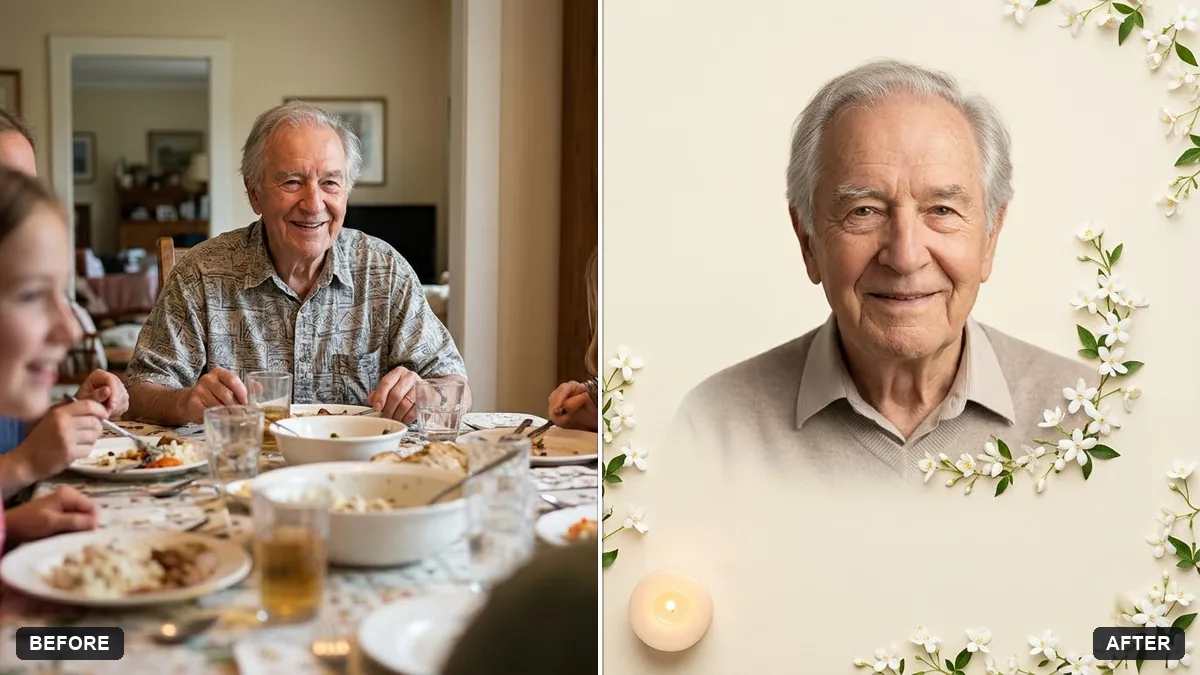
More like this
- Write a farewell or retirement speechChatGPT · Gemini · Claude
- Lunar New Year portraitGemini · ChatGPT
- Linocut print portraitGemini · ChatGPT
- Find a thoughtful gift ideaChatGPT · Gemini · Claude
- Pop art screen-print portraitGemini · ChatGPT