- Updated
Hug your younger self
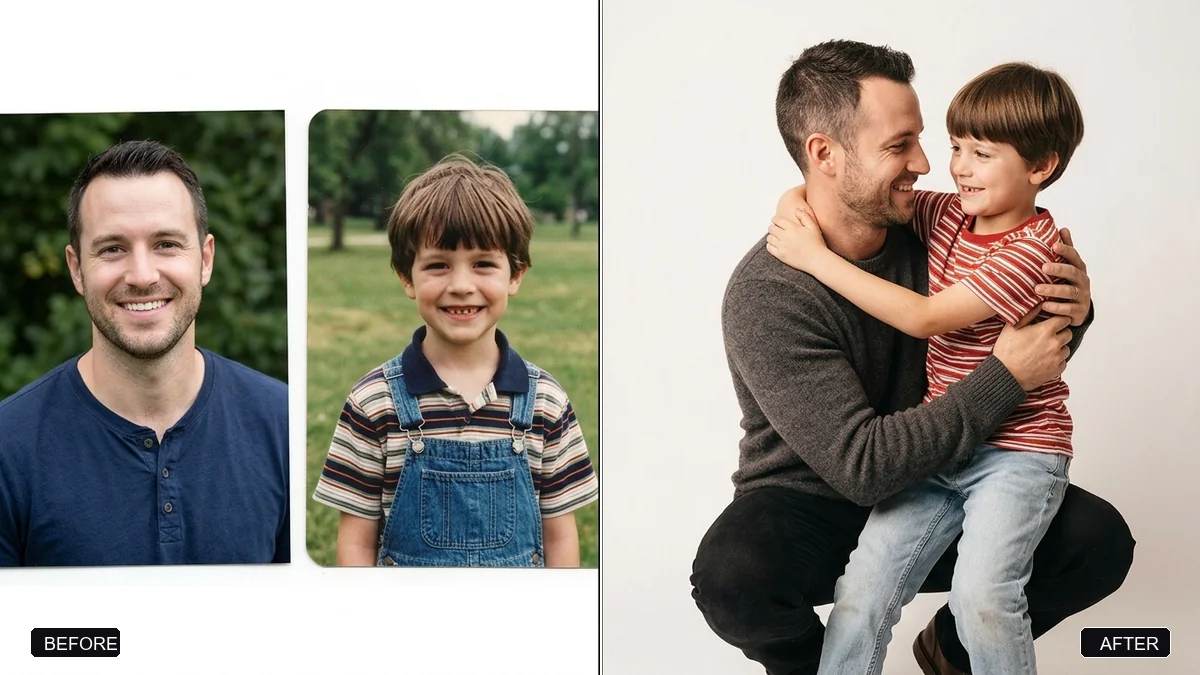
This prompt uses two photos, your current one and a childhood one, and creates a single realistic image of your present self gently hugging your younger self. Both faces are kept as in the originals. Choose a simple setting.
Using these two photos — my current photo and my childhood photo — create one realistic photo of my present self gently hugging my younger self.

Keep both faces exactly as in the originals. Setting: [SETTING, e.g. a plain white studio backdrop / the old house I grew up in]. Use soft, warm, even light on both people so they look like they were photographed together.

Natural emotional expressions, realistic skin texture, portrait 4:5.
Use a childhood photo where the face is clear and not too small.
Your photo goes to the AI app you choose, never to PromptUp.
Get a better result
One realistic photo of your present self gently hugging your younger self, with both faces kept from the originals, soft warm even light and natural, emotional expressions.
The child looks like a small adult, or both people look the same age.
Fix: State the ages: “the child is about seven, small, in a school uniform; the adult is my current age”. Size and proportions need words.
- The light on the two people does not match. Use two photos with similar light, or repeat “same soft, warm light and colour on both”. Mixed light sources are the usual cause of a pasted-on look.
- The two faces blend into each other. Upload the adult photo first and label them: “the first photo is me now, the second is me as a child”. Keep the faces separate.
Use the setting “the street outside my childhood home, soft evening light” and add “a gentle, calm smile”. A real place makes the picture more personal.
Keep both faces exactly as in their own photos. The child should clearly be a child, and the light on both people should match.
Guides that use this prompt
More photo editing prompts
See all 334 →
More like this
- Graduate with familyGemini · ChatGPT
- Join two halves of a torn photoGemini · ChatGPT
- Gentle memorial tribute portraitGemini · ChatGPT
- Soft maternity portraitGemini · ChatGPT
- Flatten a crumpled photoGemini · ChatGPT