- Updated
Passport-style photo prompt for Gemini & ChatGPT
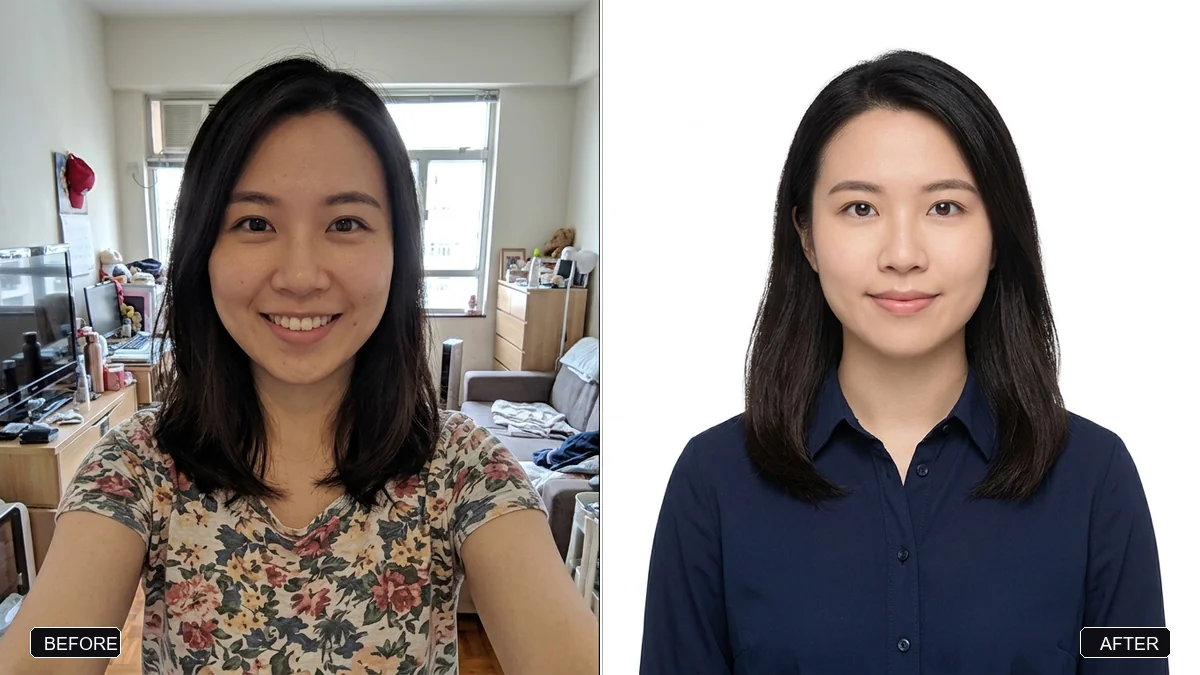
This prompt converts a selfie into a formal passport-style photo: plain background, head and shoulders centred, neutral expression, even lighting and no beautifying. Official passport and visa photo rules vary by country, so check yours before you submit.
Convert this selfie into a formal passport-style photo. Keep my face, features, and skin tone exactly the same — do not beautify or reshape anything.

Requirements: a plain [BACKGROUND, e.g. white] background; head and shoulders centred and facing straight; neutral expression with both eyes open; even lighting with no shadows on the face or background; [OUTFIT, e.g. a plain dark collared shirt].

Output in [SIZE, e.g. 35 × 45 mm] proportions, high resolution.
Always check your country's official photo rules before submitting.
Your photo goes to the AI app you choose, never to PromptUp.
Get a better result
A plain, front-facing head-and-shoulders photo of you on a white or light background, even light, neutral face with both eyes open and no beautifying, cropped to the size you named.
The face is smoothed or reshaped.
Fix: Repeat “do not beautify, retouch or change the face shape, skin or eyes in any way”. Official offices reject retouched photos.
- Shadows remain on the wall behind you. Ask for “flat even lighting, no shadow on the face or on the background”, or retake the selfie facing a window.
- The size is wrong for the form. Look up the exact size, background and head height rule for your country and type it into the bracket.
Place the result next to the government sample image and check the eye line, head size and crop. Use the official upload checker if there is one.
Keep the face untouched. Centre the head, level the shoulders and check the result against the official sample.
Guides that use this prompt
More photo editing prompts
See all 334 →
More like this
- Confident lawyer headshotGemini · ChatGPT
- Natural teeth brighteningGemini · ChatGPT
- Healthcare professional portraitGemini · ChatGPT
- Airline pilot portraitGemini · ChatGPT
- Actor-style black-and-white headshotGemini · ChatGPT