- Updated
Graduation portrait in gown and cap
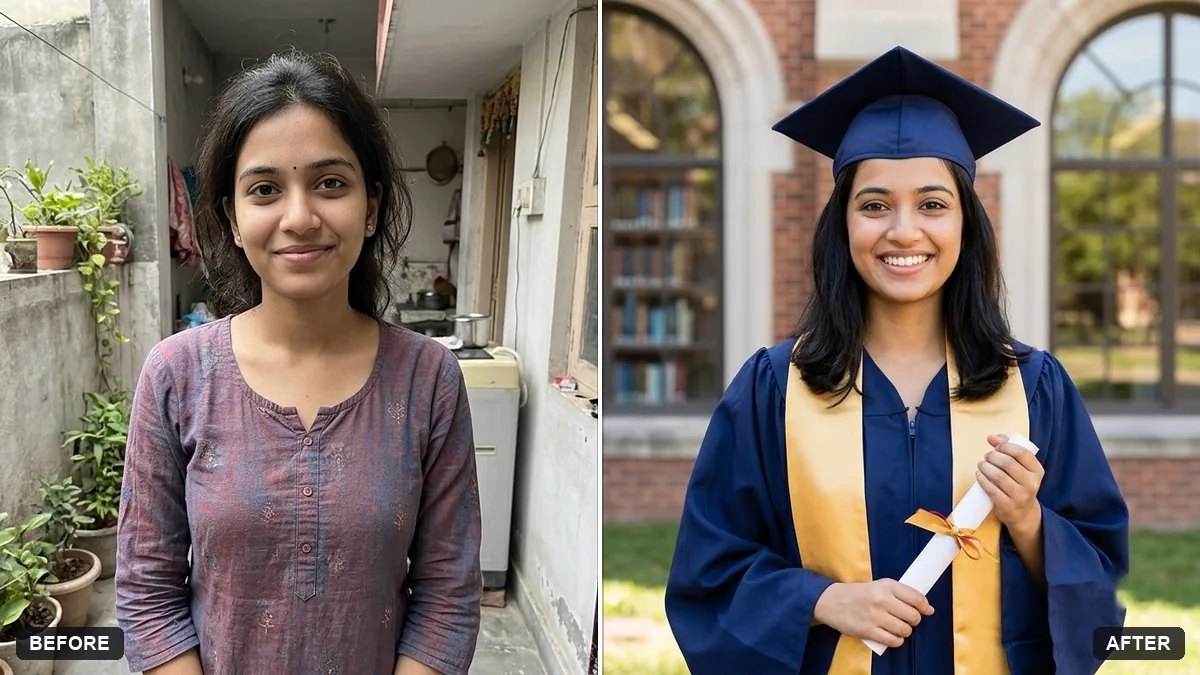
This prompt turns your photo into a graduation portrait. You choose the gown, cap and stole colours and the background, such as a university building, and your face and features stay the same.
Turn this photo into a graduation portrait. Keep my face and features exactly the same.

Put me in a [COLOUR] graduation gown and cap with a [COLOUR] stole. Background: [e.g. university library / campus lawn]. Bright, proud, natural smile as in the original. Sharp studio-quality light, realistic fabric folds and no extra text.
Upload a clear waist-up photo. Full-body shots lose face detail.
Your photo goes to the AI app you choose, never to PromptUp.
Get a better result
A graduation portrait of you in the gown, cap and stole colours you chose, with a proud natural smile, studio-quality light, realistic fabric folds and the background you picked, with your face unchanged.
A graduation portrait should look like the real day, so the prompt keeps your face and your natural smile from the original. A gown, cap and stole in your colours and a library or campus lawn background set the scene. Asking for realistic fabric folds and no extra text keeps it clean for framing.
The cap or tassel looks flat or floats above the head.
Fix: Say “the cap sits flat on the head with a tassel hanging on the right side”. A waist-up photo with your hair visible works best.
- Your university’s colours or crest appear wrong. Name the colours only, and add any crest yourself later. Do not ask the AI to draw a real university logo.
- Your smile changes. Add “keep my smile and expression exactly as in the photo”, and choose a photo where you already look happy.
Ask for “the same portrait with an empty strip along the bottom for a thank-you message”. Write the words yourself for the family and teachers.
Keep my face and smile exactly the same. Make the gown a deeper blue, lower the stole slightly and blur the library behind me.
Guides that use this prompt
More photo editing prompts
See all 334 →
More like this
- Graduation photo with a cap tossKling · Veo · Seedance
- Graduation photo cap toss (Higgsfield)Higgsfield · Kling
- Graduation ceremony and cap tossVeo · Kling · Seedance
- Graduation announcement cardGemini · ChatGPT · Midjourney
- Fitness coach portraitGemini · ChatGPT