- Updated
Creative portfolio portrait
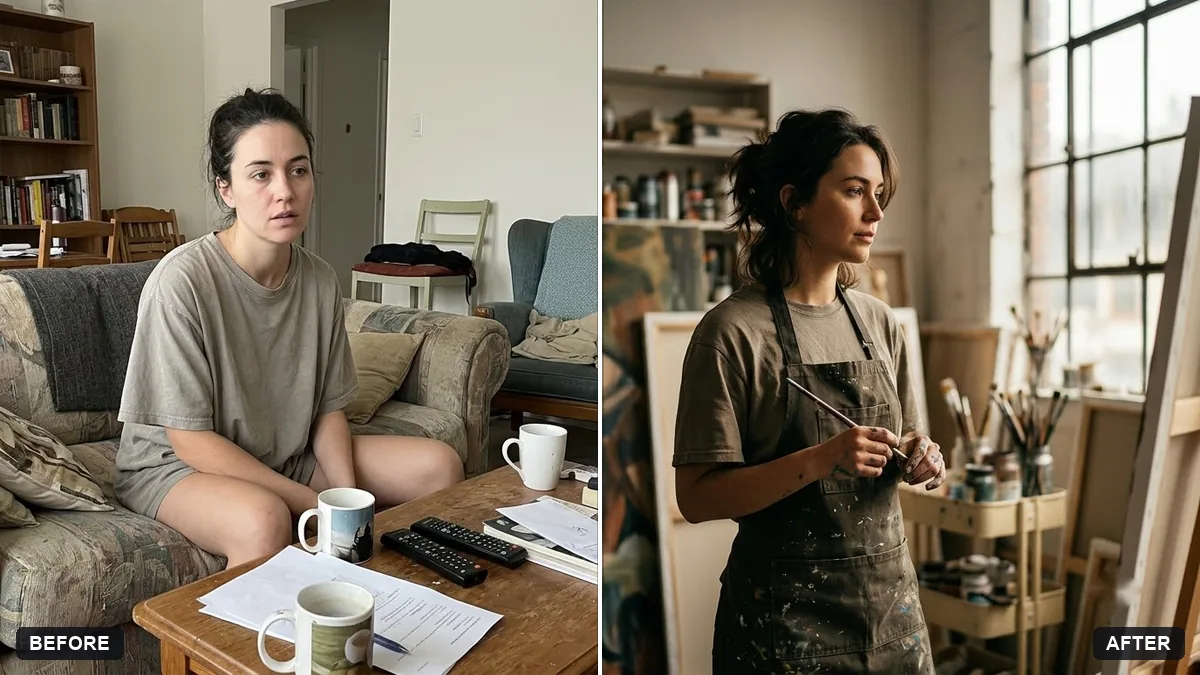
This prompt restyles your photo as a portrait for a creative portfolio site, in a setting such as a bright studio, without changing your face or expression.
Restyle this photo as a portrait for my creative portfolio website. Keep my face and expression unchanged.

Setting: [e.g. bright studio with a large window / cluttered art studio], holding or near [TOOL OF MY TRADE]. Moody but warm natural light, shallow depth of field, relaxed confident pose, editorial colour grade. Leave space on the right for text.
Mention your craft or tool so the picture tells people what you do.
Your photo goes to the AI app you choose, never to PromptUp.
Get a better result
A moody but warm editorial portrait for your portfolio site, with you in a studio setting near the tool of your trade, shallow depth of field and empty space on the right for text.
A portfolio photo should tell people what you do, so the prompt asks for the tool of your trade in the shot. The setting blank lets you choose a bright studio or a cluttered workspace that matches your style. Warm natural light and an editorial colour grade give it a polished feel. Space on the right is planned for your name or intro text on the website.
The space for text is missing.
Fix: Say “subject on the left third, clear space on the right” and check that the empty area is plain.
- The tool looks wrong. Describe it in detail, such as “a graphics tablet and stylus”, and fix any odd shapes in an editor.
- The look is too dramatic for a business page. Ask for “relaxed and approachable” and lighter shadows. Visitors should feel welcome.
Ask for a 3:1 wide crop with you on the left and a softly blurred workspace stretching across the rest.
Keep this look. Describe the light, colours and setting in one short sentence I can reuse for my other portfolio photos so they match.
More photo editing prompts
See all 334 →
More like this
- Facebook or Instagram ad creativeIdeogram · ChatGPT · Gemini
- Turn a project into a portfolio case studyChatGPT · Gemini · Claude
- Architect at work portraitGemini · ChatGPT
- Developer workspace portraitGemini · ChatGPT
- Creative writing prompts for kidsChatGPT · Gemini · Claude