- Updated
Developer workspace portrait
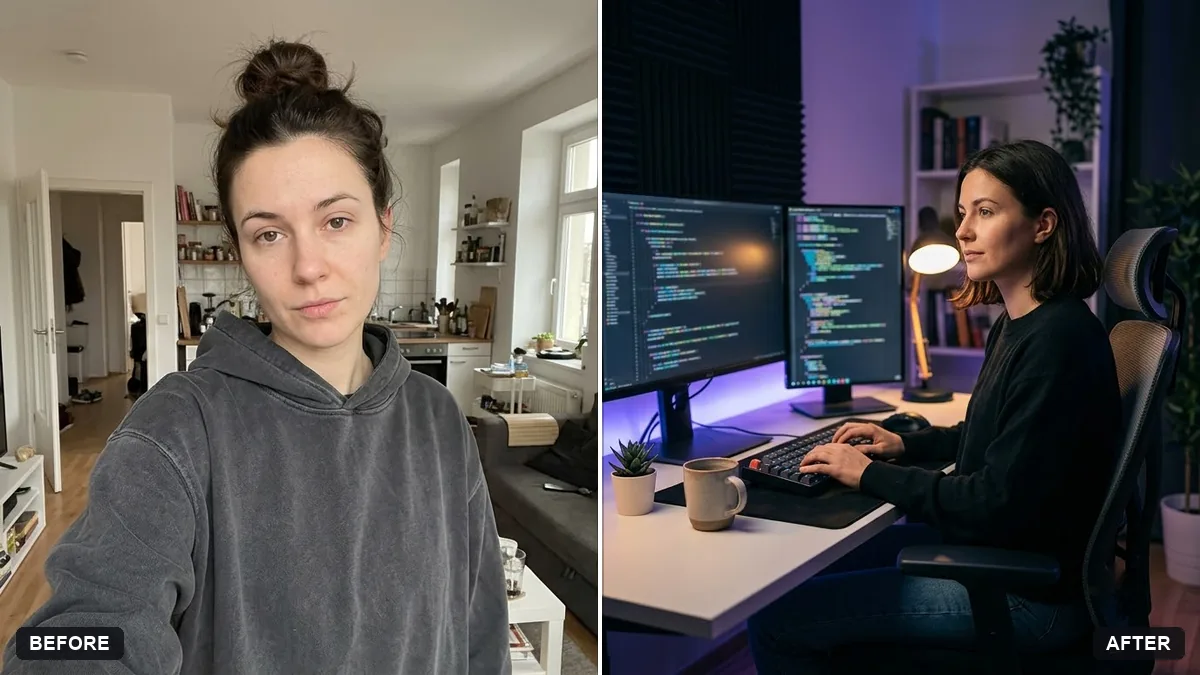
This prompt places you in a modern workspace with two monitors showing blurred code, a mechanical keyboard, soft ambient lighting, a plant and a coffee mug, in a tech-company profile style.
Turn this photo into a portrait of me as a software developer in a modern workspace. Keep my face and features exactly the same.

Two monitors with blurred code, a mechanical keyboard, soft [COLOUR] ambient lighting, a plant and a coffee mug. Relaxed smile, shallow depth of field, tech-company profile style.
Ask for code on the screens to be unreadable placeholders to avoid odd text.
Your photo goes to the AI app you choose, never to PromptUp.
Get a better result
A relaxed portrait of you as a developer, with two monitors showing blurred code, a mechanical keyboard, a plant and a mug under soft ambient lighting.
A tech profile photo needs to look like a real desk, so the prompt lists the familiar items: two monitors, a mechanical keyboard, a plant and a coffee mug. Blurred code on the screens avoids the odd text AI often writes. Soft ambient light in your colour gives the room a mood, and shallow depth of field keeps you sharp while the setup stays in the background.
The screens show odd text.
Fix: Ask for unreadable, softly blurred code as the tip says, and do not rely on any text the AI draws.
- The desk is too perfect. Ask for a lived-in desk with a cable or a notebook, so the picture feels real.
- The colour clashes with your brand. Name an exact lighting colour that matches your site or profile theme.
Ask for the same workspace at night, with the room dark, the screens glowing and a soft lamp on one side.
Keep my face. Make the lighting soft and even from the left so it matches my other team page photos.
Guides that use this prompt
More photo editing prompts
See all 334 →

More like this
- Fitness coach portraitGemini · ChatGPT
- Confident lawyer headshotGemini · ChatGPT
- Teacher portrait in a classroomGemini · ChatGPT
- Actor-style black-and-white headshotGemini · ChatGPT
- Creative portfolio portraitGemini · ChatGPT