- Updated
Architect at work portrait
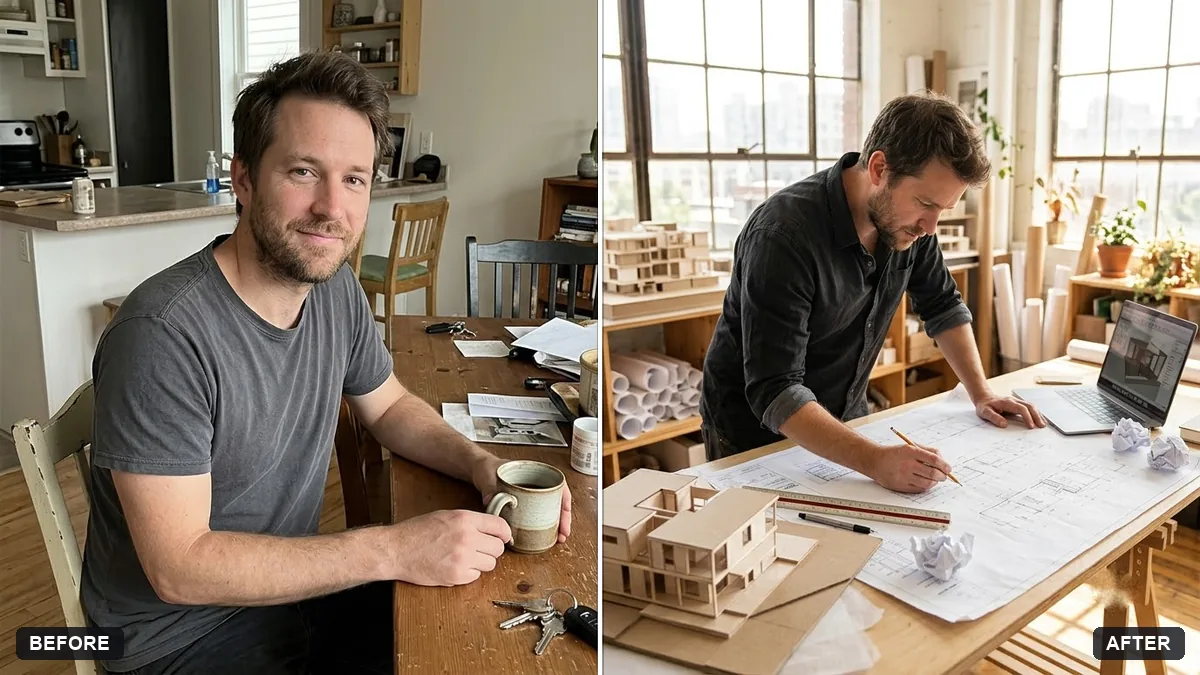
This prompt shows you as an architect working at a drafting desk surrounded by blueprints, a scale model, a pencil and a laptop in a bright studio or office with large windows.
Turn this photo into a portrait of me as an architect working at a drafting desk. Keep my face and features exactly the same.

Surround me with blueprints, a scale model, a pencil and a laptop, in a bright [STUDIO / OFFICE] with large windows. Natural light, thoughtful expression, editorial style.
Mention the tools on the desk to keep it accurate to your work.
Your photo goes to the AI app you choose, never to PromptUp.
Get a better result
A bright editorial portrait of you at a drafting desk with blueprints, a scale model, a pencil and a laptop, in a studio or office with large windows and natural light.
The prompt sets you at work rather than posing, with the tools of the job around you: blueprints, a scale model, a pencil and a laptop. Naming them gives the picture accuracy, as the tip says, which matters if you use it for a profile. Large windows and natural light make it bright and professional. A thoughtful expression and an editorial style suit a feature or a website about page more than a stiff headshot.
The drawings look like nonsense.
Fix: Ask for softly blurred plans, since AI cannot draw readable technical drawings. Add real ones in an editor if needed.
- The desk looks cluttered. Limit the list to the four items named and say “tidy, organised desk”.
- Your face changes. Use a clear photo and repeat “keep my face and features exactly the same”.
Ask for the same portrait on a building site with a hard hat, rolled plans and a half-built frame behind you.
Keep my face and the desk. Replace the tools with these ones I really use: [TOOLS AND SOFTWARE].
Guides that use this prompt
More photo editing prompts
See all 334 →

More like this
- Creative portfolio portraitGemini · ChatGPT
- Fitness coach portraitGemini · ChatGPT
- Actor-style black-and-white headshotGemini · ChatGPT
- Chef portrait in a professional kitchenGemini · ChatGPT
- Teacher portrait in a classroomGemini · ChatGPT