- Updated
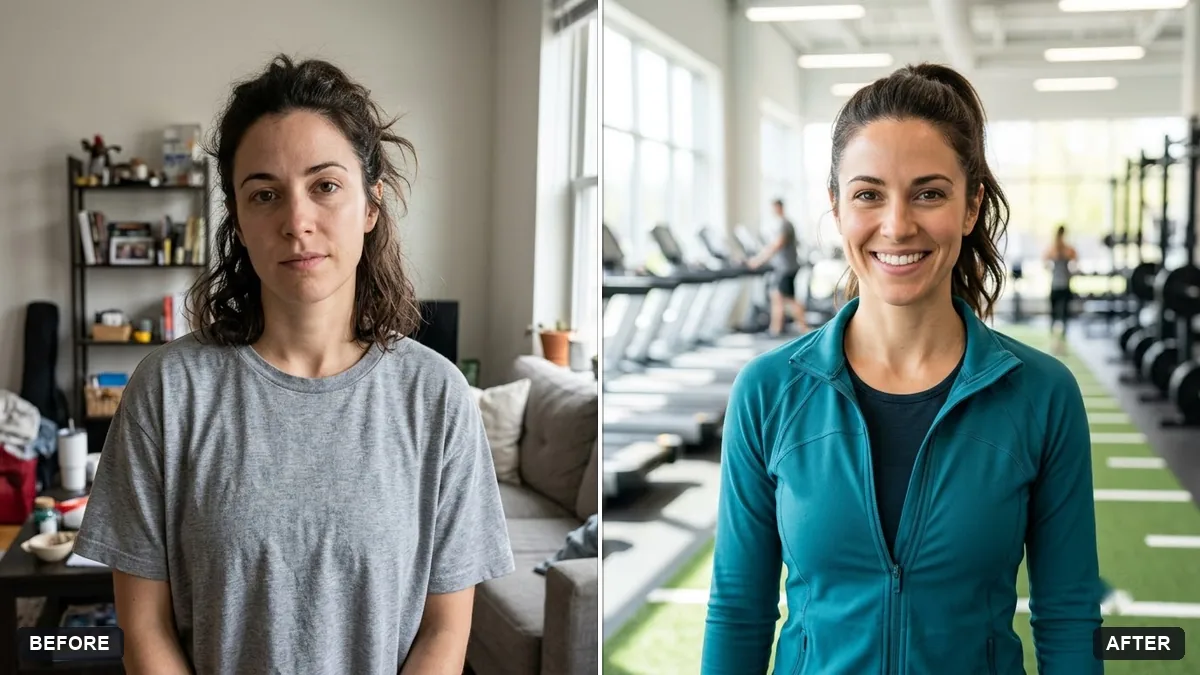
Fitness coach portrait
This prompt creates a coach portrait in a gym or outdoor setting. It keeps your face and body proportions exactly the same and does not change your physique.
Turn this photo into a fitness coach portrait. Keep my face and body proportions exactly the same. Do not change my physique.

Setting: [GYM / OUTDOOR PARK] at [TIME OF DAY], athletic [OUTFIT COLOUR] activewear, energetic but natural smile, crisp light with a gentle rim, slightly desaturated sporty colour grade.
Do not alter your body shape. Honest results build trust with clients.
Your photo goes to the AI app you choose, never to PromptUp.
Get a better result
A crisp portrait of you as a fitness coach, in a gym or park in activewear, with an energetic natural smile, a gentle rim of light and a slightly muted sporty colour grade.
A coach’s photo has to be honest, so the prompt says twice to keep your face and physique exactly the same. Clients trust a coach who looks like their real self, as the tip says. The setting and time blanks let you choose a gym or a park. Crisp light with a gentle rim outlines your shape, and a slightly desaturated grade gives a sporty feel.
Your body is reshaped.
Fix: Keep the “do not change my physique” line and compare the result with your original. Do not mislead clients.
- The gym looks generic. Name the equipment you actually teach with, such as kettlebells or a yoga mat.
- The smile looks forced. Use a photo with a natural expression and ask for “relaxed and approachable”.
Ask for a morning park scene with a small group stretching behind you, with soft background blur.
Keep my face and body exactly the same, with no change to my physique. Make the background brighter and leave space on the right for text.
More photo editing prompts
See all 334 →
More like this
- Graduation portrait in gown and capGemini · ChatGPT
- Developer workspace portraitGemini · ChatGPT
- Confident lawyer headshotGemini · ChatGPT
- Architect at work portraitGemini · ChatGPT
- Matching team page headshotGemini · ChatGPT