- Updated
Remove power lines and wires from the sky
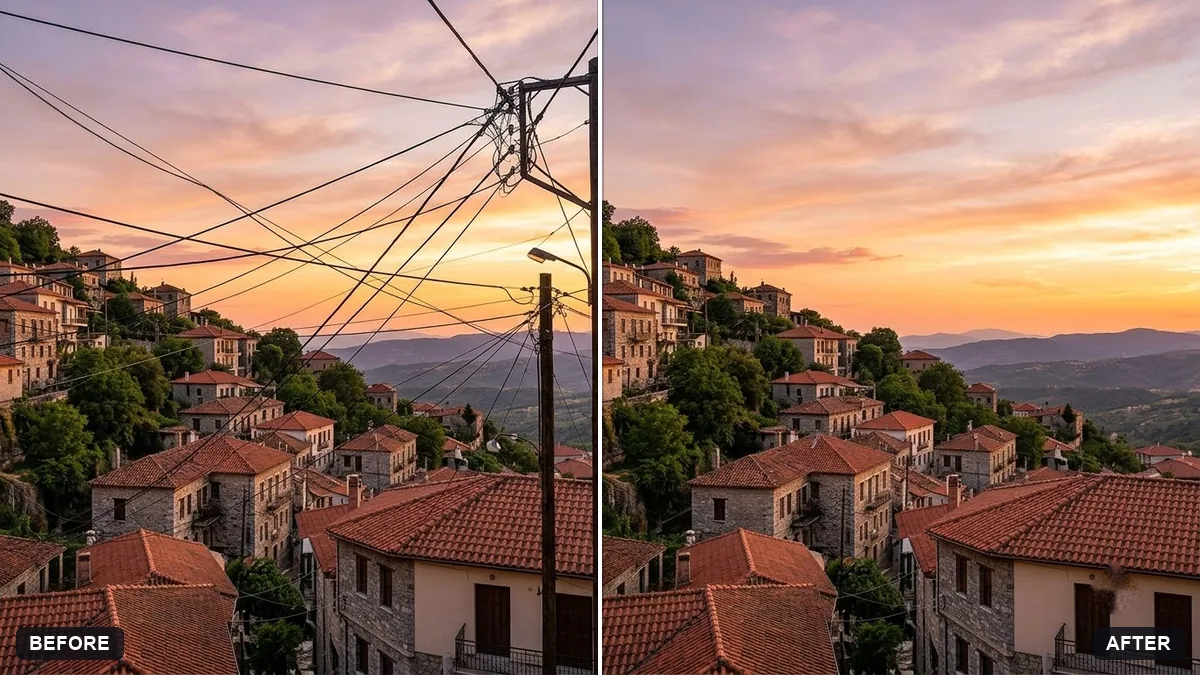
This prompt removes power lines and wires crossing an area of your photo, such as the sky, while keeping the buildings and trees exactly as they are.
Remove the power lines and wires crossing the [AREA, e.g. sky] in this photo. Keep the buildings, trees and everything else exactly the same.

Reconstruct the sky behind them with matching clouds, gradient and colour so there are no smudges or patches.
Do it in two passes if there are a lot of wires: first the thickest lines.
Your photo goes to the AI app you choose, never to PromptUp.
Get a better result
Your photo with the wires gone and the sky or background rebuilt with matching clouds, gradient and colour, without smudges, while buildings and trees stay exactly as shot.
Wires are thin but cross a lot of sky, so the prompt asks to rebuild clouds, gradient and colour behind them without smudges. Naming the area narrows the job. Keeping buildings and trees exactly the same, and two passes for many wires as the tip says, avoids damage.
Thin wires remain, or a pale smear shows where they were.
Fix: Follow the tip and do two passes: the thickest lines first, then “remove the remaining thin wires”. Zoom in to check the sky.
- Wires crossing trees or buildings are patched badly. Say “also remove wires that cross the tree and the rooftop, and reconstruct the branches and the roof edge”.
- The sky gets a visible blur or a different tone. Add “match the sky’s gradient, clouds and noise exactly so there is no visible patch”.
Change the area to “the street” and list “electric poles, cables and the transformer”. Keep the buildings unchanged and check that the lower floors are not redrawn.
Keep everything else exactly as in the original photo. Only change what I asked for.
Guides that use this prompt
More photo editing prompts
See all 334 →

More like this
- Clear crowds from a beach photoGemini · ChatGPT
- Remove parked cars from a street photoGemini · ChatGPT
- Remove unwanted lens flareGemini · ChatGPT
- Remove signs and clutter from a street photoGemini · ChatGPT
- Tidy a cluttered backgroundGemini · ChatGPT