- Updated
Phone photo of a page to clean scan
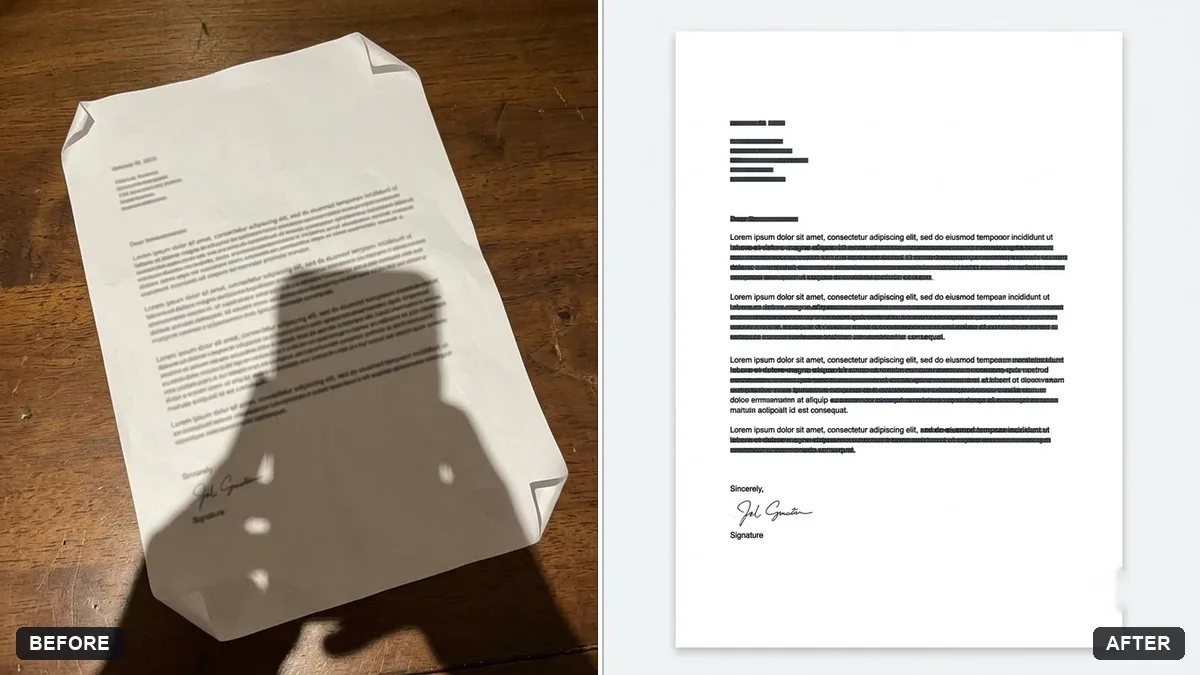
This prompt turns a phone photo of a document, such as a printed letter, into a clean flat scan by straightening the perspective and cropping. Do not use it for documents where any change would be a problem.
Turn this photo of a [DOCUMENT, e.g. printed letter] into a clean flat scan. Straighten the perspective and crop to the page edges.

Remove shadows, fold shadows and fingers, make the background pure white and the text sharp and dark. Keep all text, stamps and signatures exactly as they are. Do not change any words or numbers.
Always compare the numbers on the result with the original.
Your photo goes to the AI app you choose, never to PromptUp.
Get a better result
A straightened, cropped page on a plain white background, with shadows and fingers removed and the text dark and sharp, while stamps and signatures stay as they were.
A scan is only useful if the words are right, so the prompt says twice that text, stamps, signatures, words and numbers must not change. The fixes are what a scanner would do: straighten, crop, remove shadows and whiten the page. Checking numbers afterwards, as the tip says, is essential.
Numbers or words change slightly.
Fix: Read every figure against your original. Never use an AI-cleaned copy where exact digits matter, such as bank or legal papers.
- The corners are still bent. Retake the photo from directly above with the page flat, and say which corner is lifted.
- Faint text disappears. Ask it to keep light pencil and pale print visible instead of turning the whole page pure white.
Ask for a high-contrast black and white scan suited to printing, with the background fully white and no grey patches.
Keep every word and number exactly as in the original photo. Do not sharpen or redraw any text, only remove the shadow and straighten the page.
More photo editing prompts
See all 334 →
More like this
- Remove a shadow from a document photoGemini · ChatGPT
- Remove stains and mould from a scanGemini · ChatGPT
- Printable colouring pageChatGPT · Gemini · Midjourney
- Turn a photo into a colouring pageGemini · ChatGPT
- Convert a film negative to a positiveGemini · ChatGPT