- Updated
Hoodie design mockup
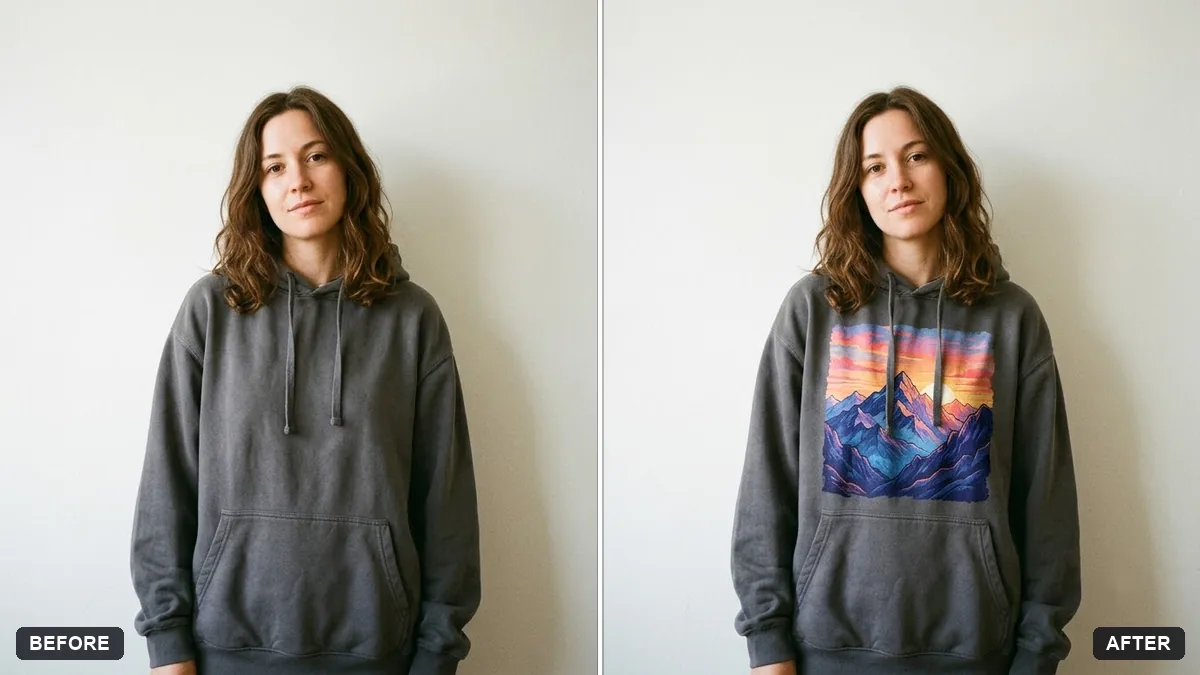
This prompt places your design on a hoodie in the colour you choose, following the fabric folds and texture so the print looks real, in a clean streetwear mockup style. Simple, bold designs work best.
Place the design from this image on the chest of a [COLOUR] hoodie worn by a person standing against a plain wall. Follow the fabric folds and texture so the print looks real.

Keep the design colours accurate. Clean streetwear mockup style.
Choose a simple, bold design; fine detail can get lost in fabric folds.
Your photo goes to the AI app you choose, never to PromptUp.
Get a better result
Your design printed on the chest of a hoodie in the colour you chose, worn by a person against a plain wall, with the print following the fabric folds and the design colours kept accurate.
The design is distorted, and small text becomes unreadable.
Fix: Use a simple bold design, and keep any words to a few large letters. Check the result at full size.
- The print colours look washed out. Say “keep the design colours exactly as uploaded, printed with no fading”. Dark hoodies need a design with bright colours.
- The print sits too high or off-centre. Ask for “centred on the chest, about 10 cm below the collar”.
Ask for “the same hoodie in black, cream and forest green, in a row”. Customers can see which base colour makes your design stand out.
Keep the design exactly as it is. Move the print slightly lower, and show the hoodie in heather grey with a soft shadow on the wall.
Guides on this topic
More photo editing prompts
See all 334 →
More like this
- Poster in a frame mockupGemini · ChatGPT
- Billboard advertising mockupGemini · ChatGPT
- Screenshot on a laptop mockupGemini · ChatGPT
- Wall art in a room mockupGemini · ChatGPT
- Preview a new shop frontGemini · ChatGPT