- Updated
Billboard advertising mockup
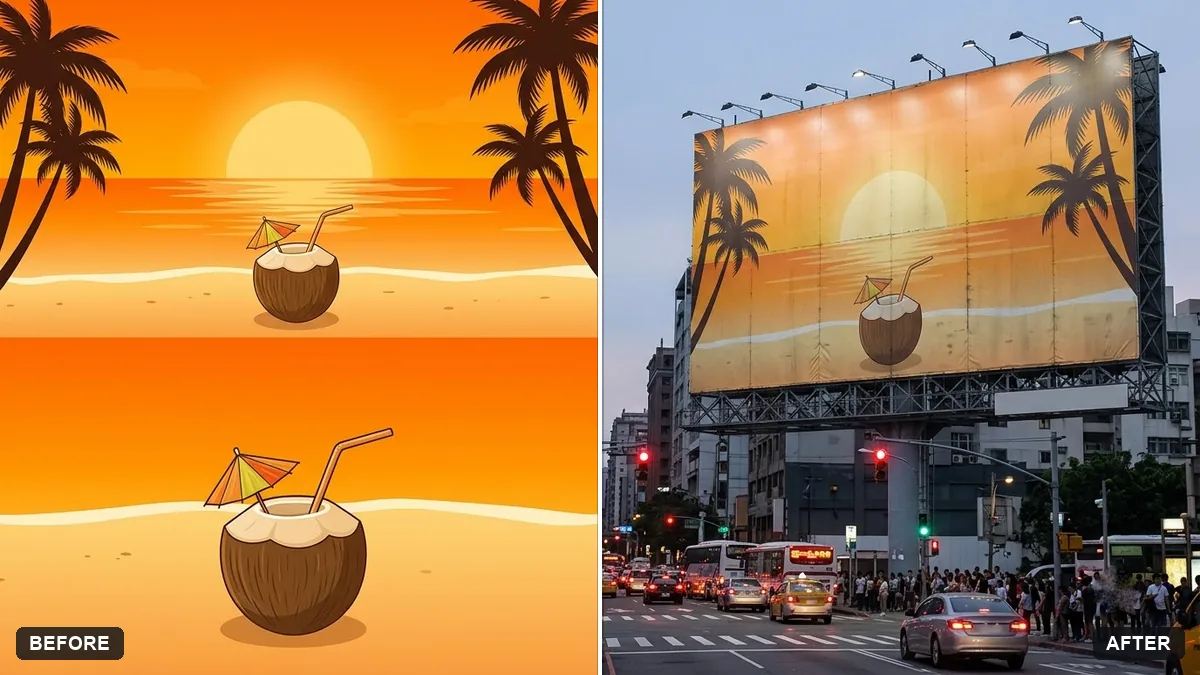
This prompt places your ad design on a city billboard at the time of day you choose, keeping the design exactly the same.
Place my ad design (the uploaded image) on a large city billboard at [TIME OF DAY]. Keep the design exactly the same, with correct perspective and slight weathering.

Surroundings: [e.g. busy street with traffic and pedestrians], realistic lighting, small reflections, wide-angle photography look.
Mockups are only for previews. Do not use them to imply an ad exists.
Your photo goes to the AI app you choose, never to PromptUp.
Get a better result
Your uploaded ad shown on a large city billboard at the time of day you chose, with correct perspective, light weathering, street life around it and reflections, and the artwork itself unchanged.
The ad text on the billboard is changed or blurred.
Fix: Upload the design at high resolution with short text, and check each word in the result. If a word is wrong, add the text back in an editor.
- The billboard looks pasted flat on the scene. Say “the billboard is mounted on a steel frame with a slight angle, catching the evening light and a soft shadow from the frame”.
- The crop cuts off part of your design. State the shape, such as “a wide 3 by 1 billboard” or “a tall portrait one”, and match it to your artwork’s proportions.
Ask for “blue hour, with the billboard lit from below and car headlights on the road”. A lit billboard at dusk often shows bold colours best in a pitch deck.
Keep the ad artwork exactly as uploaded. Move the camera further back so the whole billboard and the street below it are visible.
Guides on this topic
More photo editing prompts
See all 334 →
More like this
- Preview a new shop frontGemini · ChatGPT
- Hologram billboards in a cityVeo · Kling · Seedance
- Tote bag design mockupGemini · ChatGPT
- Screenshot on a laptop mockupGemini · ChatGPT
- Hoodie design mockupGemini · ChatGPT