- Updated
Restore a faded colour print: Gemini & ChatGPT prompt
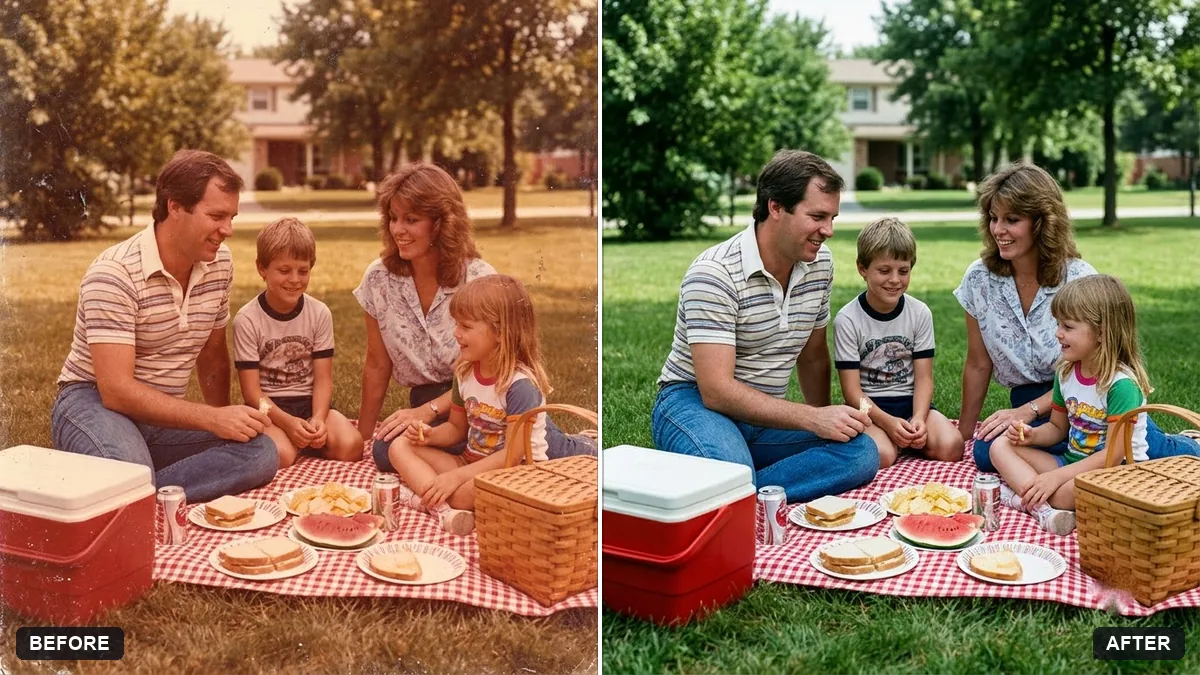
Colour prints from the 1970s to 1990s often turn orange or magenta as the dyes fade. This prompt asks the AI to bring back the original colours, remove the colour cast, lift the contrast gently and clear dust and scratches, while keeping faces faithful and the vintage feel. Type the decade in the bracket so the AI picks realistic colours.
Restore this faded colour print from the [DECADE, e.g. 1980s]. Bring back the original colours, remove the orange or magenta cast, boost contrast gently and remove dust and scratches.

Keep the faces and details faithful to the original and keep the vintage feel. Do not make it look modern or over-processed.
Tell the AI the era of the photo so it can choose realistic colours.
Your photo goes to the AI app you choose, never to PromptUp.
Get a better result
A faded colour print with the orange or magenta tint removed, colours brought back to believable levels, gentle contrast and dust cleaned up, while it still feels like a photo from its decade.
The colours come out too bright and modern, like a new photo.
Fix: Keep the decade in the prompt and add “keep the soft, slightly faded colours of a real print from that time”.
- The tint is removed so strongly that skin turns grey or blue. Add “keep warm, natural skin tones” and ask for only a partial correction first. Two gentle passes are safer than one big one.
- Dust is cleaned but small details such as jewellery disappear. Add “keep small details: jewellery, patterns on clothes and writing on signs”. Cleanup can mistake fine detail for dust.
- Contrast is pushed until faces look harsh. Change the contrast line to “restore contrast only to the level of a good print from that time”.
Scan at 600 dpi, or photograph the print straight on in daylight, and put the exact decade in the bracket, such as 1970s. The era helps the AI pick believable colours.
Tone the colours down so it looks like a real print from that decade. Keep the faces and details exactly the same.
Guides that use this prompt
More photo editing prompts
See all 334 →
More like this
- Flatten a crumpled photoGemini · ChatGPT
- Vintage faded film lookGemini · ChatGPT
- Remove stains and mould from a scanGemini · ChatGPT
- Bring an old photo to lifeKling · Veo
- Fix a blurry photo (Sharp & crisp)Gemini · ChatGPT