- Updated
Brighten a dim restaurant dish photo
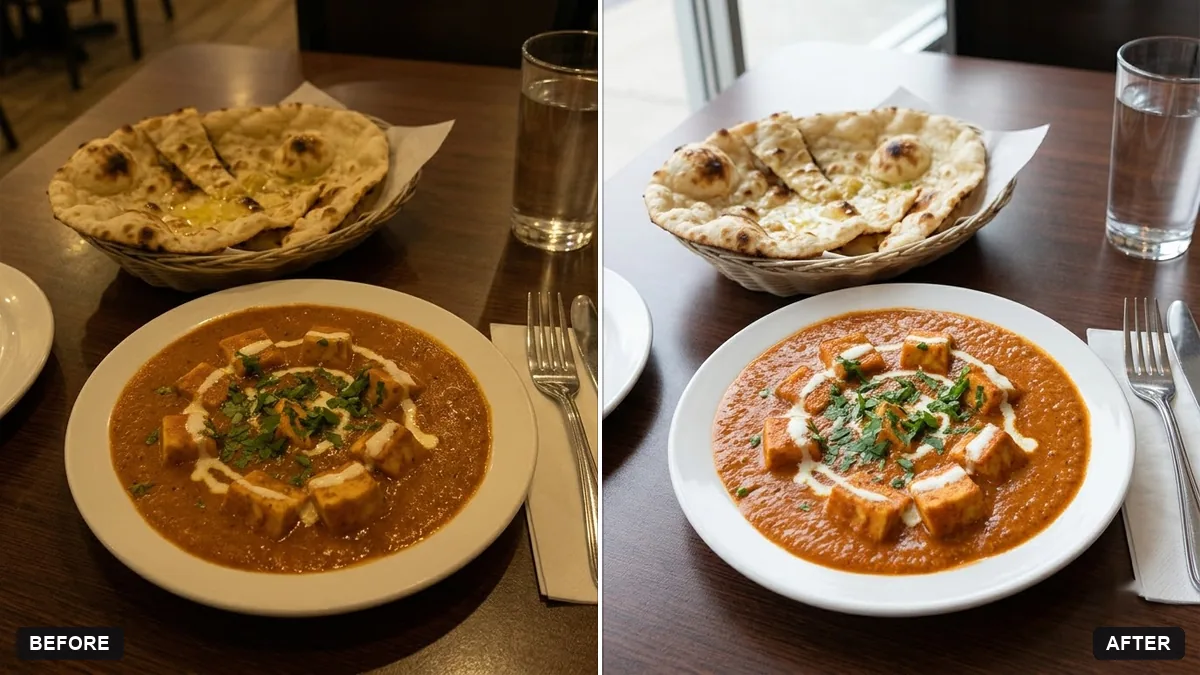
This prompt enhances a dish photographed in a dim restaurant, brightening it with soft natural light, fixing the yellow cast and boosting the freshness of the ingredients, while keeping the dish, plate and table the same and not oversaturated.
Enhance this photo of a [DISH] taken in a dim restaurant. Brighten it with soft, natural light, fix the yellow cast, boost the freshness of the ingredients and add a light shine on sauces.

Keep the dish, plate and table exactly the same. Real, appetising and not oversaturated.
Shoot from a slightly higher angle near a window for even better raw material.
Your photo goes to the AI app you choose, never to PromptUp.
Get a better result
Your own dish photo, brighter and fresher, with the yellow cast corrected and a light shine on sauces, while the plate, table and the dish itself stay exactly as served.
The food looks plastic or oversaturated.
Fix: Keep “real, appetising and not oversaturated” and add “natural colours, no glossy coating on everything”. Compare the dish with how it looks on the table.
- Ingredients are added or changed. Say “do not add garnish, change the portion or alter any ingredient”. A customer who sees a different dish will notice.
- The yellow cast stays. Name it: “remove the yellow colour cast from the restaurant lights so the white plate looks truly white”.
Ask for a square crop with the dish centred and a little space around the plate, ready for a menu card or a delivery app listing.
Keep the dish, plate and table exactly the same. Make the light slightly cooler and reduce the shine on the sauce.
Guides on this topic
More photo editing prompts
See all 334 →
More like this
- Elegant restaurant menu layoutIdeogram · ChatGPT · Gemini · Canva
- Find restaurants near you for any occasionGemini · ChatGPT
- Menu photo for food delivery appsGemini · ChatGPT
- Restaurant logo badgeGemini · ChatGPT · Midjourney
- Chef plating candidGemini · ChatGPT