- Updated
Menu photo for food delivery apps
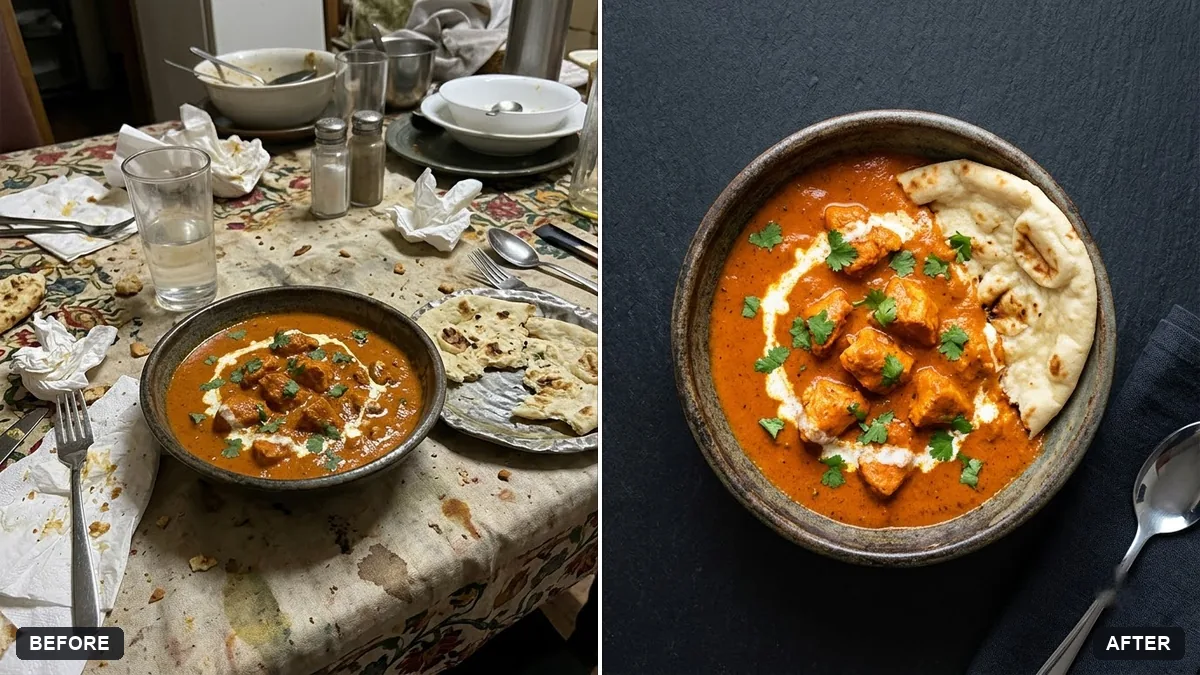
This prompt turns a photo of your dish into a clean overhead menu image on a plain coloured surface with bright even light, removing clutter.
Turn this photo of my [DISH] into a clean food delivery menu image. Overhead view on a plain [COLOUR] surface, bright even light, remove clutter and stains, enhance freshness and colour while keeping it realistic.

Do not change the dish itself.
Use a top-down photo with a plain plate for consistency across the menu.
Your photo goes to the AI app you choose, never to PromptUp.
Get a better result
Your dish as a clean menu image for a delivery app: an overhead view on a plain surface in the colour you chose, bright even light, clutter and stains removed and the dish looking fresh but realistic.
The portion looks bigger than what you really serve.
Fix: Say “keep the portion size and every ingredient exactly the same”. A picture that promises more than the plate delivers leads to complaints.
- The surface colour changes from dish to dish, so the menu looks uneven. Use the tip: fix one surface colour and one angle for every dish, then reuse the same line each time.
- Sauce marks vanish along with the crumbs. List what to remove: “crumbs and table stains, not the sauce that belongs on the dish”.
Swap the surface for “matte dark slate” for pale dishes such as rice or paneer. The contrast helps pale food stand out in a small thumbnail.
Overhead view on the same plain surface as my other dishes, the portion and ingredients exactly the same, only crumbs and table stains removed.
Guides on this topic
More photo editing prompts
See all 334 →
More like this
- Clean dish cutout for menusGemini · ChatGPT
- Brighten a dim restaurant dish photoGemini · ChatGPT
- Food truck menu boardGemini · ChatGPT · Midjourney
- Hand-lettered chalkboard menuIdeogram · ChatGPT · Gemini
- Make a restaurant dish photo look deliciousGemini · ChatGPT