- Updated
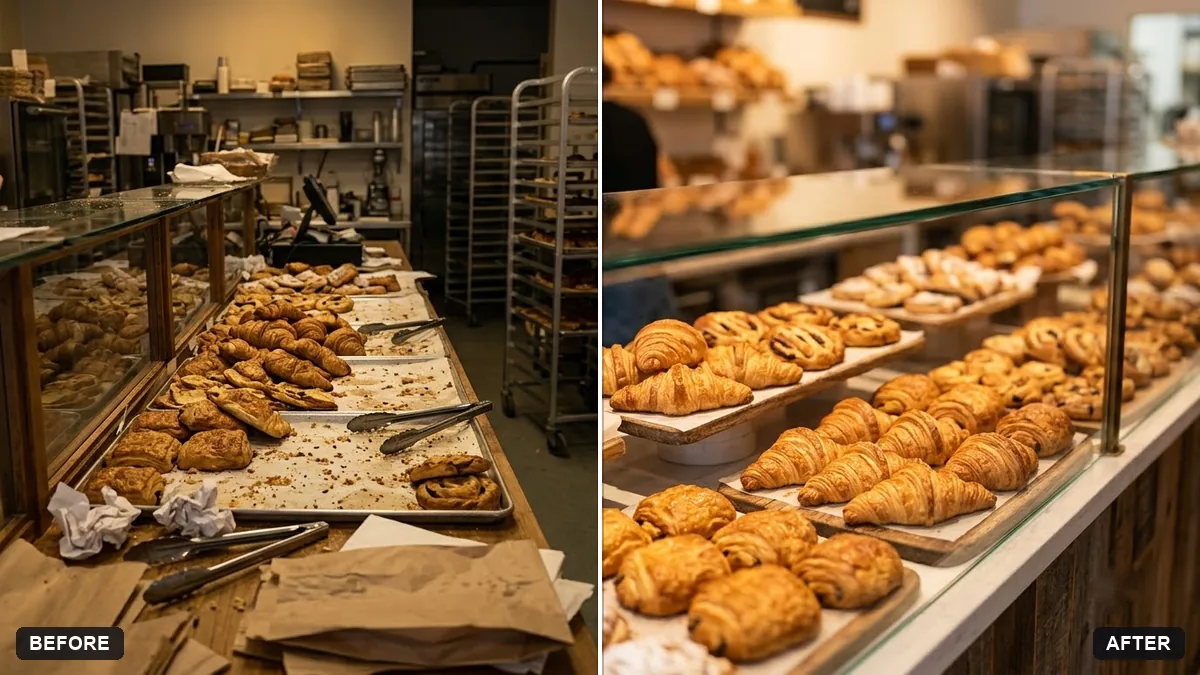
Bakery counter display photo
This prompt brightens your bakery display with warm natural light, tidies the trays, removes stray items and makes the pastries look fresh and golden.
Enhance this photo of my bakery display. Brighten it with warm natural light, tidy the trays, remove stray items and make the pastries look fresh and golden. Add a subtle handwritten price sign in [WHITE CHALK] style.

Keep the products exactly as they are.
Add warm light and a small chalkboard sign to boost the artisan feel.
Your photo goes to the AI app you choose, never to PromptUp.
Get a better result
Your own bakery counter photo, warmer and brighter, with tidier trays, stray items removed, golden fresh-looking pastries and a small handwritten-style price sign, all of them still your real products.
Pastries look shinier or different from what you really sell.
Fix: Keep “keep the products exactly as they are” and add “do not add or change any items”. Customers will compare the photo with the real thing.
- The price sign has gibberish or wrong numbers. Leave the sign blank in the AI picture, then write the real prices on it in Canva. Handwriting from an AI image is rarely reliable.
- The light turns orange and the whites look yellow. Ask for “warm natural light but keep white surfaces neutral white”. Shoot near a window for a better start.
For Diwali or Eid, change the sign to “a small festive card” and ask for “a few marigold petals near the trays”. Keep the products untouched.
Keep every pastry and tray exactly as in my photo. Make the light slightly less orange and leave the price sign empty.
Guides that use this prompt
More photo editing prompts
See all 334 →
More like this
- Bakery counter displayMidjourney · Gemini · ChatGPT
- Bakery at dawnVeo · Kling · Seedance
- Ethnic jewellery set displayGemini · ChatGPT · Midjourney
- Make a restaurant dish photo look deliciousGemini · ChatGPT
- Cocktail photo with bar moodGemini · ChatGPT