- Updated
Shoes on a display pedestal
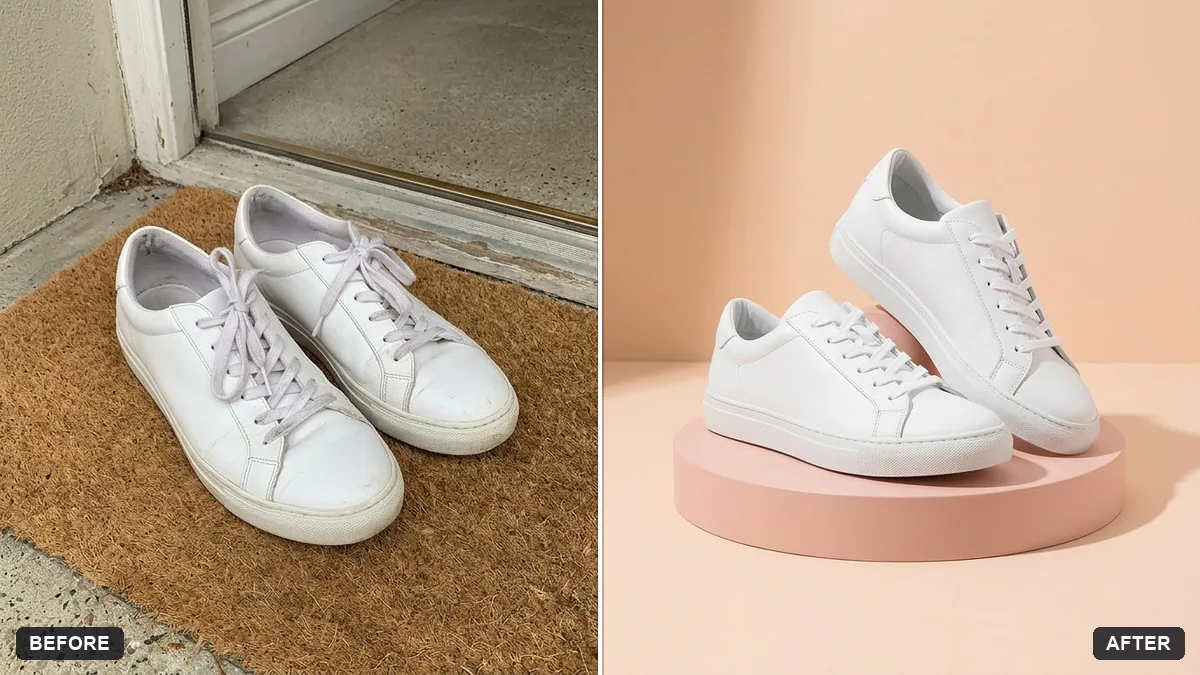
This prompt places your shoes on a round pedestal with a pastel backdrop and a subtle shadow, keeping the design, colour and laces exactly the same.
Place the shoes from this photo on a round [COLOUR] pedestal with a soft pastel backdrop and a subtle shadow. Keep the shoes' design, colour and laces exactly the same.

Clean studio lighting, sharp detail, premium retail look.
Choose a simple pastel backdrop to keep the focus on the shoes.
Your photo goes to the AI app you choose, never to PromptUp.
Get a better result
Your shoes sitting on a round coloured pedestal against a soft pastel backdrop, with a subtle shadow, clean studio lighting and a premium retail look.
A pedestal lifts the shoes like a shop display, and a soft pastel backdrop keeps the focus on them. A subtle shadow grounds them. Keeping the design, colour and laces exactly the same is what makes the photo usable for a real listing.
The shoe design changes.
Fix: Compare logos, stitching and laces with the real pair. Product photos must show the item you actually sell.
- Shadows look fake. Ask for a soft contact shadow under each shoe and a gentle one on the pedestal, in the same direction as the light.
- The backdrop competes with the shoes. Keep it to one pastel shade that is not close to the shoe colour, as the tip suggests.
Ask for one shoe on a tall pedestal and the other on a lower one, with the same backdrop and lighting.
Keep the shoes exactly the same. Make the edges of the shoes and laces crisp, with a soft, realistic shadow under them on the pedestal.
More photo editing prompts
See all 334 →
More like this
- Shoe catalogue image setGemini · ChatGPT
- Running shoe with a colour splashGemini · ChatGPT · Midjourney
- Bakery counter displayMidjourney · Gemini · ChatGPT
- Running shoe ad on a trackVeo · Kling · Seedance
- Clothing on a ghost mannequinGemini · ChatGPT