- Updated
Clothing on a ghost mannequin
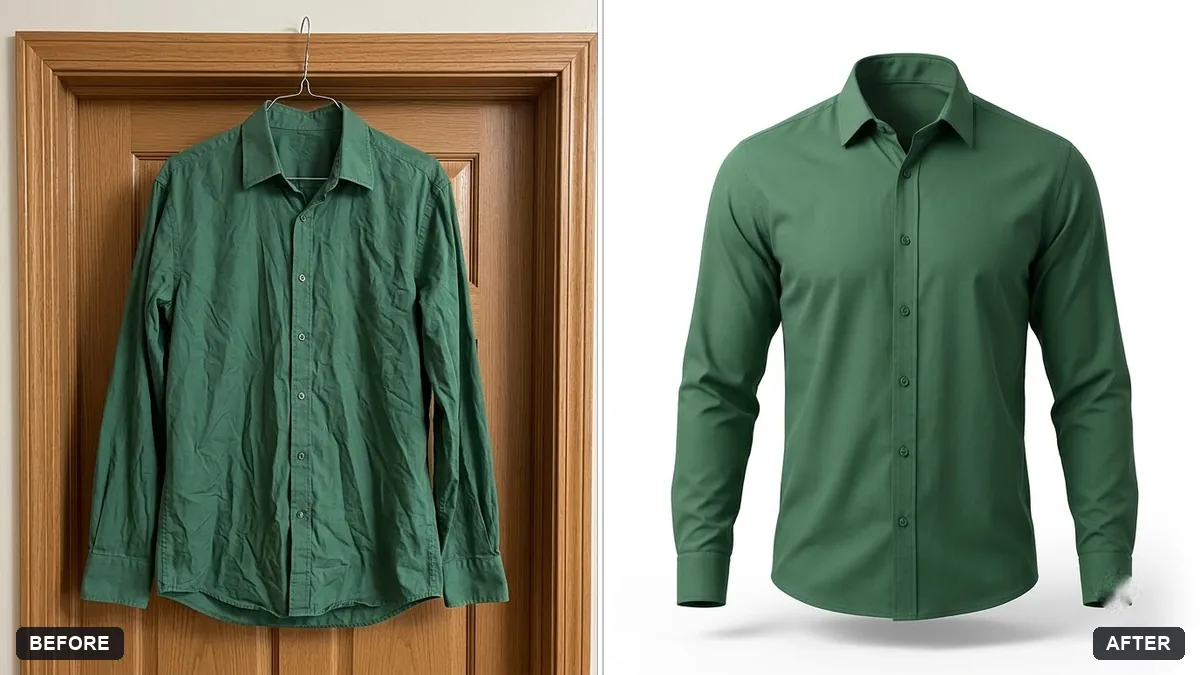
This prompt turns a photo of a garment into a ghost-mannequin style image, keeping the fabric, colour and details.
Turn this photo of a [GARMENT] on a hanger or flat surface into a ghost-mannequin style product image. Keep the fabric, colour, print and stitching exactly the same.

Give it a natural 3D fit as if worn, remove the hanger and creases, pure white background, soft studio shadow, front view, e-commerce ready.
Make sure the garment is ironed before the original photo.
Your photo goes to the AI app you choose, never to PromptUp.
Get a better result
A front-view product picture on a pure white background, with the garment shaped as if worn on an invisible body, creases and hanger removed and a soft studio shadow underneath.
The garment’s print or stitching quietly changes.
Fix: Photograph the garment flat and straight on, then zoom in on logos, buttons and seams after the edit. If a print has moved, reply “restore the print exactly as in my photo”.
- The inside of the neckline is missing, so the shape looks hollow. Ask for “show the inside back of the collar, as in a ghost-mannequin photo”. That detail is what makes the garment look filled.
- Sleeves and hem hang in a way no body would give. Say the fit you want: “relaxed, straight hem, sleeves slightly bent”. Fit words make the 3D shape believable.
For a flat-lay catalogue instead, replace the fit line with “flat lay, top-down, neatly folded, even light”. Good for listings that need consistent pictures.
Keep the print, colour and stitching exactly as in my photo. Only fix the shape so it looks worn on an invisible body.
Guides that use this prompt
More photo editing prompts
See all 334 →
More like this
- Ghost ship drifting in fogVeo · Kling · Seedance
- Shoes on a display pedestalGemini · ChatGPT
- Product on a pure white backgroundGemini · ChatGPT
- Product on a marble surfaceGemini · ChatGPT
- Jewellery on a model's handGemini · ChatGPT