- Updated
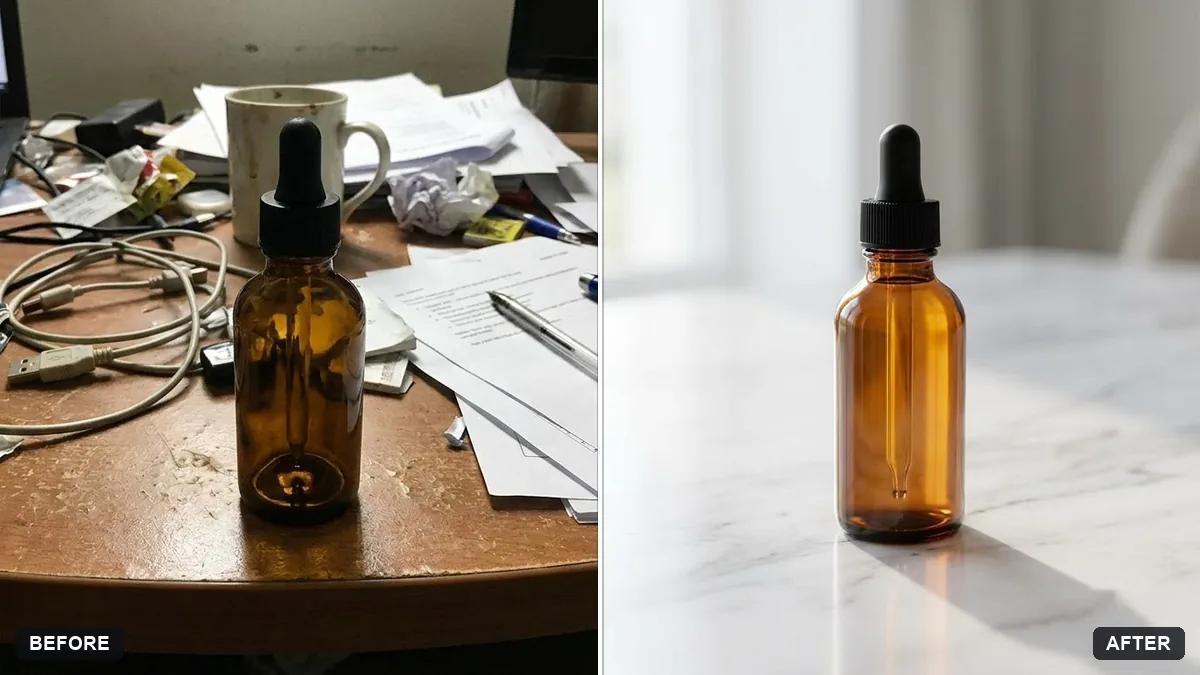
Product on a marble surface
This prompt places your product on polished white marble with soft grey veining, keeping its shape, colours and label exactly the same.
Place the [PRODUCT] from this photo on a polished white marble surface with soft grey veining. Keep the product's shape, colours, label and details exactly the same.

Soft window light from the left, a gentle shadow, a small [PROP, e.g. sprig of eucalyptus] beside it, clean minimal luxury look, shallow depth of field, room at the top for text.
Use the same surface across all your products for a consistent shop.
Your photo goes to the AI app you choose, never to PromptUp.
Get a better result
Your product on a polished white marble surface with grey veining, soft window light from the left, a small sprig beside it, a gentle shadow and clean empty space above for text.
A product photo is only useful if the product stays true, so the first instruction locks its shape, colour, label and details before anything else is added. White marble with soft grey veining reads as clean and premium without competing for attention. Light from one side gives the gentle shadow that makes the item sit on the surface rather than float. One small prop adds life, and the empty space at the top is planned for your shop text, so you do not have to crop later.
The marble pattern is loud and distracts from the product.
Fix: Ask for “soft, sparse grey veining, low contrast” so the product stays the hero.
- The colours of the product shift. Repeat “keep the exact product colours and label”, and compare the swatch with the original.
- The prop is too large. Say “one small prop, less than a third of the product’s size, placed behind and to the right”.
Ask for black marble with gold veining and a single warm light, for a more premium version of the same shot.
Keep the surface. Make the shadow shorter and softer, and angle the product slightly towards the light.
Guides on this topic
More photo editing prompts
See all 334 →
More like this
- Marble texture setMidjourney · Gemini · ChatGPT
- Product with a mirror reflectionGemini · ChatGPT
- Classical marble statue portraitGemini · ChatGPT
- Product on a pure white backgroundGemini · ChatGPT
- Handmade craft product photoGemini · ChatGPT