- Updated
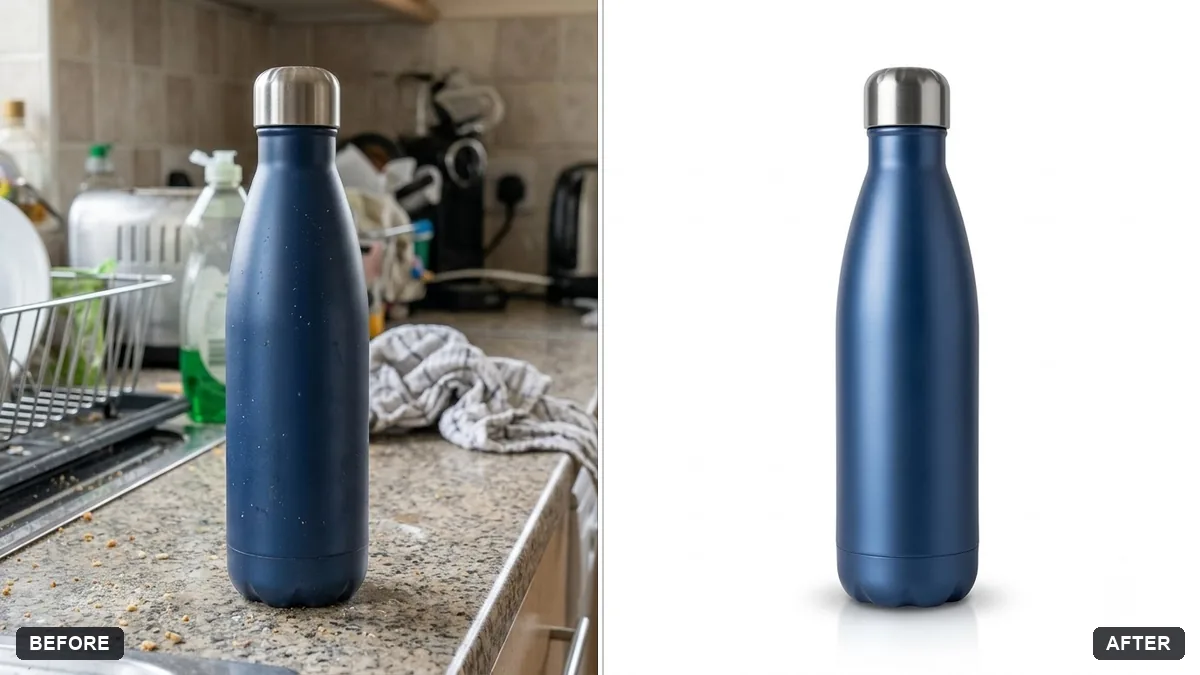
Product cutout with a soft natural shadow
This prompt cuts your product out of the photo and places it on pure white, keeping its shape, colours and label with a soft natural shadow.
Cut out the [PRODUCT] from this photo and place it on a pure white background. Keep the product's shape, colours, label text and details exactly as they are.

Add a soft natural contact shadow below it and a subtle reflection. Remove dust and small marks, but do not change the product itself.
For marketplaces, use a square 1:1 image with the product filling 85% of the frame.
Your photo goes to the AI app you choose, never to PromptUp.
Get a better result
Your product on a pure white background with its shape, colours and label text unchanged, a soft natural contact shadow and a subtle reflection, with dust and small marks removed.
Marketplaces want a plain white background, so the prompt cuts out the product and keeps its shape, colours and label exactly as they are. A soft contact shadow and subtle reflection stop it from floating. Removing dust is allowed, changing the product is not.
The label text is altered or turns into gibberish.
Fix: Repeat “keep the label text exactly as it is” and use a sharp, straight-on photo. If words still change, paste the original label back in an editor.
- The white is slightly grey, so the product looks dull next to a white page. Say “pure white, no gradient, no vignette”, and open the result beside a white page to compare.
- The shadow is hard, or it floats away from the product. Ask for “a soft shadow that touches the base of the product and fades outward”. The tip’s square 1:1 crop with 85% fill finishes the job.
For small, matte items drop the reflection: “white background, soft shadow only, no reflection”. A clean shadow alone is often enough.
Keep everything else exactly as in the original photo. Only change what I asked for.
Guides that use this prompt
More photo editing prompts
See all 334 →
More like this
- Clean dish cutout for menusGemini · ChatGPT
- Clean cutout on a transparent backgroundGemini · ChatGPT
- Product on a pure white backgroundGemini · ChatGPT
- Product with a mirror reflectionGemini · ChatGPT
- E-commerce product photo (Amazon / Flipkart)Gemini · ChatGPT · Flux