- Updated
YouTube thumbnail prompt for Gemini & ChatGPT
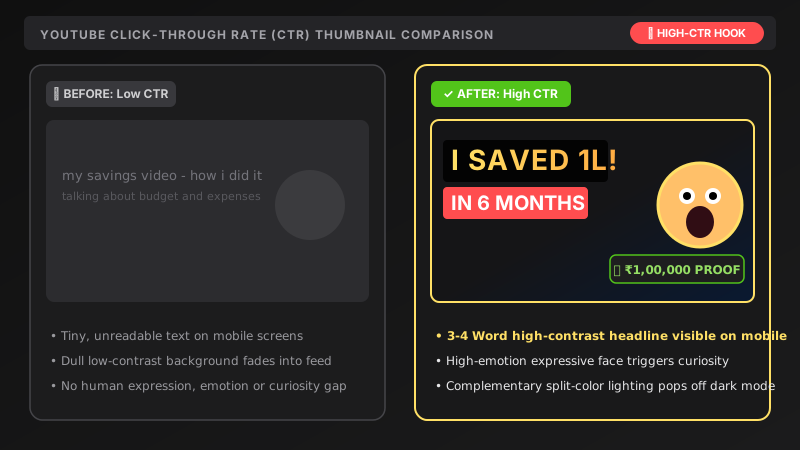
This prompt creates a 16:9 YouTube thumbnail with a large close-up visual on one side, bright high-contrast colours, a clean blurred background and open space on the other side for a short headline in quotes.
Create an eye-catching YouTube thumbnail for a video about [TOPIC, e.g. how I saved 1 lakh in 6 months]. Show [MAIN VISUAL, e.g. a young man with an excited, surprised expression holding a piggy bank] on the right side, large and close-up.

Bright high-contrast colours ([COLOURS, e.g. yellow and deep blue]), clean blurred background. Leave the left side open for bold headline text: "[3-4 WORD TITLE]". 16:9, sharp.
Keep headlines to 3-4 words max for mobile readability.
Get a better result
A 16:9 thumbnail with a large close-up main visual on the right, bright high-contrast colours, a clean blurred background and an open area on the left for a short headline.
The headline is misspelled or too small to read on a phone.
Fix: Keep the headline to 3 or 4 short words inside quotes. If the spelling is still off, leave the left side empty and add the text in Canva.
- The person’s expression looks fake or frozen. Describe it precisely: “mouth slightly open, eyebrows raised, looking at the camera”. Exaggerated but specific beats vague.
- The colours are loud but there is no clear focus. Choose two colours only and say “the face is the brightest thing in the frame”. One focal point wins the click.
- The left side is not clean enough for a headline. Add “keep the left 40 percent plain and uncluttered”. Give the space as a share, not just a side.
For a channel without a face, replace the main visual with “a big glowing object tied to the topic, such as a glowing piggy bank”. A bold object can do the job of a face.
Rewrite the headline so it reads exactly as in my prompt, letter by letter, in huge bold letters on the left. Keep everything else the same.
Guides that use this prompt
More image generation prompts
See all 347 →

More like this
- YouTube thumbnail from your photoGemini · ChatGPT
- Generate video titles and thumbnail textChatGPT · Gemini · Claude
- High-engagement Instagram captions with hooksChatGPT · Gemini · Claude
- Write a YouTube video script with a hookChatGPT · Gemini · Claude
- Scroll-stopping Reel / Shorts script with a hookChatGPT · Gemini · Claude