- Updated
YouTube thumbnail from your own photo: Gemini & ChatGPT prompt
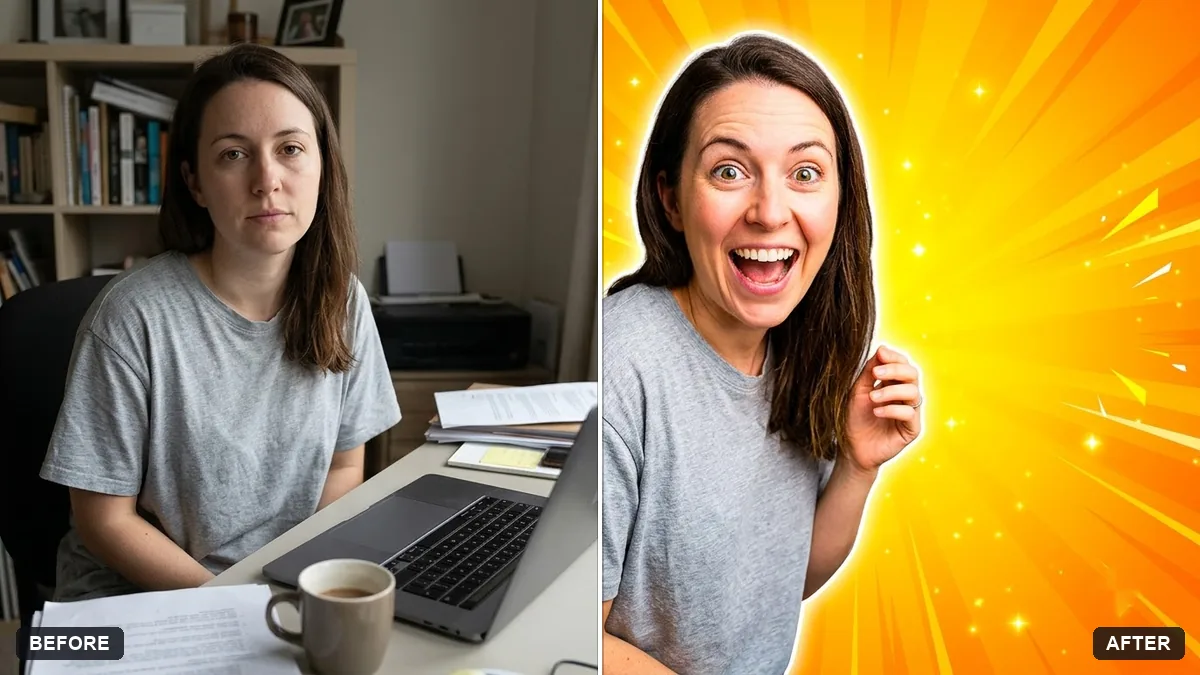
Upload a photo of yourself and this prompt turns it into a 16:9 YouTube thumbnail for your video title. It cuts you out with a clean edge, places you on the left or right over a bright gradient, adds big bold text of three or four words and a soft glow, and keeps the contrast high so it reads on a phone. Your face and expression are kept the same, so pick a photo with a clear emotion.
Turn this photo of me into a 16:9 YouTube thumbnail for a video titled "[VIDEO TOPIC]". Keep my face and expression exactly the same but make it clear and expressive.

Cut me out with a clean edge, place me on the [LEFT / RIGHT] with a bright [COLOUR] gradient background, add big bold text "[3-4 WORDS]", a subtle glow behind me and high contrast that is readable on a phone.
Faces with a clear emotion and 3 to 4 words of text get the best clicks.
Your photo goes to the AI app you choose, never to PromptUp.
Get a better result
A 16:9 thumbnail with you cut out cleanly on one side, an expressive face, a bright gradient behind you, a glow, high contrast and three or four big bold words on the other side.
The text is spelled wrong or too small.
Fix: Keep it to three or four words, check the spelling, and fix it in an editor if needed. Make it readable on a phone.
- The cutout has a rough edge. Ask for “clean edge, no halo, a thin soft outline”, or start with a photo taken against a plain wall.
- The face looks flat. Pick a photo with a clear emotion, like surprise or a big smile, and keep the expression exactly the same.
Make one version with the face on the left and one on the right, with different colours, and use the one that earns more clicks.
Keep the layout. Make the text colour contrast more with the background and enlarge the face a little.
Guides that use this prompt
More photo editing prompts
See all 334 →
More like this
- High-CTR YouTube thumbnailGemini · ChatGPT
- Generate video titles and thumbnail textChatGPT · Gemini · Claude
- Write a YouTube video script with a hookChatGPT · Gemini · Claude
- Online course cover thumbnailGemini · ChatGPT · Midjourney
- YouTube channel bannerIdeogram · ChatGPT · Gemini