- Updated
Instagram carousel cover slide
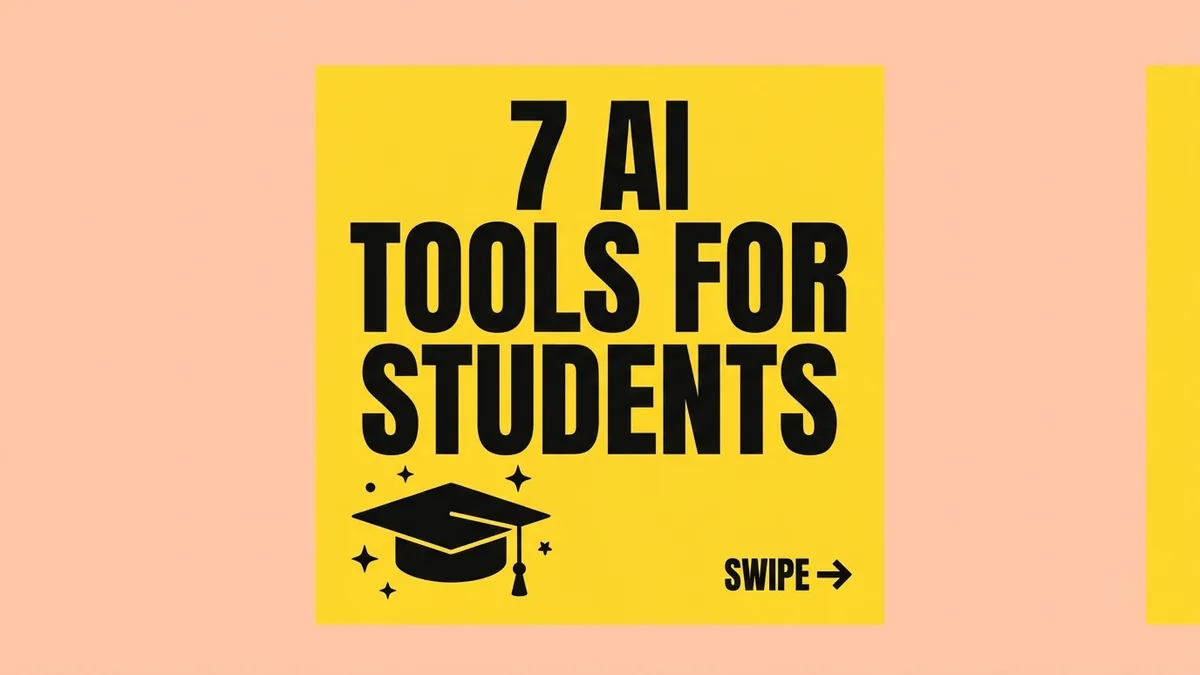
This prompt designs the first slide of an Instagram carousel. You give the topic and the exact headline, which is set huge, bold and readable on a phone, and a small Swipe hint sits at the bottom right.
Design the first slide of an Instagram carousel about [TOPIC, e.g. 7 AI tools every student needs].

Headline, spelled exactly: "[HEADLINE]" — huge, bold, and readable on a phone. Add a small "Swipe →" hint at the bottom right.

Style: [STYLE, e.g. bold editorial with a bright yellow background and black text], one simple supporting illustration, strong contrast, no clutter. Portrait 4:5.
Ask for the remaining slides in the same style so the whole carousel matches.
Get a better result
A portrait first slide for an Instagram carousel with a huge bold headline spelled as you wrote it, a small swipe hint at the bottom right, one simple illustration and strong contrast on a clean background.
The headline has a misspelt word.
Fix: Keep it to six words or fewer and check each letter. If a word fails, add the headline yourself in an editor.
- The text is too small on a phone. Say “the headline fills most of the slide, at least a third of its height”. Check it at thumbnail size.
- The style changes on the next slides. Reuse the same style line and ask for the next slides with the first attached, or recreate the layout in a template.
Ask for “the last slide in the same style with a call to action and a space for my handle”. Add your handle yourself so it is accurate.
Keep the headline wording. Make the type larger, remove the illustration’s background detail and increase the contrast.
More image generation prompts
See all 347 →



More like this
- Carousel post scriptChatGPT · Gemini · Claude
- Stylish Instagram story photo (9:16)Gemini · ChatGPT
- Team introduction slideGemini · ChatGPT · Midjourney
- Thank you slide with contact detailsGemini · ChatGPT · Midjourney
- High-CTR YouTube thumbnailGemini · ChatGPT