Navratri AI photo prompts: garba portraits that still look like you
Published
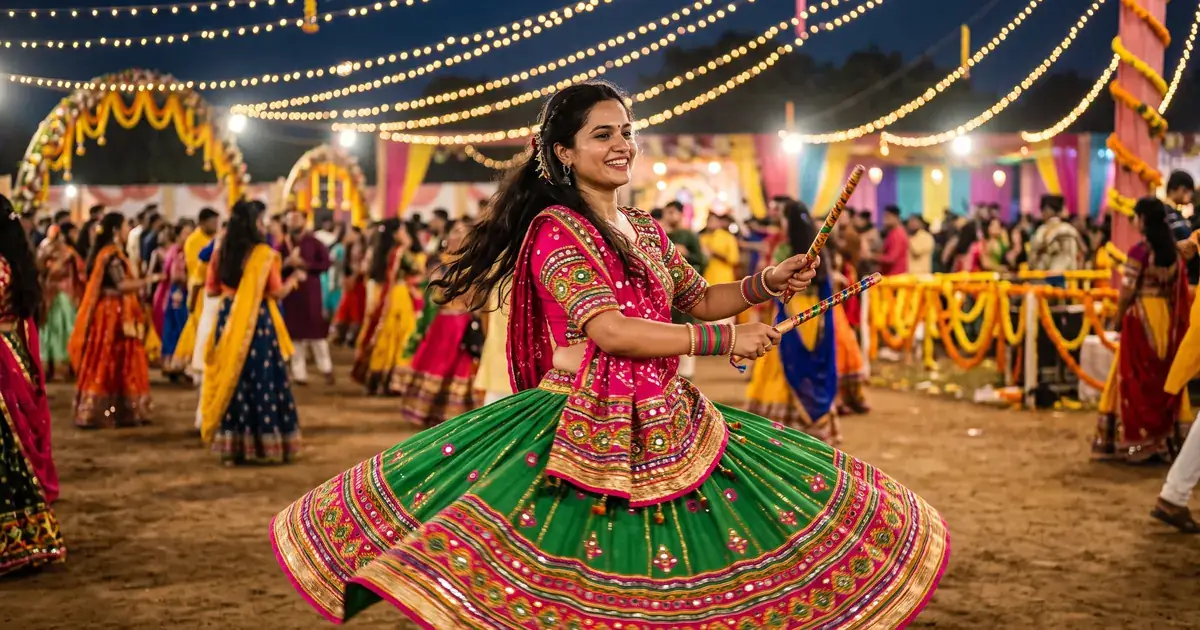
Short answerStart from one clear, well-lit photo, tell the AI to keep your face unchanged, then describe the outfit, the pose, the lights and the background in that order. Change one detail at a time until it looks right.
Every year, as Navratri gets closer, people start searching for AI prompts that turn an ordinary selfie into a garba-night portrait: a twirling chaniya choli, glowing dandiya sticks and festive lights behind. You don't need a studio or a costume. You need one good photo and a prompt that says exactly what to change and what to keep.
This guide gives you prompts you can copy, explains what each part does, and shows how to fix the most common problems. The prompts work in tools that accept a photo, such as Gemini and ChatGPT.
Start with the right photo
The photo matters more than the prompt. A weak photo gives you a face that looks like a cousin, not you.
- One person, face clearly visible. No sunglasses, no hand in front of the face.
- Good, even light. Daylight from a window works well. Avoid strong shadows across the face.
- Sharp, not heavily filtered. Beauty filters confuse the AI about what your skin and features really look like.
- Head and shoulders at least. For a full-length garba pose, a photo that shows more of you helps.
Only use photos of yourself, or of people who have agreed to it.
The garba portrait prompt
This is the Navratri garba portrait prompt from the library. Upload your photo and paste it:
Turn this photo into a Navratri garba portrait. Keep my face and features unchanged.

Outfit: colourful [OUTFIT, e.g. chaniya choli / kediyu] with traditional jewellery, mid-twirl pose, glowing dandiya sticks, festive lights and decorations, blurred dancers in the background, joyful expression, vibrant warm colours.
Here is what each part does:
| Part of the prompt | What it does |
|---|---|
| "Keep my face and features unchanged" | Tells the AI what must stay the same. Put it near the start. |
| "[OUTFIT]" | The one thing you are really changing. Be specific. |
| "mid-twirl pose, glowing dandiya sticks" | Gives the picture movement, so it feels like garba, not a passport photo. |
| "blurred dancers in the background" | Adds atmosphere without pulling attention from you. |
| "vibrant warm colours" | Sets the mood of a night lit by string lights and lamps. |
Make the outfit specific
"Traditional dress" gives you something generic. Name the colours, the fabric and the details, the way you would describe it to a tailor:
- "A red and green mirror-work chaniya choli with a bandhani dupatta"
- "A white kediyu with colourful embroidery and a red safa" (for men)
- "A yellow lehenga with gota patti borders and oxidised silver jewellery"
If you are dressing for a particular day of Navratri, add its colour to the outfit line. Colour lists for each day differ between sources and regions, so use the one your family or community follows.
A fuller prompt for more control
When you want to decide the pose, the setting and the shape of the picture, use this longer version:
Turn this photo into a realistic Navratri garba night portrait. Keep my face, skin tone, hairstyle and body shape exactly the same.

Outfit: [OUTFIT, e.g. a pink and orange mirror-work chaniya choli with a bandhani dupatta], with [JEWELLERY, e.g. oxidised silver jhumkas and bangles].
Pose: [POSE, e.g. mid-twirl with the skirt flaring out, holding two dandiya sticks].
Setting: [SETTING, e.g. an open garba ground at night] with warm string lights overhead and marigold decorations.
Background: other dancers softly blurred, not facing the camera.
Look: real photo, natural skin texture, warm light from the lamps on my face, slight motion in the skirt, sharp focus on my face.
Shape: [RATIO, e.g. portrait 4:5 for Instagram or 9:16 for a story].
"Natural skin texture" and "real photo" stop the plastic, over-smoothed look that many AI portraits have. "Not facing the camera" keeps extra faces in the background from pulling attention away from you.
Fixing common problems
The face doesn't look like you. Reply with: "Keep my face identical to the original photo. Only change the outfit and background." If it still drifts, try a clearer, front-facing photo.
The outfit looks like a costume. Ask for real fabric: "true-to-life fabric, visible mirror work and embroidery, natural folds". Remove words like "fantasy" or "glamorous" if you used them.
Hands or dandiya sticks look wrong. Hands are still hard for image tools. Ask for "two dandiya sticks, one in each hand, fingers natural", or choose a pose where the hands are partly hidden by the twirl.
It's too busy. Remove one element. Lights, decorations, dancers and jewellery all compete for attention. Keep the ones that matter to you.
Colours look wrong. Name them directly: "deep magenta and parrot green", not "bright colours".
Change one thing per try. If you change the outfit, the pose and the light together, you can't tell which change helped. Our guide to editing a prompt explains this routine.
Turn it into a short video
A still portrait is lovely, but a few seconds of movement works well for a WhatsApp status or a reel. Take your finished portrait and use the festival greeting video prompt in a video tool such as Veo or Kling. It animates the lights and adds a gentle greeting gesture while keeping your face and outfit the same.
If you want a scene rather than a portrait, the garba circle video prompt creates dancers moving in circles under string lights. Its tip is worth following: a spinning overhead shot shows the circles clearly.
Celebrating Durga Puja instead?
In Bengal and many other places, the same days are celebrated as Durga Puja. The Durga Puja pandal portrait prompt works the same way: upload your photo, keep your face, and choose a white and red saree or a kurta in front of a lit pandal. For a video, try the dhunuchi dance prompt.
Quick checklist
- Use one sharp, well-lit photo of yourself, with no filter.
- Put "keep my face unchanged" near the start of the prompt.
- Describe the outfit like a tailor would: colour, fabric, details.
- Add a pose, a setting and a shape (4:5 or 9:16).
- Ask for "real photo" and "natural skin texture".
- Fix one problem per try.
- Only use photos of people who have agreed to it.
For more ideas, see the full set of photo editing prompts in the library.

Comments
No comments yet. Be the first to share what worked for you.