- Updated
New Year party portrait
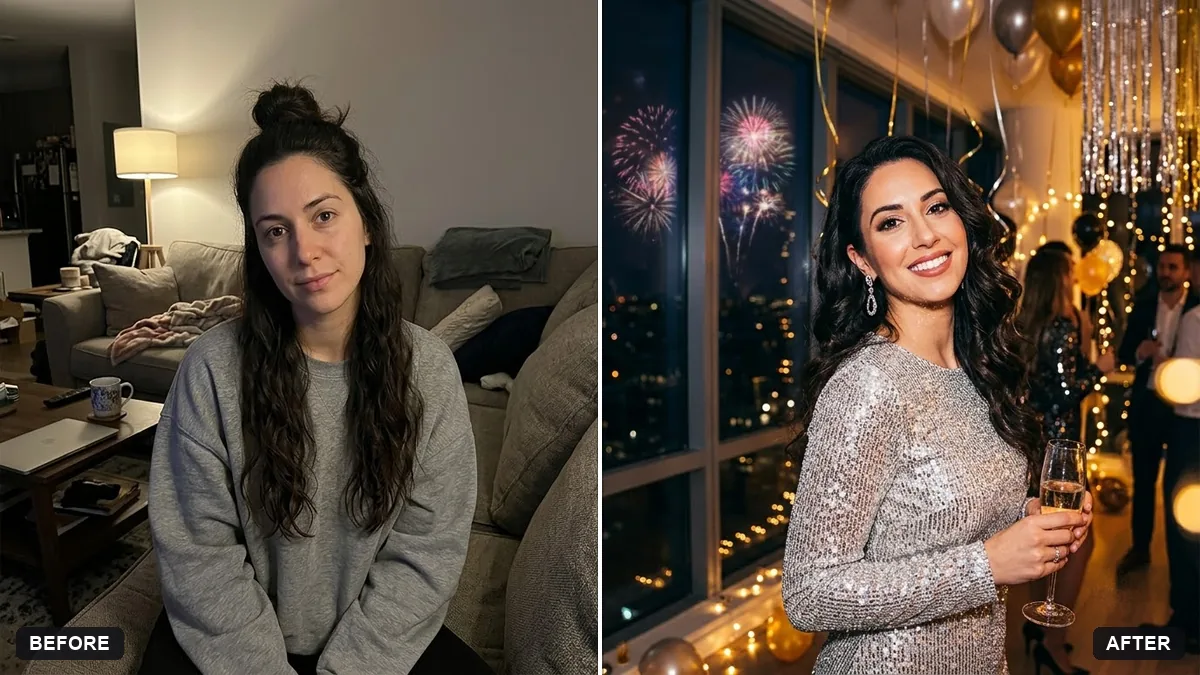
This prompt places you at a New Year's Eve party in a sparkly outfit, keeping your face and features exactly the same.
Turn this photo into a New Year's Eve party portrait. Keep my face and features exactly the same.

Outfit: [SPARKLY OUTFIT]. Background: city skyline with fireworks, gold and silver streamers, champagne glasses blurred, warm bokeh lights, festive glow. Add "Happy New Year [YEAR]" in small gold lettering.
Use vertical 9:16 for stories, and 4:5 for feed posts.
Your photo goes to the AI app you choose, never to PromptUp.
Get a better result
You in a New Year’s Eve party portrait: a sparkly outfit, a city skyline with fireworks, gold and silver streamers, blurred glasses, warm bokeh and a small gold “Happy New Year” line. Your face stays the same.
The prompt builds a New Year scene: fireworks over a skyline, streamers, blurred glasses and warm bokeh. A sparkly outfit fits the night. Small gold lettering keeps the greeting tidy, and 9:16 or 4:5, as the tip says, suits stories or posts.
The year in the gold lettering is wrong or the digits are scrambled.
Fix: Type the actual year in place of [YEAR] and check every digit. If it is wrong, leave the text out and add it in a phone editor.
- The glasses show alcohol in a family or teen photo. Say “sparkling juice in the glasses” or remove them: “no drinks, hold a sparkler instead”.
- The sparkly outfit changes your body shape or neckline. Describe the outfit by colour and fabric only, and add “keep my body proportions and neckline exactly the same as in the photo”.
Replace the skyline with “a large illuminated clock behind me showing one minute to midnight, confetti in the air”. A countdown suits a story posted just before midnight.
Keep my face and body exactly the same. Replace the glasses with sparklers, and write the year 2027 in small gold letters, spelt correctly.
Guides that use this prompt
More photo editing prompts
See all 334 →
More like this
- Eid celebration portraitGemini · ChatGPT
- Year in review photo collageGemini · ChatGPT
- Birthday portrait with balloons and confettiGemini · ChatGPT
- Halloween costume portraitGemini · ChatGPT
- Pongal traditional portraitGemini · ChatGPT