- Updated
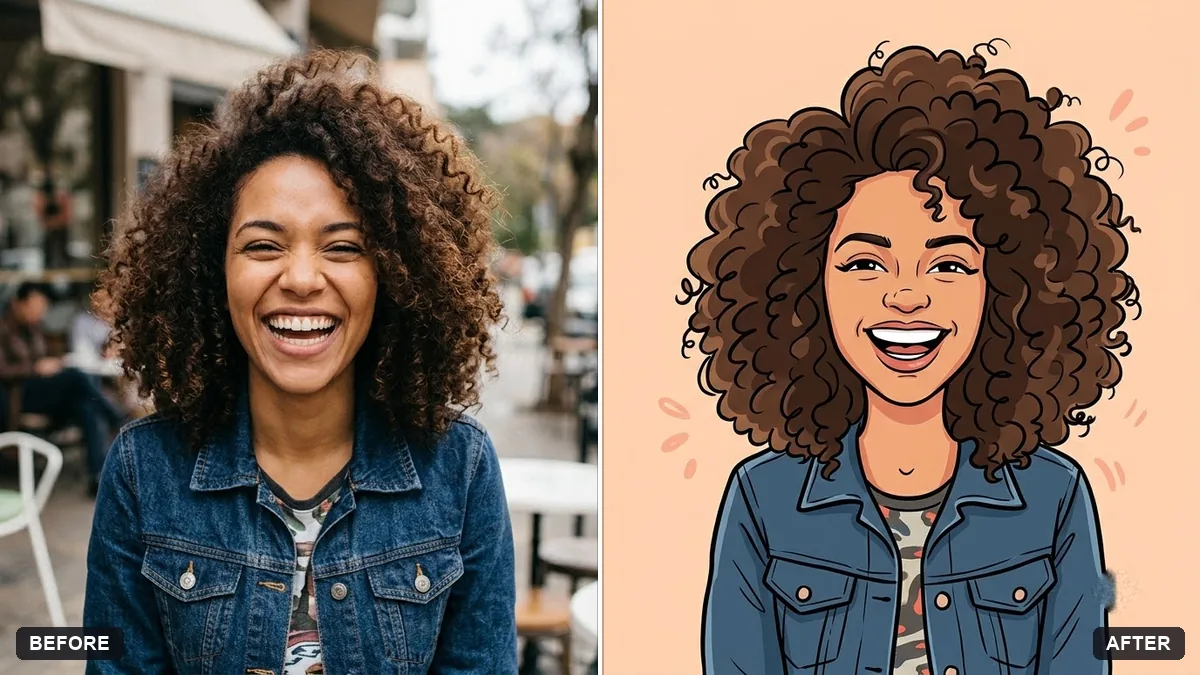
Friendly caricature of you
This prompt draws a caricature that is warm, not mocking. You choose a feature to exaggerate slightly, such as your smile or hairstyle, and you stay clearly recognisable, in a bold ink style.
Draw a friendly, flattering caricature from this photo. Slightly exaggerate my [FEATURE, e.g. smile / hairstyle], keep me clearly recognisable, and keep it warm, not mocking.

Style: bold ink outlines, bright colours, big head and small body, holding [OBJECT THAT SHOWS MY JOB / HOBBY]. Plain colourful background.
Tell it your hobby or job to get a more personal caricature.
Your photo goes to the AI app you choose, never to PromptUp.
Get a better result
A friendly, flattering caricature with bold ink outlines, bright colours, a big head and small body, one feature slightly exaggerated and an object from your job or hobby, on a plain colourful background.
It looks mocking, with flaws exaggerated.
Fix: Keep “warm, not mocking” and choose the feature to exaggerate yourself, such as the smile or hairstyle. Add “never exaggerate nose, weight or teeth”.
- It is no longer recognisable as you. List your key features, such as “curly hair, thick glasses, a beard”, and keep the line “clearly recognisable”.
- The object in your hands is wrong or unreadable. Say what it is and how it is held: “a camera held in both hands at chest height”. Use the tip and name your job or hobby.
Make a set for a team by repeating the same style line for each person: “same ink outlines, same palette, same background”. Matching words give a poster that looks drawn by one artist.
Keep everything else exactly as in the original photo. Only change what I asked for.
Guides that use this prompt
More photo editing prompts
See all 334 →
More like this
- Video game character versionGemini · ChatGPT
- Start a new hobby in 30 daysChatGPT · Gemini · Claude
- Turn your photo into an anime sceneGemini · ChatGPT
- Claymation character versionGemini · ChatGPT
- Hand-painted animated film styleGemini · ChatGPT