- Updated
Hand-painted animated film style
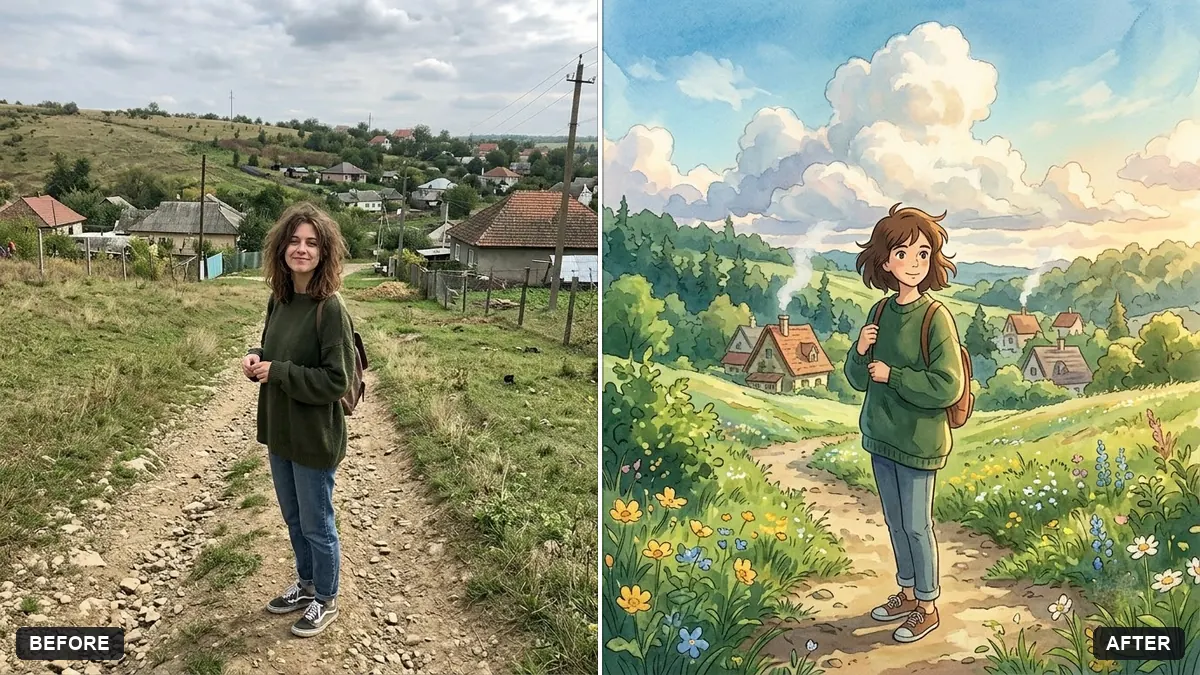
This prompt redraws your photo as a frame from a hand-painted animated fantasy film. Your face shape, hairstyle and expression stay recognisable.
Redraw this photo as a still from a hand-painted animated fantasy film. Keep my face shape, hairstyle and expression recognisable.

Soft watercolour backgrounds with detailed clouds, warm gentle light, [SETTING, e.g. a green hillside village], simple expressive eyes, delicate line work, dreamy peaceful mood. Portrait 4:5.
Describe the setting in detail. The background does most of the work in this style.
Your photo goes to the AI app you choose, never to PromptUp.
Get a better result
A still in the style of a hand-painted animated fantasy film: you with a recognisable face shape, hairstyle and expression, soft watercolour clouds, gentle warm light and the setting you described, in 4:5.
In hand-painted animated films the background carries the mood, as the tip says, so the prompt spends its words on watercolour skies, detailed clouds and a setting. Simple expressive eyes and delicate line work turn you into a character while your face shape, hair and expression stay recognisable.
The result looks like a sharp digital cartoon.
Fix: Ask for “painted backgrounds with soft brush texture and gentle colour, simple line work on the character”.
- You no longer look like yourself. Name features to keep, such as “my side-parted hair and round face”. A clear front-facing photo gives a more faithful result.
- The background is empty or generic. Write more detail, for example “a hillside village with stone houses, wind in the grass and big cumulus clouds”.
Keep everything and say “autumn, with orange leaves blowing across the path”. The same character in another season gives a set of matching pictures.
Keep my face shape and hairstyle. Paint the sky with larger clouds and add a path winding down to the village behind me.
Guides that use this prompt
More photo editing prompts
See all 334 →
More like this
- Turn your photo into an anime sceneGemini · ChatGPT
- Claymation character versionGemini · ChatGPT
- Comic book cover with youGemini · ChatGPT
- Flat vector illustrated avatarGemini · ChatGPT
- Rajasthani haveli courtyardMidjourney · Gemini · ChatGPT