- Updated
1980s family album photo prompt
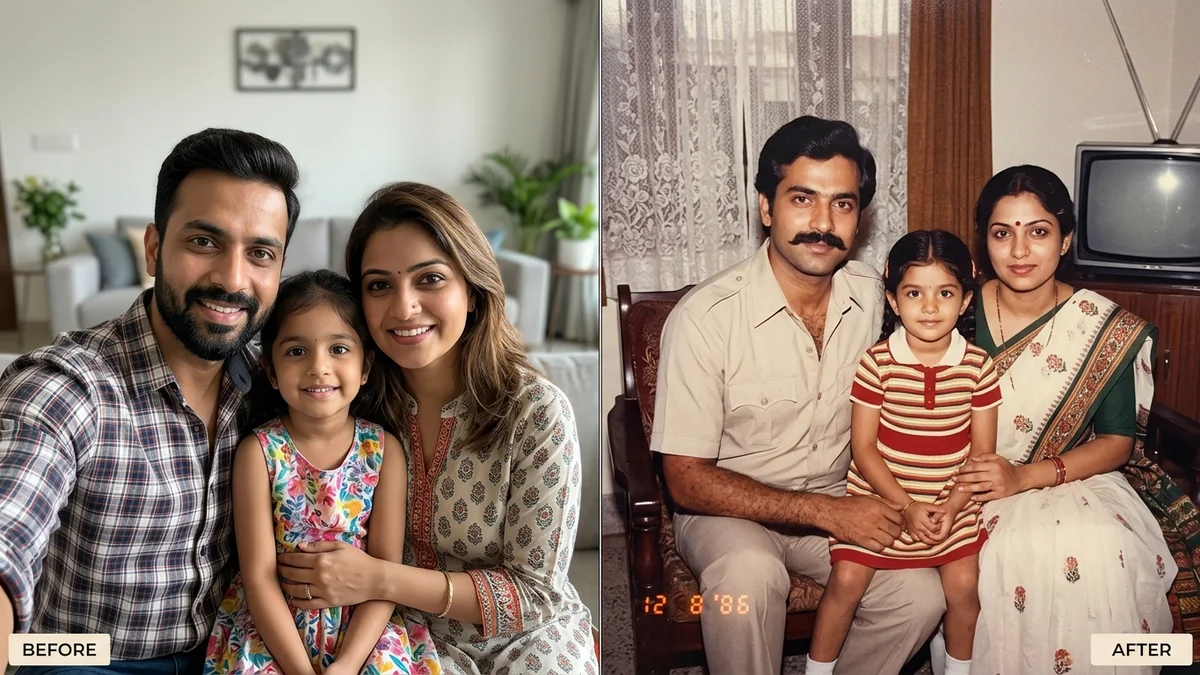
This prompt turns a group photo into a 1980s family album picture. It restyles clothes and hair for the era, places everyone in a setting such as a living room with a CRT TV, and adds on-camera flash and the yellow tint of an old print, keeping every person in the frame.
Turn this group photo into a 1980s family album picture. Keep every person's face, identity, age, and skin tone exactly the same, and keep everyone in the photo.

Restyle clothes and hair in 1980s fashion, and place the family in [SETTING, e.g. a living room with a CRT TV, lace curtains, and a wall calendar].

Look: on-camera flash, warm faded colours, soft grain, a rounded-corner print with a slight yellow tint, and an orange date stamp reading [DATE, e.g. 12 8 '86] in the corner.
Works best with 2–6 people. For bigger groups, add “do not remove anyone”.
Your photo goes to the AI app you choose, never to PromptUp.
Get a better result
A 1980s family album print made from your group photo: period clothes and hair, a living room setting, on-camera flash, faded warm colours, a rounded-corner print with a yellow tint and an orange date stamp.
Someone goes missing, or two faces get mixed up.
Fix: Use a photo where everyone faces the camera, and add “do not remove, add or merge anyone”.
- The date stamp is wrong. Write it exactly, in quotes, in the order a 1980s camera printed it, for example “12 8 ’86”, and check every digit.
- Older and younger faces look aged or de-aged. Add “everyone stays their exact current age; only the clothes and hair change”. Period styling can pull faces toward the era.
- The living room has too many props. Choose three: “a CRT TV, lace curtains, a wall calendar”. More props make the scene noisy.
Set the date near Diwali and add “a plate of sweets and a string of marigold flowers on the table”. A seasonal album page feels more personal.
Keep every person from the original photo, each with their exact face and age. Do not remove, add or merge anyone.
Guides that use this prompt
More photo editing prompts
See all 334 →
More like this
- Album or single cover artMidjourney · Gemini · ChatGPT
- Music album cover from your photoGemini · ChatGPT
- 80s retro saree lookGemini · ChatGPT
- Graduate with familyGemini · ChatGPT
- VHS camcorder still (90s home video)Gemini · ChatGPT