- Updated
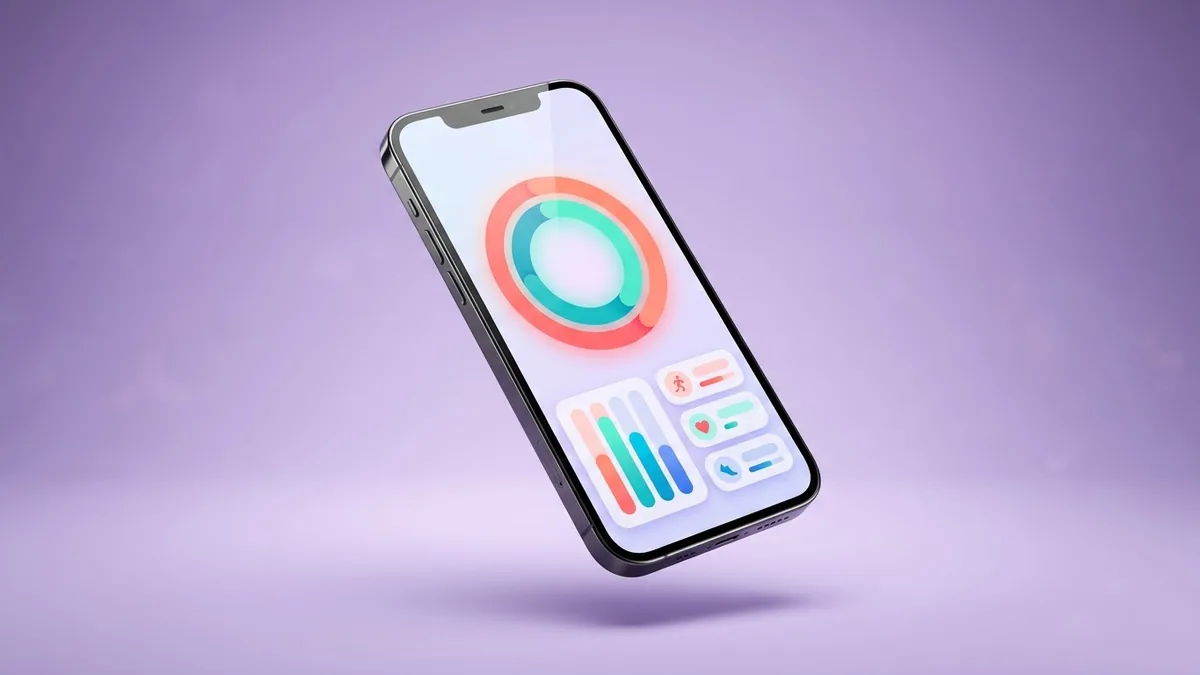
App dashboard UI mockup for a pitch deck
This prompt creates a clean UI mockup of an app dashboard, such as a fitness tracker with a weekly activity chart and streak counter, on a phone screen. Use it as an illustration, not a final design.
A clean UI mockup of a [TYPE, e.g. fitness tracking] app dashboard on a phone screen: [ELEMENTS, e.g. weekly activity chart, streak counter, goal ring, bottom navigation], modern minimal design, [COLOUR] accent, rounded cards, readable typography, soft shadow, phone floating on a light gradient background.
Use it in a pitch deck to show a concept, and build the real screens in your design tool.
Get a better result
A clean mockup of your app’s dashboard on a floating phone, with the elements you listed in rounded cards, a single accent colour, readable type and a soft shadow on a light gradient.
The numbers and labels on screen are nonsense.
Fix: Treat the text as placeholder. For a pitch deck, replace it in a design tool or add a note that the screen is a concept.
- Too many elements make the screen busy. Cut the list to three or four, as in the example, and ask for “plenty of white space between the cards”.
- The mockup looks like a finished product you do not have. Follow the tip: label it as a concept, and build the real screens in your design tool before you show them as the product.
Ask for “the same dashboard in dark mode, with the accent colour as a glow on the main chart”. It shows how the design can adapt.
Keep the same app. Remove the bottom navigation, enlarge the main chart and keep a single accent colour.
Guides that use this prompt
More image generation prompts
See all 347 →

More like this
- Dark mode analytics dashboardGemini · ChatGPT · Ideogram · Midjourney
- Startup pitch deck outlineChatGPT · Gemini · Claude
- T-shirt design mockup on a personGemini · ChatGPT
- Hoodie design mockupGemini · ChatGPT
- Plan a spreadsheet dashboardChatGPT · Gemini · Claude