- Updated
App onboarding screens mockup
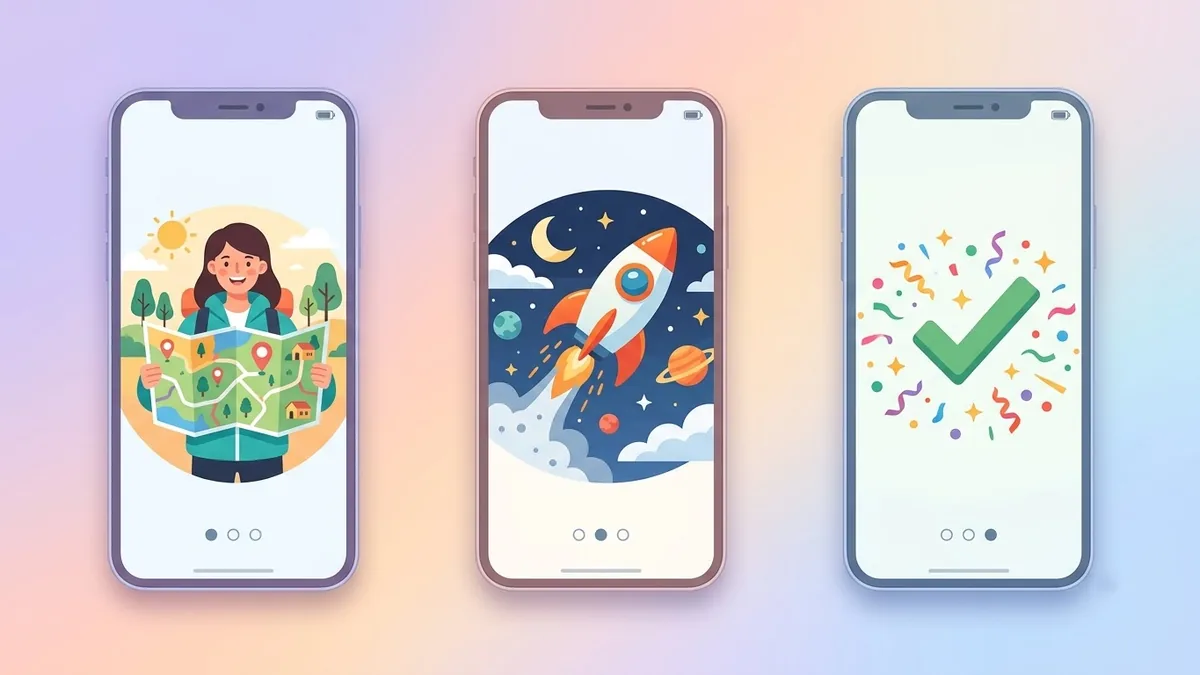
This prompt shows three onboarding screens side by side for your app type, each with a friendly flat illustration, a short headline, a one-line description and a rounded Next button on plain white phone frames. Use it as a concept for a pitch or design brief.
Three mobile app onboarding screens side by side for a [APP TYPE] app. Each screen has a friendly flat illustration, a short headline, a one-line description and a rounded "Next" button, consistent [COLOUR] and white palette, modern iOS style, clean spacing, shown on plain white phone frames. --ar 16:9
Describe the app's purpose and colours, and add real text afterwards in your design tool.
Get a better result
Three side-by-side mobile onboarding screens, each with a flat illustration, a short headline, a one-line description and a rounded Next button in one colour scheme, on plain white phone frames.
The screens have garbled headlines.
Fix: Treat the text as placeholders and add real words in your design tool, as the tip says.
- The three screens look unrelated. Say “the same illustration style, the same button and the same spacing on all three”, and describe each screen’s idea in a line.
- It does not reflect how the app works. Describe the app’s real three benefits, and use the result for layout ideas only before you design the real screens.
Add “three small progress dots above the button, the current one highlighted”. It shows the flow of the three steps.
Keep the style. Make the illustrations simpler, the buttons larger and the headline a single short line on each screen.
More image generation prompts
See all 347 →
More like this
- Customer onboarding email seriesChatGPT · Gemini · Claude
- Onboarding plan for a new hireChatGPT · Gemini · Claude
- App promo with a phone in handHiggsfield · Veo
- T-shirt design mockup on a personGemini · ChatGPT
- Product packaging mockupIdeogram · ChatGPT · Gemini