- Updated
Cinematic 360 product reveal: Veo & Kling prompt
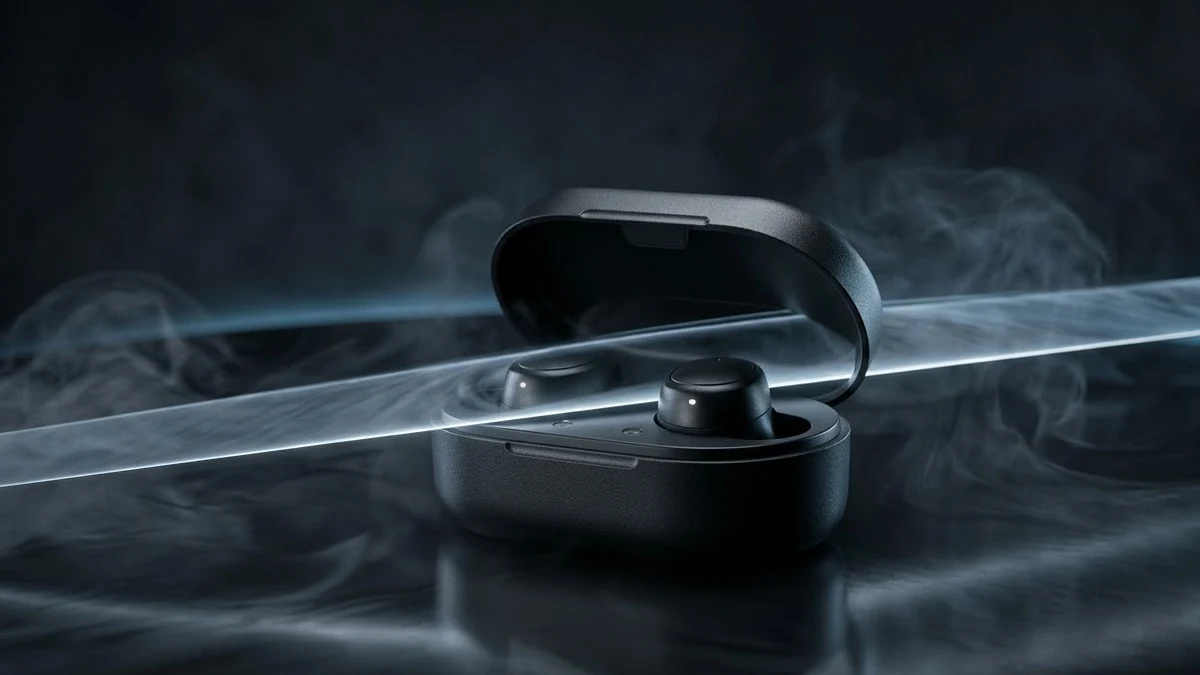
This prompt makes an 8-second commercial-style product reveal. The camera slowly orbits your product on a dark reflective surface while a thin light strip sweeps across it to show texture and edges, with wisps of smoke and a premium look. It also describes the sound, a low ambient hum and a soft click. For accurate details, upload a real photo of the product as the first frame.
Cinematic product reveal of [PRODUCT, e.g. black wireless earbuds in a matte case] on a dark reflective surface.

The camera slowly orbits 360° as a thin light strip sweeps across it, revealing texture and edges; the case opens at the end to show the earbuds. Wisps of smoke, sharp focus, a premium commercial look.

A deep ambient hum and a soft "click" when it opens. 16:9, 8 seconds.
Upload a real photo of your product as the first frame so the details stay accurate.
Get a better result
An 8-second 16:9 cinematic product reveal: the camera orbits your product on a dark reflective surface as a thin light strip sweeps across it, then the case opens at the end, with smoke wisps and a premium commercial look.
The product changes shape or gains a logo during the orbit.
Fix: Use a real photo as the first frame, as the tip says, and add “do not add any logo, text or buttons that are not in the photo”.
- The product spins on the spot instead of the camera orbiting. Write “the product stays still on the surface and only the camera circles it”. Check that the full circle is complete.
- The case opens in an impossible way. Simplify: “the lid lifts slightly and stops”, or skip the opening and end on the product. Moving mechanical parts are hard to get right.
Remove the orbit and ask for “a locked camera, one thin strip of light sweeping slowly across the product from left to right”. A still camera keeps the details exact.
Use my photo as the first frame, add no logos or text, keep the product still while the camera orbits and end on the closed case.
Guides that use this prompt
More video generation prompts
See all 489 →
More like this
- Earbuds commute adVeo · Kling · Seedance
- Product photo turned into a rotating videoKling · Veo · Seedance
- Wireless earbuds and caseGemini · ChatGPT · Midjourney
- Himalayan sunrise revealVeo · Kling · Seedance
- Product demo with hands in frameVeo · Kling · Seedance