- Updated
Desk setup tour
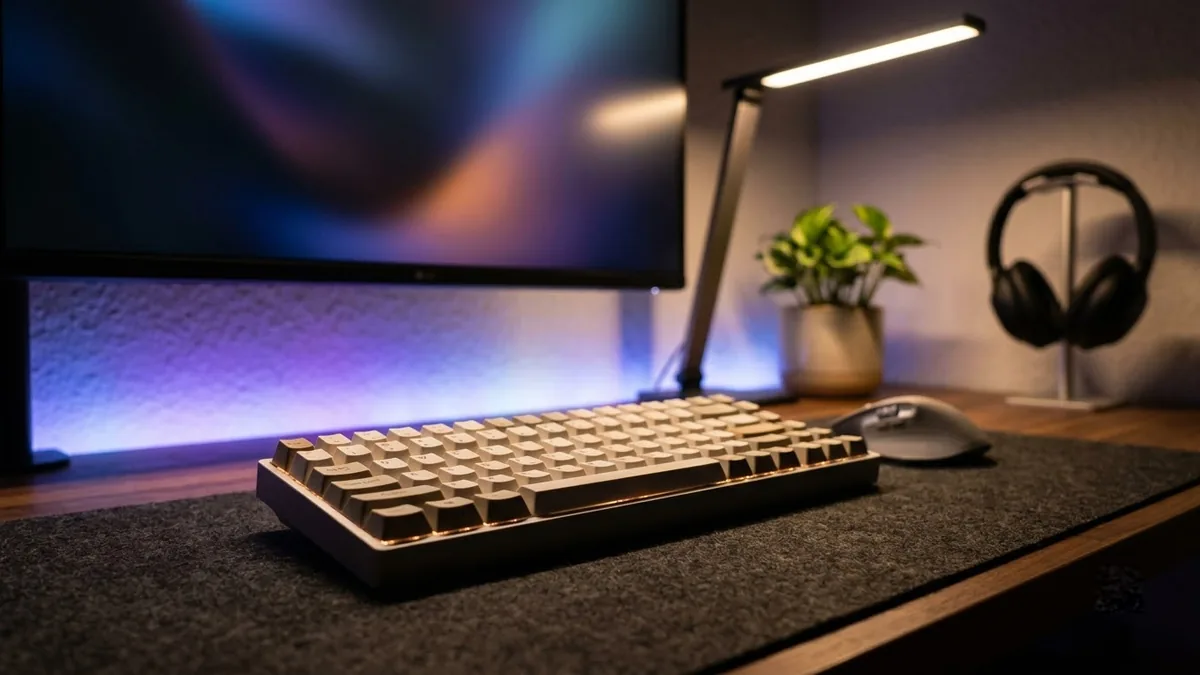
This prompt describes a smooth camera glide along a desk with items you list, such as a wide monitor, mechanical keyboard, plants and a desk lamp.
A smooth camera glide along a tidy modern desk setup: [ITEMS, e.g. wide monitor, mechanical keyboard, plants, desk lamp], soft RGB accent lighting in [COLOUR], macro on the keys as they are pressed, slow slider move, shallow depth of field, evening ambience, satisfying clean look.
Perfect for tech creators. Keep the camera slow and smooth.
Get a better result
A slow, smooth glide along a tidy desk with your items, soft RGB accent light in your colour, a close-up of keys being pressed, a shallow depth of field and an evening feel.
Desk tours are about smooth movement, so the prompt asks for a slow slider glide and a macro on the keys. RGB accent light in your colour sets the mood. Listing your items makes it your setup.
The monitor shows garbled text.
Fix: Ask for a dark wallpaper or a simple gradient on the screen, with no windows.
- Keys warp as they are pressed. Make the key close-up a separate short clip with one finger pressing one key.
- It shows gear that is not yours. For a real setup tour, film your own desk. Use the AI clip as an intro or a mood reference.
Ask for daylight from a window, a cup of coffee steaming and the RGB lights off, for a calmer feel.
a very slow steady glide, each item in focus for a moment as the camera passes
Guides that use this prompt
More video generation prompts
See all 489 →
More like this
- Tidy desk setup flat layGemini · ChatGPT
- Smooth property walkthroughVeo · Kling · Seedance
- Laptop on a styled deskGemini · ChatGPT · Midjourney
- Office comedy sketchVeo · Kling · Seedance
- Understand a new codebase fastClaude · ChatGPT · Claude Code