- Prompt at a glance
- Category
- Text & chat
- Works with
- Claude · ChatGPT · Gemini
- Length
- 90 words
- Fields to fill
- RUNTIME, SHORT DESCRIPTION, PASTE: caches, event listeners, timers, global lists
- Last updated
Track down a memory leak
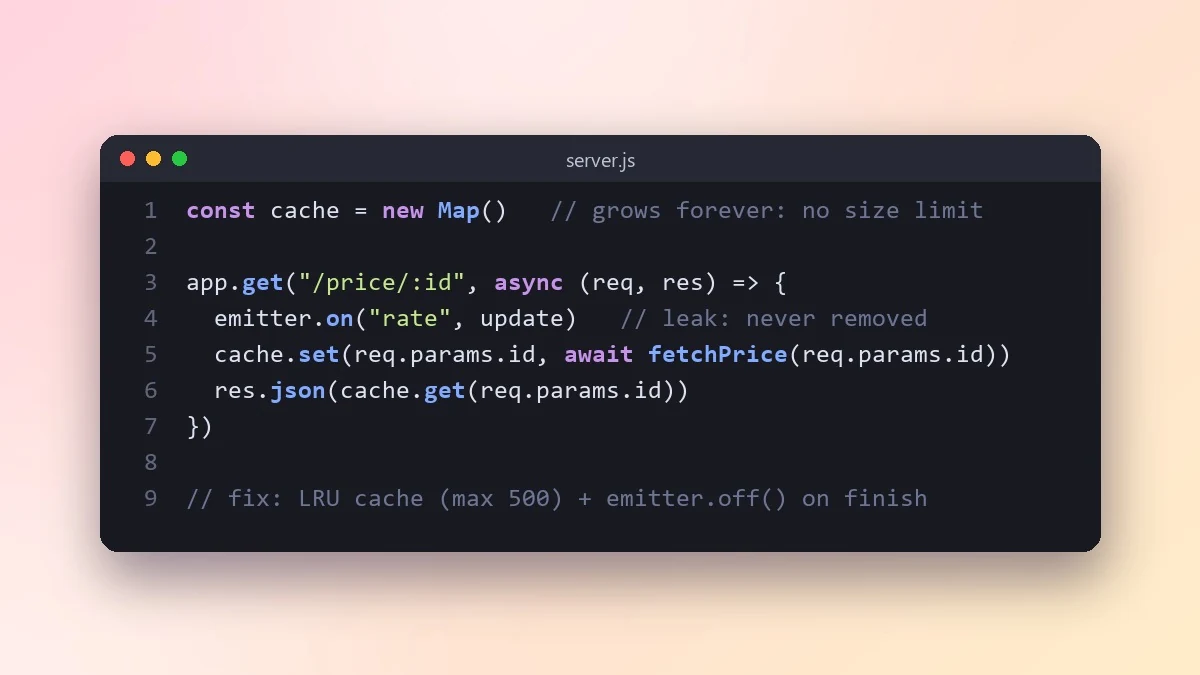
Memory that keeps growing until the app restarts usually comes from caches, listeners or timers that never let go. This prompt reviews your suspicious code and gives a step-by-step plan to confirm the leak with a profiler.
Act as an expert in [RUNTIME, e.g. Node.js / Python / Java] memory issues.

Symptom: [e.g. memory grows from 200 MB to 2 GB over 6 hours, then the app restarts]
What the app does: [SHORT DESCRIPTION]
Suspicious code:
[PASTE: caches, event listeners, timers, global lists]

List the most likely leak sources in this code, explain why each one keeps memory alive, and show the fix. Then give me a step-by-step plan to confirm the leak with a heap snapshot or profiler, including exactly what to compare between two snapshots.
Common leaks: listeners that are never removed, caches with no size limit, and timers that keep running after a request ends.
From copy to answer in four steps
- 1
Open Claude and start a new chat.
- 2
Paste the prompt.
- 3
Replace each [BRACKETED] field with your real details and paste in your own text where asked.
- 4
Reply with follow-ups such as "make it shorter" or "make it sound more like me".
About this prompt
Which AI tools work with this prompt?
It is written for Claude, ChatGPT and Gemini. Paste it into your preferred tool and adjust the wording if the result is off.
What do I need to fill in?
Replace these fields before you send it: RUNTIME, SHORT DESCRIPTION, PASTE: caches, event listeners, timers, global lists. Each field shows an example in the prompt.
Should I paste private information into the prompt?
Only what the task needs. Remove names, contact details and other sensitive data before pasting a resume or document into any AI tool.



