- Updated
Mehendi hands close-up
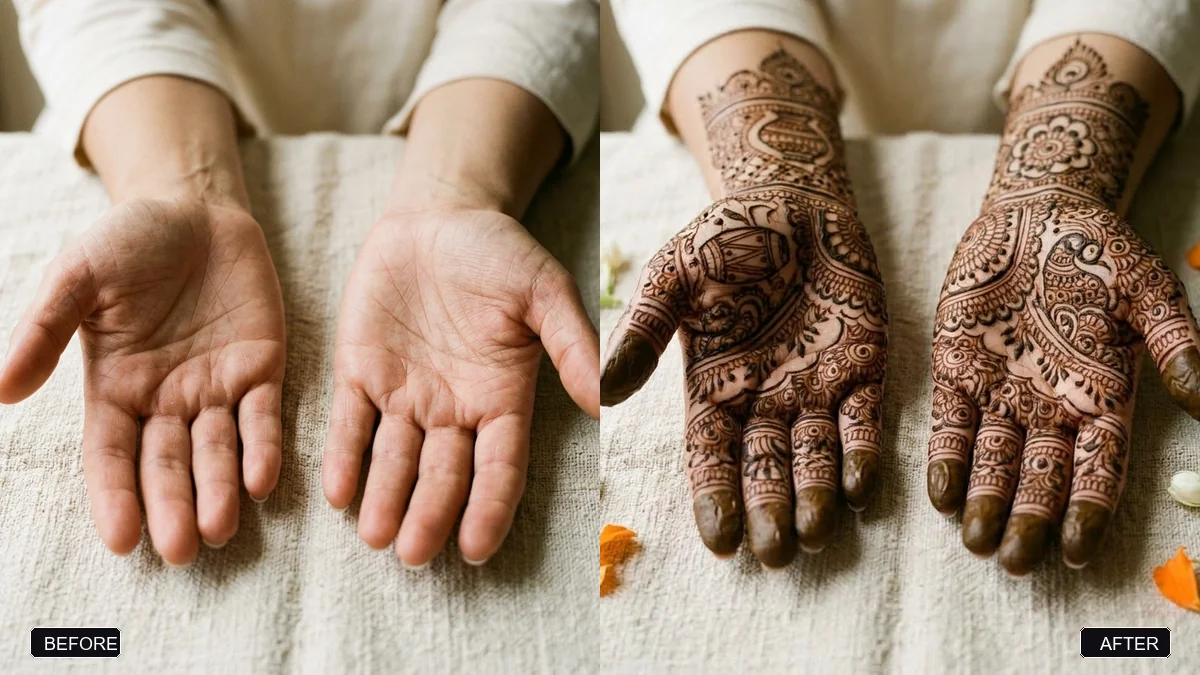
This prompt adds deep brown henna patterns on both palms and fingers in a style you choose, keeping the shape and skin tone of the hands unchanged.
Using the hands in this photo, add intricate [BRIDAL / ARABIC / SIMPLE FLORAL] mehendi patterns in deep brown henna on both palms and fingers. Keep the shape and skin tone of the hands exactly the same.

Fine detail, natural henna sheen, soft window light, a few jasmine flowers nearby, close-up photography.
Use a photo of your hands on a plain background for the best pattern placement.
Your photo goes to the AI app you choose, never to PromptUp.
Get a better result
Your own hands with detailed henna patterns across both palms and fingers in deep brown, with a natural sheen, soft window light and a few jasmine flowers nearby, in a close-up photograph.
The pattern covers only one hand or stops at the wrist.
Fix: Write “the same pattern on both palms and all fingers, mirrored”, and name the style: bridal, Arabic or simple floral.
- The hand shape changes, or extra fingers appear. Use a clear photo of your hands flat on a plain background, as the tip says, and repeat “keep the shape and skin tone of the hands exactly the same”.
- The henna looks printed on, like a sticker. Add “natural henna paste texture that follows the curves of the skin, a slight shine where it is fresh”.
Add “a set of red and gold bangles and a simple gold ring, the hands held together near a lace dupatta”. Keep the pattern style on bridal for the full effect.
Add the same bridal pattern to both palms and all fingers, keep the hand shape and skin tone exactly the same, with natural paste texture and a soft sheen.
Guides that use this prompt
More photo editing prompts
See all 334 →
More like this
- Wedding save-the-date cardGemini · ChatGPT · Midjourney
- Engagement portrait for a coupleGemini · ChatGPT
- Wedding photo to slow-motion clipHiggsfield · Kling
- Preview a tattoo placementGemini · ChatGPT
- Wedding planning timelineChatGPT · Gemini · Claude