- Updated
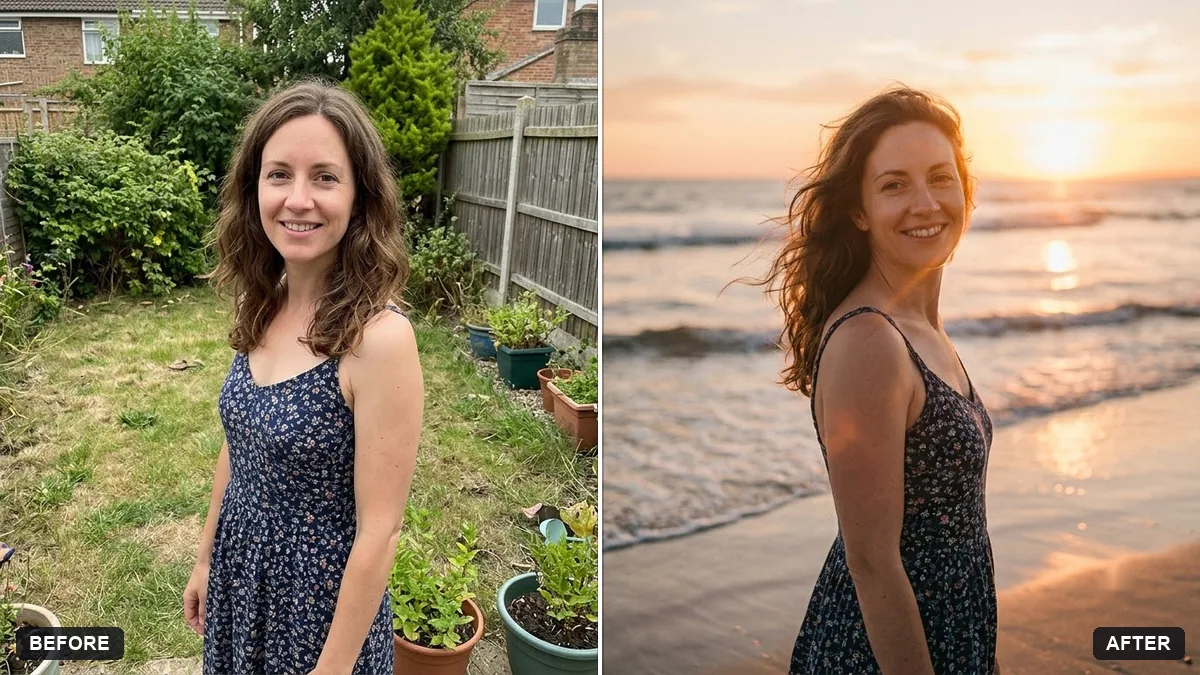
Beach sunset portrait
This prompt places you on a beach at sunset, with warm golden light, waves at your feet, hair moving in the breeze and slight film grain. A photo of you standing or walking gives more natural results.
Place me on a beach at sunset. Keep my face, body and outfit exactly the same.

Warm golden light, gentle waves at my feet, soft sky in [COLOURS], hair moving in the breeze, a relaxed smile, shallow depth of field, natural skin tones and a slight film grain.
A photo of you standing or walking gives the AI more natural posture to work with.
Your photo goes to the AI app you choose, never to PromptUp.
Get a better result
You standing on a beach at sunset with warm golden light, gentle waves at your feet, a soft sky in the colours you chose, hair moving in the breeze, natural skin tones and a slight film grain.
The prompt keeps you exactly as you are and changes only the place and light. Golden light, waves at your feet and moving hair make it feel alive. Slight film grain softens the edit so it looks like a real photo.
Your body proportions or your outfit change.
Fix: Repeat “keep my face, body and outfit exactly the same”, and start from a full-body photo, as the tip suggests.
- The sky takes on an unreal neon pink and purple. Name soft colours such as “peach, pale gold and a little dusty rose”, and keep “natural skin tones” in the prompt.
- Your feet float above the sand, or the waves look pasted on. Add “feet pressed into wet sand, a thin wave washing over the toes, a small reflection on the wet sand”.
Add “a long dupatta lifted by the wind, trailing behind me”. Moving fabric gives the picture a feeling of motion without changing your pose.
Keep my exact face from the original photo: same eyes, nose, smile, skin tone and age. Change only the style.
Guides on this topic
More photo editing prompts
See all 334 →
More like this
- Clear crowds from a beach photoGemini · ChatGPT
- Golden wheat field portraitGemini · ChatGPT
- Outdoor adventure portraitGemini · ChatGPT
- Cosy bookstore portraitGemini · ChatGPT
- Iceland black sand beachVeo · Kling · Seedance