- Updated
Cosy bookstore portrait
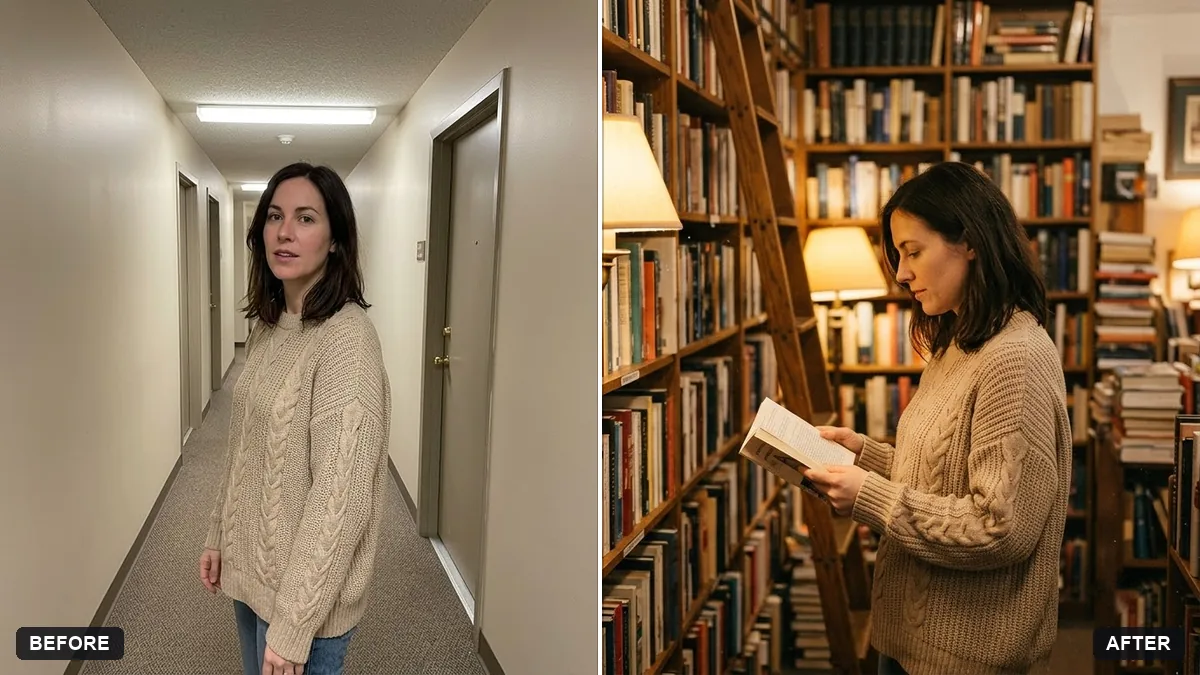
This prompt places you in a cosy old bookstore holding a book of a genre you choose, with warm lamp light, crammed wooden shelves, a rolling ladder and dust in the light. Your face, body and clothing stay the same.
Place me in a cosy old bookstore, browsing a shelf with a [GENRE] book in my hands. Keep my face, body and clothing exactly the same.

Warm lamp light, wooden shelves crammed with books, a rolling ladder, dust drifting in the light, soft film look, quiet and inviting mood.
Add a specific book genre or colour of shelves to fit your style.
Your photo goes to the AI app you choose, never to PromptUp.
Get a better result
You in a cosy old bookstore, browsing a shelf with a book of your chosen genre, with warm lamp light, packed wooden shelves, a rolling ladder, dust in the light and a soft film look.
Your clothes or body shape change.
Fix: Repeat “keep my body and clothing exactly the same”, and start with a waist-up photo where your clothes are clearly visible.
- The shelves show unreadable or odd book titles. Add “book spines in plain muted colours with no readable titles”. A stronger film grain also hides small errors.
- The picture looks like a bright modern shop. Name the age, such as “a narrow shop from the 1950s, with dark wood and brass lamps”, and say “few windows, mostly lamp light”.
Replace the genre with “poetry” for pale spines and soft light, or “mystery” for dark green leather and a lamp glow. The genre quietly changes the colours of the whole picture.
Keep my face, outfit and pose. Make the light warmer and darker, and move the ladder behind me, a little out of focus.
Guides on this topic
More photo editing prompts
See all 334 →
More like this
- Monsoon umbrella portraitGemini · ChatGPT
- Snowy winter portraitGemini · ChatGPT
- Author photo for a book back coverGemini · ChatGPT
- Autumn leaves portraitGemini · ChatGPT
- City night bokeh portraitGemini · ChatGPT