- Updated
Moody rainy window portrait
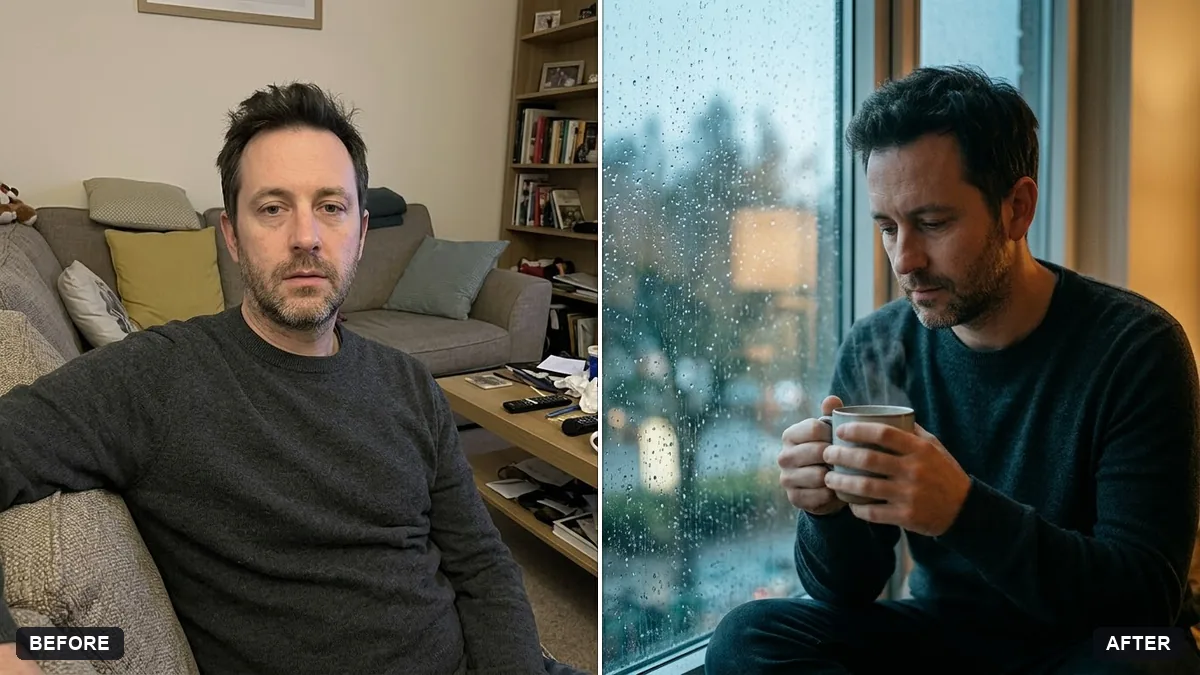
This prompt creates a reflective portrait with raindrops on the glass, cool blue-grey light from outside, a warm glow inside and a cup of tea or coffee in your hands, in cinematic tones.
Turn this photo into a moody portrait of me looking out of a rainy window. Keep my face and features exactly the same.

Raindrops on the glass, soft blue-grey light from outside, warm glow inside, a cup of [TEA / COFFEE] in my hands, reflective and calm mood, shallow depth of field, cinematic tones.
Use a photo with a calm expression; the mood carries the whole image.
Your photo goes to the AI app you choose, never to PromptUp.
Get a better result
A moody, quiet portrait of you at a window with rain on the glass, cool blue-grey light outside, a warm glow inside and both hands around a cup of tea or coffee.
The mood comes from contrast: cool blue light outside, warm glow inside and raindrops on the glass. A cup in your hands gives a calm pose. Keeping your face exactly the same, with a calm expression as the tip suggests, carries the feeling.
The raindrops are huge and cover your face.
Fix: Ask for “drops only on the glass in front of the lens, face sharp behind it, shallow depth of field”.
- The warm and cool light are muddled. State it directly: “cool daylight from the window, warm lamp light on the face”.
- The expression is too happy for the mood. Pick a calm photo to start from, or add “soft, thoughtful, relaxed face”.
Ask for the same scene in black and white with strong contrast, keeping the raindrops and the steam from the cup.
Keep the mood. Turn my gaze towards the window and add steam rising from the cup.
Guides that use this prompt
More photo editing prompts
See all 334 →
More like this
- Moody dark photo presetGemini · ChatGPT
- Rainy window mood clipVeo · Kling · Seedance
- Rainy London streetMidjourney · Gemini · ChatGPT
- Rainy Tokyo alley at nightMidjourney · Gemini · ChatGPT
- Monsoon umbrella portraitGemini · ChatGPT