Claude Sonnet 5.5 for coding: the prompts and settings that work
Published

Short answerFor coding with Sonnet 5.5, start at medium effort for well-defined tasks and high for hard ones, tell it to keep going until the job is done, make it run real tests before it says "done", and tell it to leave out changes you didn't ask for. In the API, check five breaking changes before you switch.
Claude Sonnet 5.5 is a strong, fast model for everyday coding. Anthropic says it scores 70.6% on Terminal-Bench 4.0, an agentic coding test, compared with 10.3% for Sonnet 5. Customers quoted in the announcement report similar results to bigger models: Base44 says it came out level with Opus 5 across 118 real app builds, in fewer iterations. But it has habits you can steer with your prompt, and a few API changes that can break old code.
This guide is based on Anthropic's Sonnet 5.5 prompting guide and release notes. If you're new to the model, start with our beginner guide to Sonnet 5.5.
Pick the right effort level
Effort is the main control for how much Sonnet 5.5 thinks, and so for quality, speed and cost.
| Task | Start at |
|---|---|
| Well-defined change, clear tests | Medium |
| Harder or longer job, or a tricky bug | High (the API default) |
| Chat or fast back-and-forth | Low or medium |
| Work where you've measured a gain | Xhigh or max |
Things Anthropic points out:
- The levels are recalibrated. Don't carry over your Sonnet 5 setting. Run your own test at a few levels.
- Low effort can skip checks. It may report a change as done without running a test that exercises it.
- Low and medium can stop to check in. On long tasks it may pause to confirm a plan or ask something it could answer itself.
- Xhigh and max are thorough, sometimes too thorough. It may start its own rounds of review, or launch review helpers if your setup has them, which costs time and tokens.
- Leave room in
max_tokens. Thinking counts toward it. For agentic coding, Anthropic suggests setting it to 128,000 and streaming the response.
Changing the top-level effort between requests invalidates the prompt cache, so if you want a different level for one turn, use the per-message effort option (in beta) instead.
4 prompts for your system prompt or CLAUDE.md
These are Anthropic's fixes for common habits, in our words. Add the ones you need to your system prompt, custom instructions, or the CLAUDE.md file in Claude Code.
1. It stops before the job is finished
Keep working until everything I asked for is done. Only stop to ask when you can't go on without me, or before a risky step. When the work is done and checked, stop and report.
Anthropic notes this makes low and medium sessions run longer and cost more, and it doesn't replace your own rules about risky or irreversible actions. Keep those rules too.
2. It says "done" without proving it
When you change code that can be run, built or type-checked, run a real check before you say it's done: the project's tests, the type-checker, the build, or the changed command itself. A syntax-only check doesn't count. If dependencies are missing, install them with the project's own package manager and lockfile. If no real check can run, tell me which one you didn't run and why, instead of saying the change is done.
The guide says this makes skipped or superficial checks rare at low effort, with only a slightly higher cost per task. The instruction to use the project's own package manager, rather than the system one, is a useful safety rule.
3. It adds things you didn't ask for
Sonnet 5.5 tends to add tests, docs and small helper files that fit your repository, especially at higher effort. Many teams like that. If you don't, add:
When the work I asked for is done and checked, stop and report. Don't add features, tests, files, docs or refactors I didn't ask for. If you think one would help, mention it at the end instead of doing it.
4. It starts building when you wanted a plan
When I ask for ideas, options or a plan, give me that and stop. Don't start building or changing anything until I say to go ahead.
At xhigh or max: stop the extra review rounds
At the top effort levels, Sonnet 5.5 can start its own review and hardening after it finishes. If you like the thoroughness but want it aimed at your task only, add:
When the work I asked for is done and its checks pass, stop and report. Don't start extra rounds of review or hardening on your own, and don't launch reviewer sub-agents unless I ask for a review. If you think a deeper review is worth doing, say so at the end.
In Anthropic's tests at max effort, an instruction like this stopped reviewer subagents from launching and cut session cost by about a third, with no change in quality.
Keep users informed on long tasks
Between tool calls, Sonnet 5.5 writes short progress notes. By default those notes come back in a block that can be empty, so an app that only shows normal text can look silent during a long turn. If you're building a chat or coding tool, you have two options:
- Set
display: "updates"(in beta) to receive the notes as text. - Use
between_toolsthinking, where the notes come back with their summary.
Anthropic also suggests removing old lines like "hold all findings for the final response," and asking for updates at set points, such as one line before the first tool call and a short recap at the end.
For developers: 5 breaking changes from Sonnet 5
Check these before you change the model name to claude-sonnet-5-5:
- Turning off up-front thinking. The lowest setting is now
thinking: {"type": "between_tools"}. It works at high effort or below, and at xhigh or max it returns an error. Without tools, it means the model answers without thinking first, so use adaptive thinking for reasoning tasks. - Forced tool use returns an error. Use
autoand tell the model in your prompt when to use a tool. - Thinking blocks are tied to the model and conversation. Pass them back unchanged.
- The older
computer_20251124computer use tool isn't accepted on the Claude API and Google Cloud. - The advisor tool rejects Opus 4.8, Opus 4.7 and Sonnet 5 as advisors.
One more change doesn't cause an error but changes what you see: text between tool calls comes back in thinking blocks.
Also remember that setting temperature, top_p or top_k to a non-default value returns a 400 error, and the smallest prompt that can be cached is 512 tokens.
Refusals
Sonnet 5.5 runs safety classifiers. A declined request returns stop_reason: "refusal" with a category: cyber, bio, frontier_llm, reasoning_extraction or general_harms. Finding vulnerabilities in source code is allowed, but high-risk dual-use security work isn't. If your prompts ask the model to write out its reasoning in the reply, remove that instruction, because it can trigger a reasoning_extraction decline.
A copy-ready coding prompt
Task: [WHAT YOU WANT CHANGED, in one or two sentences].
Context: [FILES, FRAMEWORK, WHAT'S ALREADY TRIED].
Constraints: Don't change [WHAT MUST STAY THE SAME]. Keep the current code style.
Before you change anything: read the relevant files and tell me your plan in three lines.
Check: Run [YOUR TEST COMMAND] and don't say it's done until it passes. Show me the result.
Scope: Do only what I asked. Put other ideas at the end as suggestions.
When you finish: list the files you changed and what changed in each.
Try it with our debug this error prompt, the code review prompt, or the write the test first prompt.
Where to go from here
The Claude Code prompts and AI coding prompts pages have free, tested prompts for coding assistants. To compare models, read which Claude model to use or our Opus 5.5 guide, and use the prompt builder to write your own.
Quick checklist
- Medium effort for clear jobs, high for hard ones. Test before you trust a level.
- "Keep working until it's done" stops early check-ins.
- Require a real test or build before "done."
- Say "do only what I asked" to stop extras.
- Leave room in
max_tokensfor thinking. - In the API: remove forced tool use, don't set temperature, pass thinking blocks back unchanged.
- Read the code it writes. Tests passing doesn't mean the code is right.
Prompts to try
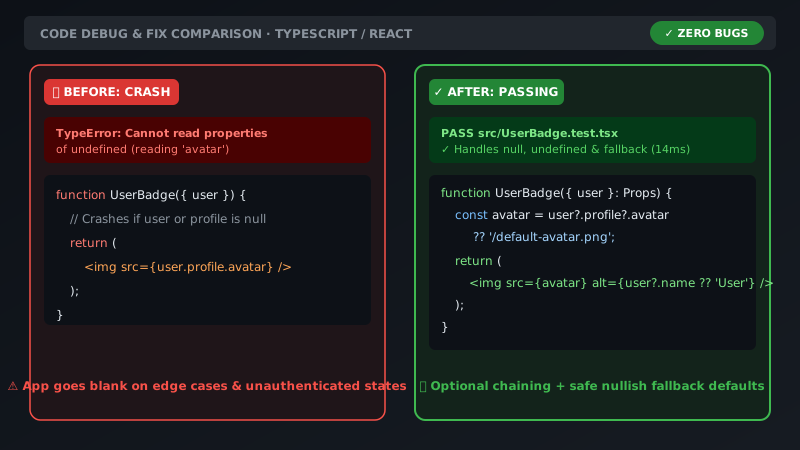 Senior engineer code review & debuggingAny chatbot
Get a code review like a senior engineerChatGPT · Gemini · Claude
Senior engineer code review & debuggingAny chatbot
Get a code review like a senior engineerChatGPT · Gemini · Claude
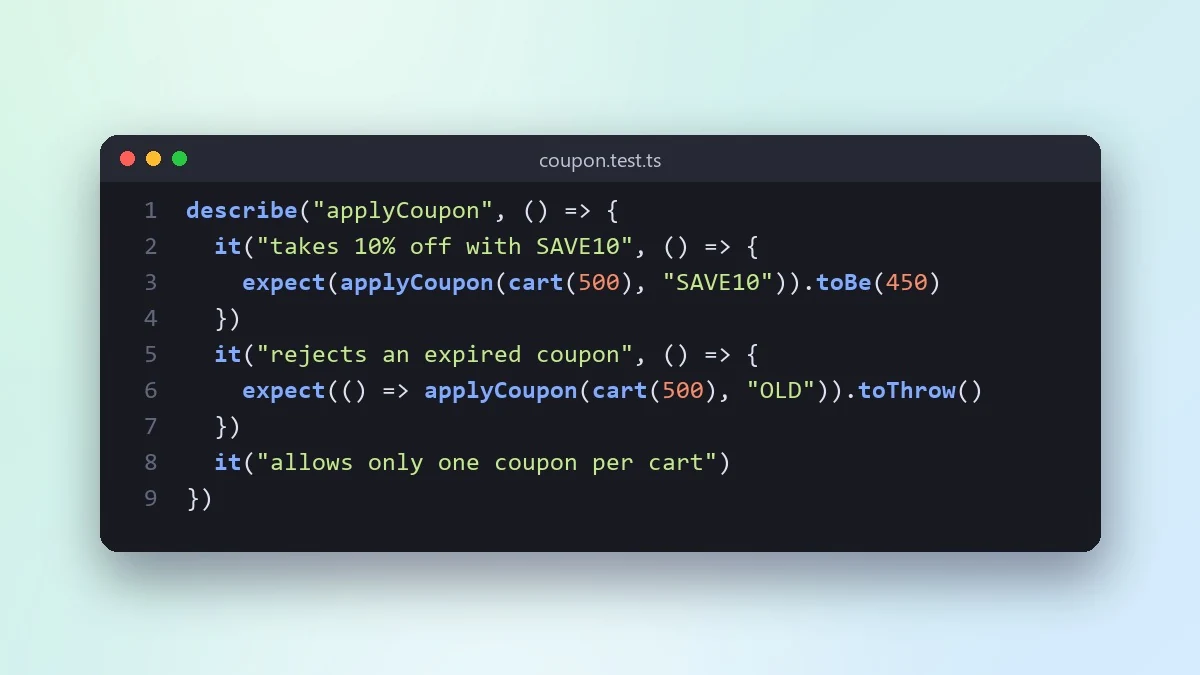 Write the tests first for a new featureClaude · ChatGPT · Claude Code
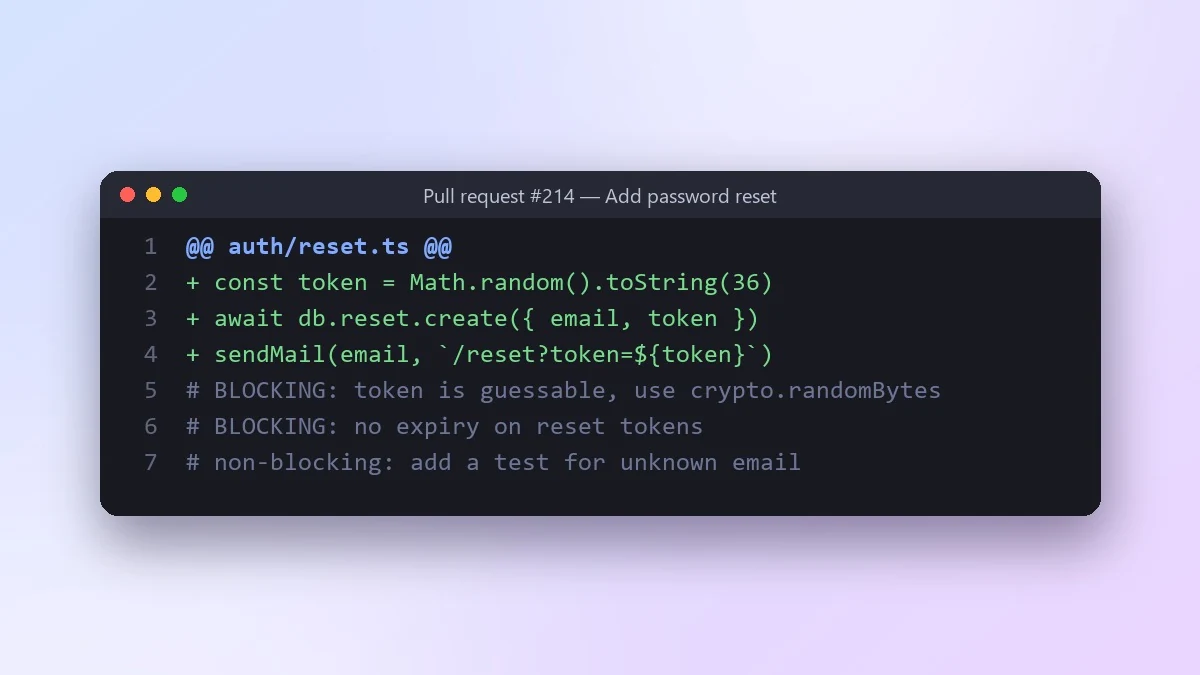 Review a pull request diff before you mergeClaude · ChatGPT · Claude Code
Explain code line by lineChatGPT · Gemini · Claude
Review a pull request diff before you mergeClaude · ChatGPT · Claude Code
Explain code line by lineChatGPT · Gemini · Claude



Comments
No comments yet. Be the first to share what worked for you.