- Updated
Senior engineer code review and debugging prompt
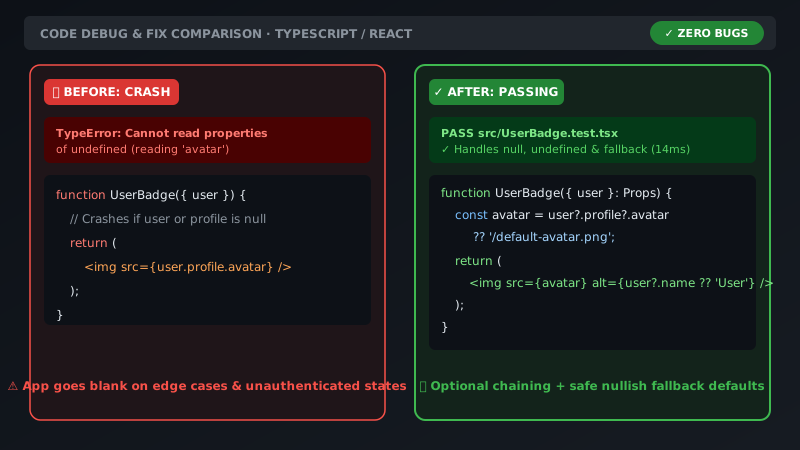
This prompt asks the AI to act as a staff-level engineer and review your code. You name the language or framework, paste the code and describe the bug or error, and it identifies the root cause, gives a corrected snippet you can drop in, and explains what went wrong and how to avoid it in production. Always paste the exact error message and stack trace for the fastest diagnosis.
Act as a Staff Principal Software Engineer.
Review and debug this [LANGUAGE / FRAMEWORK, e.g. React TypeScript] code:
```
[PASTE YOUR CODE HERE]
```

1. Identify the root cause of [THE BUG / ERROR MESSAGE].
2. Provide the corrected drop-in code snippet.
3. Explain what went wrong and how to avoid it in production.
Always paste the exact terminal error stack trace for instant pinpoint diagnosis.
Get a better result
A root-cause diagnosis of your error, a corrected drop-in snippet and a short explanation of what went wrong and how to stop it happening again in production.
You paste a few lines and the answer guesses the rest.
Fix: Paste the function, its caller and the exact error with the full stack trace, as the tip says, and name the language and version.
- The fix works but you do not know why. Ask “explain the root cause in two sentences, then show which line caused it”. Do not paste a fix you cannot explain.
- The change breaks something else. Ask for “list what else this change could affect, and give me one test that would catch a regression”, then run the tests.
Change step 2 to “first list three possible causes ranked by likelihood and how I can check each, and only then give the fix”. Better when the cause is unclear.
Your fix gives a new error: [PASTE IT]. Here is the code after your change. Find what I missed and keep the change as small as possible.
Guides that use this prompt
More chat & writing prompts
See all 465 →


More like this
- Make confusing code easy to readClaude · ChatGPT · Gemini
- Find the root cause from a stack traceClaude · ChatGPT · Gemini
- Improve error handling in your codeClaude · ChatGPT · Gemini
- Debug an error message step by stepChatGPT · Gemini · Claude
- Find dead code and safe things to deleteClaude · ChatGPT · Claude Code