Blog
Claude Opus 5.5: what's new and how to prompt it well
Short answer: Opus 5.5 is Anthropic's new Opus model, released on 22 September 2026. It is faster and cheaper than Opus 5 and stronger at coding, analysis and reading charts. To prompt it well, give it the whole task up front, name exactly what to avoid, ask for evidence, and pick the right effort level.
Published

Anthropic released Claude Opus 5.5 on 22 September 2026. It is the first model in the Claude 5.5 family, and Anthropic says Sonnet 5.5 and Haiku 5.5 will follow in the coming weeks.
Most prompts that worked on earlier Claude models still work. But Opus 5.5 behaves differently in a few ways that are worth knowing, because a prompt written for an older model can hold it back. This guide covers what's new, how to write prompts for it, and a template you can copy.
What's new in Claude Opus 5.5
These figures come from Anthropic's launch announcement:
| What | Opus 5.5 | Compared with Opus 5 |
|---|---|---|
| Speed | Writes output more than 30% faster | Faster |
| API price | $4 per million input tokens, $20 per million output tokens | Was $5 and $25 |
| Typical cost | About 40% less on typical workloads | Cheaper per finished task |
| Context window | 1 million tokens | Same |
| Where to use it | Claude apps, Claude Code, the API (claude-opus-5-5), AWS, Google Cloud and Microsoft Azure | Same places |
Anthropic reports the biggest gains in four areas:
- Coding. Multi-step work in a real codebase, and code review that catches more bugs with fewer false alarms.
- Knowledge work. Analysis, reports and financial models, and it is less likely to state a figure or cite a source that your material doesn't support.
- Charts, diagrams and screenshots. It reads values off dense charts and follows arrows in diagrams more accurately.
- Clearer writing. Less jargon, and it puts the important information first.
Benchmark scores change quickly and every company picks its own, so treat them as a guide. What matters is how it does on your own tasks.
The one change that affects every prompt
Opus 5.5 always thinks before it answers. On earlier models you could switch thinking off; on Opus 5.5 you can't. How much it thinks is set by an effort level instead (more on that below).
This means some old prompting habits are now wasted words, or even get in the way:
- "Think step by step" is no longer needed. It already reasons before replying. Use the space to describe the task better.
- Don't ask it to write out all its internal reasoning. Anthropic's documentation says requests that try to make the model reproduce its hidden reasoning in the answer can be declined. Ask for a short explanation instead: "Give your answer, then the three main reasons for it."
- Don't tell it not to think. It can't follow that instruction. If you want quicker, shorter answers, lower the effort level.
7 ways to write better prompts for Opus 5.5
1. Give it the whole task at the start
Opus 5.5 is built for long, multi-step work. It does best when it knows the full goal from the first message: what you want, who it's for, what "done" looks like, and any limits. Drip-feeding the task over five messages wastes that.
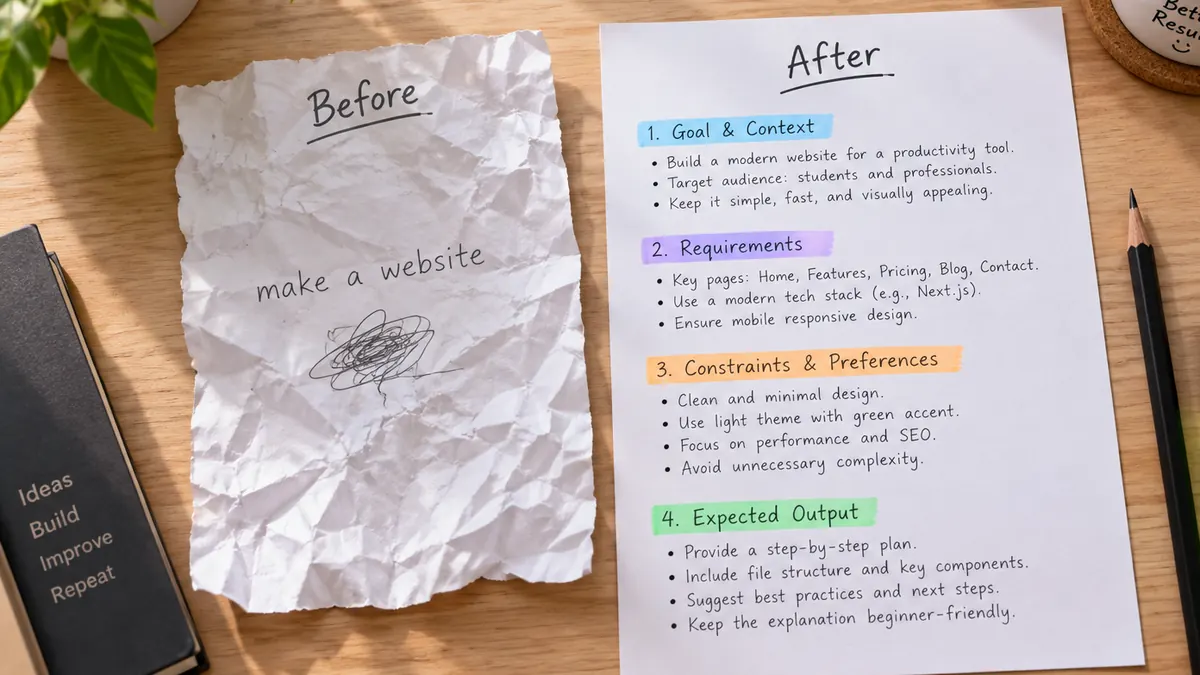
Here is the difference in practice. A weak prompt:
Write something about our sales numbers.
A strong prompt for Opus 5.5:
Goal: Write a one-page summary of our Q3 sales for the leadership team.
Audience: Busy executives who will read it in two minutes.
Material: The sales table is pasted below.
What to include: total revenue, the three biggest changes from Q2, and one risk.
Format: A 2-sentence headline, then 5 bullets, then one "Risk" line.
Rules: Use only numbers from the table. If a number is missing, say "not in the data" instead of estimating.

<sales_table>
[PASTE YOUR TABLE HERE]
</sales_table>
2. Put your material in labelled sections
When you paste documents, data or examples, wrap each one in simple tags like <report> and </report>, or put a clear label on its own line. Anthropic has long recommended tags for Claude, and with a 1-million-token context window you can paste a lot. Labels stop the model from mixing up your instructions with your material.
3. Name exactly what to avoid
Anthropic notes that Opus 5.5 responds well to instructions that name specific patterns to avoid, and that a general request such as "don't make it look generic" mostly swaps one default for another. The same idea works for writing:
- Weak: "Make it sound less like AI."
- Strong: "Don't start with a question. Don't use the words 'delve', 'crucial' or 'landscape'. No bullet points. No summary paragraph at the end."
If the first result still has a habit you dislike, add it to the list and ask again. For more on this, see how to make AI-written text sound human.
4. Ask for evidence, not a reasoning replay
Opus 5.5 is better than Opus 5 at sticking to the facts in your material, but you should still make it show where each claim comes from:
For every number in your answer, add the row or section of my document it came from. If something isn't in the document, write "not stated" instead of guessing.
This gives you something you can check in seconds, which is far more useful than a long explanation of how it got there.
5. Send it charts and screenshots
Reading visual material is one of the biggest upgrades. You can upload a chart, a slide, a diagram or a screenshot and ask direct questions about it.
Tips that help:
- Use a sharp, high-resolution image. Anthropic says this matters most for technical drawings.
- Ask specific questions. "What was the value for March, and which month had the largest drop?" works better than "Explain this chart."
- Ask it to check the chart against the numbers. "Does this chart match the figures in the table below? List any that disagree."
6. Say when you want updates on long tasks
For big jobs, such as reviewing a folder of documents or making a change across a codebase, Opus 5.5 may work for a long time before it replies. If you want to follow along, say so: "Before you start, tell me your plan in one line. When you finish, give me a short summary of what you changed and anything you need from me."
7. Remove old workarounds and test again
Many people have prompts full of fixes for older models, such as "be concise", "don't over-explain" or "double-check everything three times". Anthropic suggests re-testing these on Opus 5.5 rather than carrying them over, because the model already writes more clearly and uses fewer words. Try your prompt without them. Keep a rule only if the answer gets worse when you take it out.
Effort levels: which one to pick
The effort level controls how much Opus 5.5 thinks before answering, and so how long it takes and what it costs. Developers set it in the API, and Claude Code lets you choose it too. There are five levels.
| Effort | Use it for |
|---|---|
| Low | Quick answers, simple rewrites, sorting and tagging, anything where speed matters most |
| Medium (the default) | Most everyday work: writing, summaries, analysis, normal coding |
| High | Harder problems where you have seen medium miss things |
| Xhigh | Long, difficult coding or multi-step agent work |
| Max | When being right matters much more than time or cost |
Two things are different from Opus 5:
- The default is now medium, not high. In Anthropic's testing, Opus 5.5 at medium did better than Opus 5 at high on coding and knowledge work, so medium is a strong starting point.
- To get shorter, quicker answers, lower the effort before you add "keep it short" to your prompt. Anthropic says lowering effort reduces thinking, cost and waiting time more reliably than prompting does.
A copy-ready prompt template for Opus 5.5
Fill in the brackets and paste it into Claude. It follows the 5-part prompt formula: role, task, context, format and limits.

You are [ROLE, e.g. an experienced financial analyst].

Task: [WHAT YOU WANT, in one or two sentences].
This is for: [WHO WILL READ OR USE IT, and why].
Done looks like: [WHAT A GOOD RESULT INCLUDES].

Format: [LENGTH, STRUCTURE, e.g. "5 bullets, each under 20 words"].
Avoid: [SPECIFIC THINGS YOU DON'T WANT, e.g. jargon, a closing summary, emoji].
Accuracy: Use only the material below. If something isn't in it, say so instead of guessing.

<material>
[PASTE YOUR DOCUMENT, DATA OR NOTES HERE]
</material>
If you'd rather not write prompts from scratch, the PromptUp prompt builder fills in this structure for you, and the Claude prompts page has hundreds of ready-made ones.
For developers: what changes in the API
If you call Opus 5.5 through the API, check these before you switch the model name to claude-opus-5-5. They come from Anthropic's migration notes.
- Thinking can't be turned off. Requests that disable thinking or set a fixed thinking budget return an error. Remove them and set
output_config.effortinstead. - Set effort explicitly. The default is
medium, one level lower than Opus 5'shigh. - Leave room in
max_tokens. Thinking counts toward it, so a limit sized for a no-thinking setup can cut answers off. - Forced tool use is not supported. A
tool_choiceofanyor a named tool returns an error. Useauto, name the tool in your prompt, and check that the call happened. - Handle refusals. Check
stop_reasonforrefusalbefore reading the answer, and consider Anthropic's fallback option so a false positive doesn't break your app.
Quick checklist
- Give the full task, audience and finish line in the first message.
- Wrap pasted material in labelled sections.
- List specific things to avoid instead of asking it to be "less generic".
- Ask for sources and "not stated" instead of guesses.
- Upload charts and screenshots directly, as sharp as possible.
- Drop "think step by step" and old workarounds, then test.
- Start at medium effort; go up only when a task needs it.
Opus 5.5 is a big step up, but it can still be wrong. For names, numbers, dates or advice you plan to act on, check the important facts yourself.
Prompts to try
 Text & chatExplain any complex topic simplyChatGPT · Gemini · Claude
Text & chatCompare yourself with three competitorsChatGPT · Gemini · Claude
Text & chatWrite unit tests for your codeClaude · ChatGPT · Gemini
Text & chatProofread without changing your voiceChatGPT · Gemini · Claude
Text & chatExplain any complex topic simplyChatGPT · Gemini · Claude
Text & chatCompare yourself with three competitorsChatGPT · Gemini · Claude
Text & chatWrite unit tests for your codeClaude · ChatGPT · Gemini
Text & chatProofread without changing your voiceChatGPT · Gemini · Claude