- Updated
Photographer with a camera
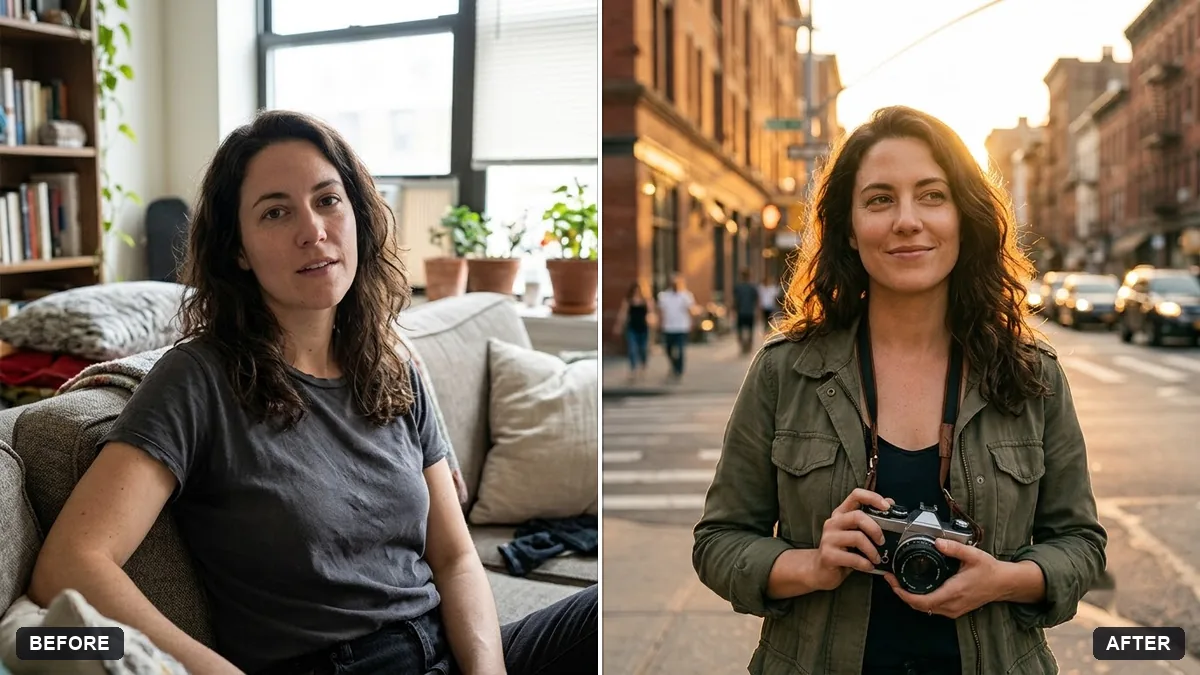
This prompt shows you as a photographer holding a camera of your choice, with your face and features kept exactly the same.
Turn this photo into a portrait of me as a photographer holding a [VINTAGE FILM / MODERN MIRRORLESS] camera. Keep my face and features exactly the same.

Golden hour city street, camera strap around my neck, warm backlight, relaxed confident look, lifestyle photography.
Upload a clear photo with your hands visible, and mention the type of camera.
Your photo goes to the AI app you choose, never to PromptUp.
Get a better result
A lifestyle portrait of you as a photographer on a city street at golden hour, holding a vintage film or modern mirrorless camera with the strap around your neck and warm backlight.
The camera type blank matters more than it looks: a vintage film camera and a modern mirrorless camera have very different shapes, and naming one stops the model inventing a strange hybrid. A strap around your neck makes it look like your own gear. Golden hour light from behind gives a warm rim around you, and a city street sets a lifestyle mood instead of a studio shot.
The camera has strange extra parts.
Fix: Name the type and size, such as “compact mirrorless with a small prime lens”, and keep it simple.
- Your fingers merge with the camera. Use a photo where your hands are visible, as the tip says, and ask for a natural two-hand grip.
- Logos appear on the camera. Ask for no brand names on the camera body.
Ask for a studio with softboxes and a backdrop, with you checking a shot on the camera screen.
Keep my face. Make a second version where I am looking through the viewfinder with one eye closed.
More photo editing prompts
See all 334 →
More like this
- Wedding planning timelineChatGPT · Gemini · Claude
- Black-and-white street photographMidjourney · Gemini · ChatGPT
- Architect at work portraitGemini · ChatGPT
- Graduation portrait in gown and capGemini · ChatGPT
- Creative portfolio portraitGemini · ChatGPT