- Updated
Farmer in the field
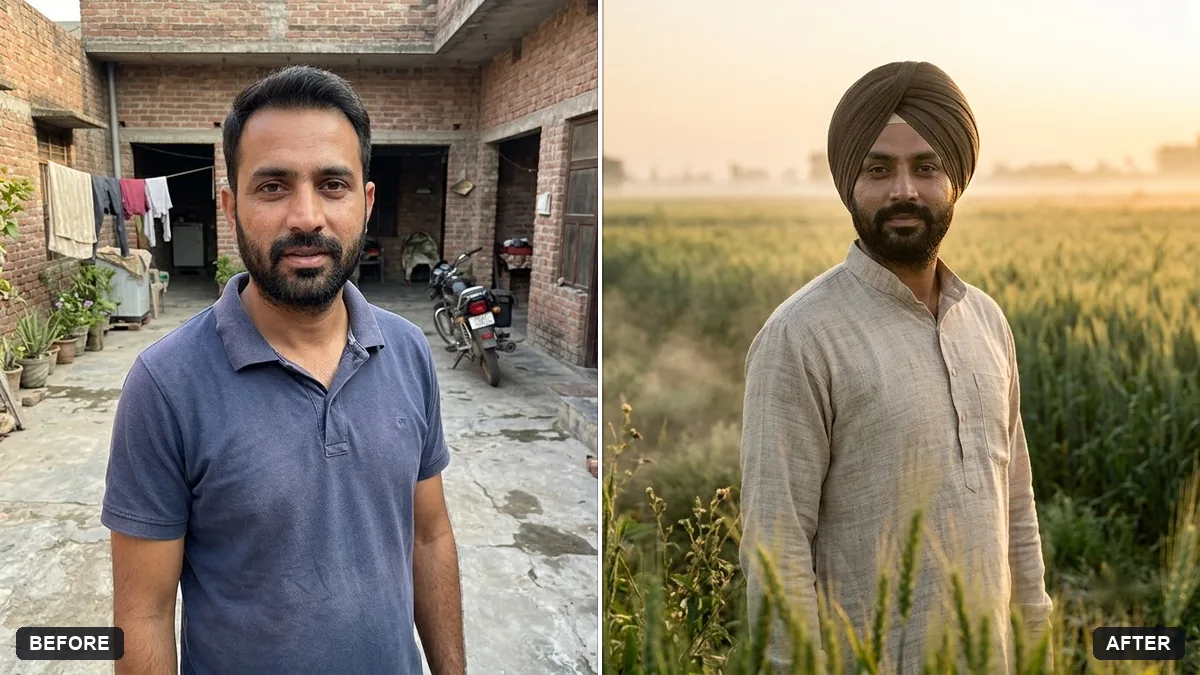
This prompt shows you as a farmer standing in a green field at sunrise in simple traditional clothing in a documentary style, keeping your face and features exactly the same.
Turn this photo into a documentary portrait of me as a farmer standing in a green [CROP] field at sunrise. Keep my face and features exactly the same.

Simple traditional clothes, a turban or hat, morning mist, a calm proud expression, natural colours, respectful documentary photography.
Ask for a warm and respectful documentary tone with natural skin and clothing.
Your photo goes to the AI app you choose, never to PromptUp.
Get a better result
A calm, respectful documentary portrait of you as a farmer standing in a green crop field at sunrise, in simple traditional clothes and a hat or turban, with morning mist and natural colours.
Documentary portraits should feel respectful and true, so the prompt asks for simple traditional clothes, natural colours and a calm, proud expression. A field of your chosen crop at sunrise with morning mist gives a quiet, honest setting. Keeping your face and features the same means it stays your portrait.
The clothes become a costume.
Fix: Name the region and season, and ask for everyday working clothes, not festival dress.
- The crop does not match the region. Fill in a crop that grows there, such as wheat, rice or mustard, and the month.
- The skin looks airbrushed. Ask for natural skin with sun and weather, as the tip says. Smooth skin breaks the documentary feel.
Ask for harvest time with golden crops and you holding a bundle, with a tractor or bullock cart far behind.
Keep my face. Use the second image I uploaded as the field, so the crop and land match the real farm.
More photo editing prompts
See all 334 →
More like this
- Haldi ceremony portraitGemini · ChatGPT
- Gentle memorial tribute portraitGemini · ChatGPT
- Cafe window light portraitGemini · ChatGPT
- Pongal traditional portraitGemini · ChatGPT
- Natural skin retouch (no plastic look)Gemini · ChatGPT