- Updated
AI action figure prompt for Gemini & ChatGPT
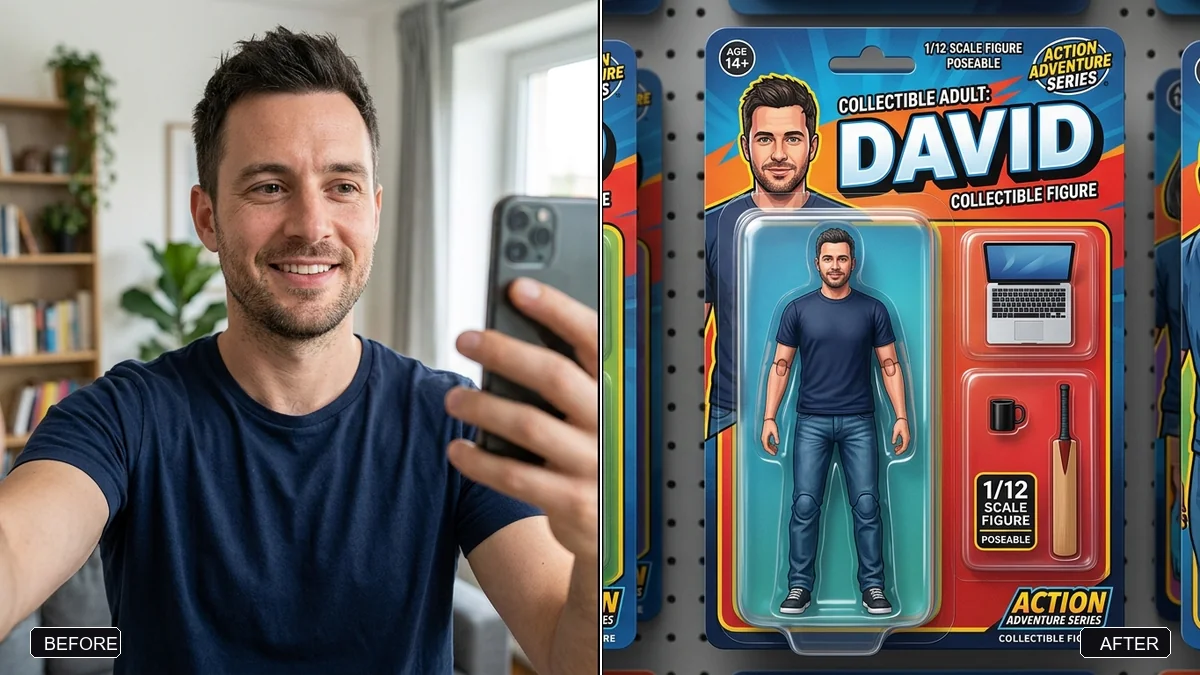
This prompt creates a photorealistic collectible action figure of you, sealed in a retail blister pack. You choose the figure name, a short tagline, three accessories and the outfit, and the face is meant to clearly look like yours.
Create a photorealistic collectible action figure of the person in this photo, sealed in a retail blister pack. The figure's face must clearly look like me.

Packaging: a bold card backing with the name "[FIGURE NAME]" at the top and the tagline "[TAGLINE, e.g. Powered by chai]". Accessories in separate plastic slots next to the figure: [3 ACCESSORIES, e.g. laptop, coffee mug, cricket bat].

Outfit: [OUTFIT]. Studio product lighting, glossy plastic reflections, shot straight-on, portrait 4:5.
Keep the name short — Nano Banana 2 and ChatGPT render short packaging text most cleanly.
Your photo goes to the AI app you choose, never to PromptUp.
Get a better result
A photorealistic collectible figure of you sealed in a retail blister pack, with a bold card backing, your figure name and tagline, accessories in separate plastic slots, glossy plastic reflections and studio lighting.
This prompt reads like a toy designer’s brief: the figure, the sealed blister pack, a card backing with name and tagline, and accessories in separate plastic slots. Listing three accessories gives the box a personality and stops them melting into the figure. Glossy plastic reflections and straight-on studio light are what make it look like a real product on a shop shelf. Short name and tagline text, as the tip says, comes out cleanest.
The name on the box comes out misspelled.
Fix: Keep the figure name and the tagline short, 1 to 3 words each, inside the quotes.
- The figure does not look like you. Upload a clear front-facing photo and mention glasses, hairstyle and skin tone. A figure’s face is small, so key features matter.
- The accessories are missing or merged into the figure. List them as three separate items, each in its own slot: “laptop, coffee mug, cricket bat”.
- The blister pack has no plastic shine. Add “clear glossy plastic bubble with soft reflections and a printed card behind, slightly bent at one corner”.
Ask for “three figures in the same packaging style: casual, formal and sports outfits”. A series looks like a real toy line.
Fix the text on the box so the name and tagline read exactly as in my prompt, letter by letter. Keep the figure and the face the same.
Guides that use this prompt
More photo editing prompts
See all 334 →
More like this
- Travel photo at a famous landmarkGemini · ChatGPT
- Premium tea box packaging mockupGemini · ChatGPT · Midjourney
- Product packaging mockupIdeogram · ChatGPT · Gemini
- Tiny chibi me in your handSeedance · Kling
- Movie poster starring youGemini · ChatGPT